In my “Tutorial: Catching Rogue Memory Accesses with Eclipse and GDB Watchpoints” I have used Eclipse/CDT and GDB watchpoints. I used a conditional watchpoint, but this comes with a performance hit. In this article I show how to use the ARM Cortex trace hardware to catch specific writes to a memory location. Without severe performance degradation. But for this I need a little helper: the DEADBEEF catcher!
Tag Archives: Debugging
Tutorial: Catching Rogue Memory Accesses with Eclipse and GDB Watchpoints
Eclipse is great: it gives me the tools and capabilities to solve the really hard bugs to find. An example of that ‘hard’ category are ‘rogue’ memory accesses: something in the application is accessing an unwanted memory location and corrupts the data. This might be very sporadic, or takes a long while until it happens. With normal ‘stop-mode’ debugging (setting a normal breakpoint) and stepping usually won’t let me find that bug, as it might be coming from a pointer somewhere. Maybe from an interrupt routine. Or maybe an unitialized or corrupted pointer corrupts to my memory. Usually all what I know is the memory adddress of the data, maybe what is written, but not what or who is writing to that location.
In this article I’m using one of the ‘less-known’ debugging techniques available in Eclipse and CDT and how it works: watchpoints!
First Steps with the NXP i.MX RT1020 EVK Board
Powerful ARM Cortex-M7 microcontroller are on the rise, bridging the gap between traditional microcontroller and Embedded Linux systems. I already published articles for the NXP i.MX RT1052 which is an ARM Cortex-M7 running at 600 MHz. Because the RT105x is available in BGA196 package only, I have as oredered the i.MX RT 1050 EVK which has a similar device on it, but in LQFP package:
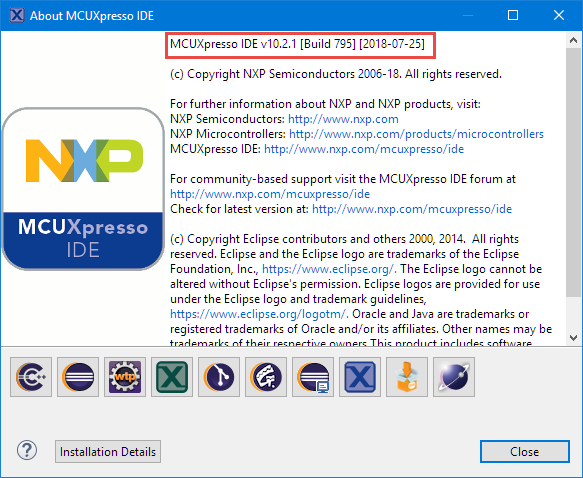
MCUXpresso IDE 10.2.1
NXP has just released the 10.2.1 update of their flagship Eclipse based IDE. While the number increase from 10.2.0 to 10.2.1 indicates a minor release, there are a several things which make me move over to that new release.
Debug the Last Launched Application with Eclipse and other Debug Tricks
My usual workflow is: edit – build – debug and repeat. And this for the same project again and again. So here are a few tips how to make these iterations faster with Eclipse. One thing is to use the F11 shortcut to debug the last launched/debugged application:
Adding a Rocktech Capacitive Touch LCD to the NXP i.MX RT1052 EVK
It is never too early to start thinking about Halloween projects :-).
When I ordered originally the MIMXRT1050-EVK from Mouser, it was without the LCD display (see “MCUXpresso IDE V10.1.0 with i.MX RT1052 Crossover Processor“. I ordered the LCD for the board soon after writing that article, but I was too busy with the university lectures and exams to get a hand on it. Finally I have spent a few hours at night and I proudly can say: the display is working 🙂
Eclipse Debugging with Pointers and Arrays
In the C programming language it is good practice to pass values by reference (using a pointer), especially for large set of data. For example the following function takes a message string and pointer to integer data which then is printed to the console:
static void printData(const char *msg, const int *intBuf, size_t bufSize) {
puts(msg); /* print message */
for(int i=0; i<bufSize;i++) {
printf("buf[%i] = %i\n", i, intBuf[i]);
}
}
Tutorial: FreeRTOS 10.0.1 with NXP S32 Design Studio 2018.R1
NXP not only sells general purpose microcontroller, but as well a portfolio of automotive devices which includes the S32K which is ARM Cortex based. For this device family, they offer the S32 Design Studio (or S32DS) with its own Eclipse distribution and SDK. The interesting part is that the S32DS includes Processor Expert (which is a bit different from the ‘mainstream’ Processor Expert). It comes with its own components for the S32K SDK which includes a component for FreeRTOS. But that component in S32DS 2018.R1 comes with an old V8.2.1 FreeRTOS component:
So what to do if I want to use the latest FreeRTOS (currently 10.0.1) with all the bells and whistles?
Show FreeRTOS Threads in Eclipse Debug View with SEGGER J-Link and NXP S32 Design Studio
By default, the FreeRTOS threads do not show up with the SEGGER J-Link debug connection in the Eclipse based NXP S32 Design Studio IDE. But don’t worry: Here is how to get it working with SEGGER J-Link debug connection:
Measuring ARM Cortex-M CPU Cycles Spent with the MCUXpresso Eclipse Registers View
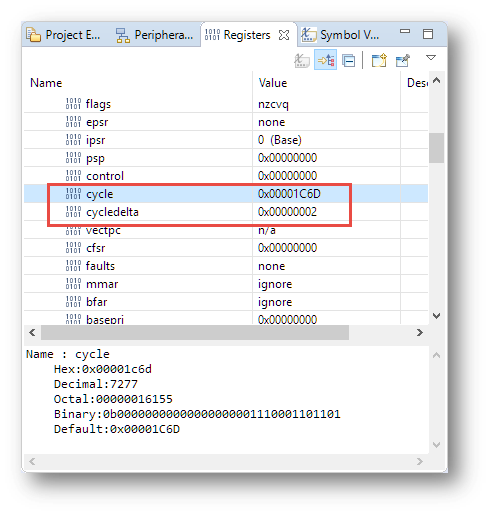
The ARM DWT (Data Watchpoint and Trace) is an optional feature of the ARM-Cortex-M, and many Cortex-M3, M4 and M7 devices have it implemented. With it comes a cycle counter which counts the cycles spent. In Cycle Counting on ARM Cortex-M with DWT I described an approach how the application on the target can access the cycle counter.
The MCUXpresso IDE shows that cycle counter in the Eclipse Registers view: