In Tutorial: Getting Started with MCUXpresso SDK – Repositories with VS Code and Tutorial: Getting Started with MCUXpresso SDK – west I showed how to get the MCUXpresso SDK. In this article it is about tweaking and streamlining the project.
The result is a clean, portable and self-contained MCUXpresso SDK project.
Outline
One way to start your project is to use an example project provided. However, usually these projects come with a complex setup and more things than really needed. What I usually want is an ’empty’ starting project. And then add things to it.
The NXP VS Code Extension for the MCUXpresso SDK has a ‘New Project Wizard’ which can create such a starting project. It is actually a ‘blinky’ project which is fine.
But looking at the ‘blinky’ project I had in my hands (or on my screen), I still seemed a bit complicated. Additionally, the project was not ‘gitable’. What I mean was not possible to share it on git, and someone else could use it. Because the project files included paths and settings local to my machine.
So I took the challenge to transform that ‘blinky’ project. Making it cleaner for me. Removing dependencies to my local machine. So that at the end I have a self-contained project which is shareable in a version control system. A project I can use with the NXP configuration tools.
The basic steps are:
- Create a project with the ‘New Project Wizard’
- Make the SDK local to the project
- Move all the board and device specific files to a ‘board’ folder
- Update the JSON and CMake files to reflect above changes
The side effect after that experiment: I had a much better understanding how CMake works, and how NXP has designed their SDK to work with CMake. So even if you don’t plan to change your project in the way I did, you can learn from it.
New Project Wizard
The NXP extension includes a ‘New Project Wizard’ for new projects.
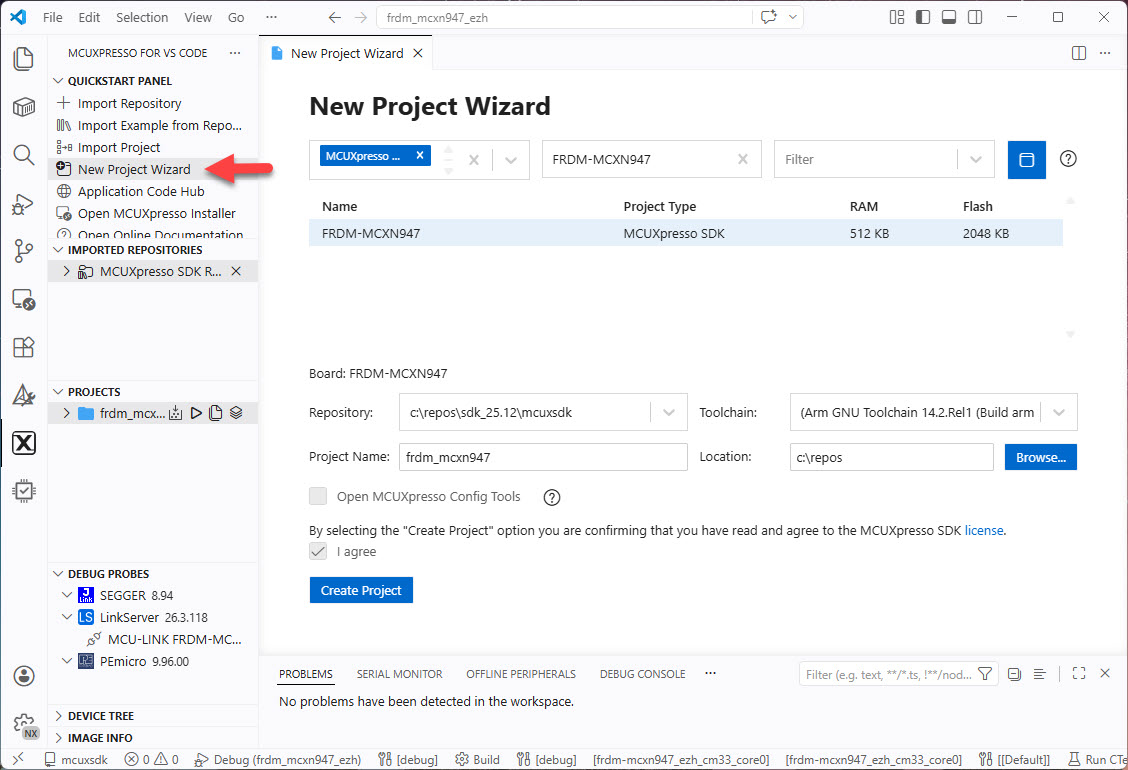
Use the ‘New Project Wizard’ entry on the left side (see above picture). For the repository, I can select an already imported one or clone one especially for this project.
That project is a good starting point. But we can make it even better and adjust the project to our needs. This is what we do in the next steps.
Symbolic Link
The first thing we can notice is that the project uses a symbolic link to the SDK.
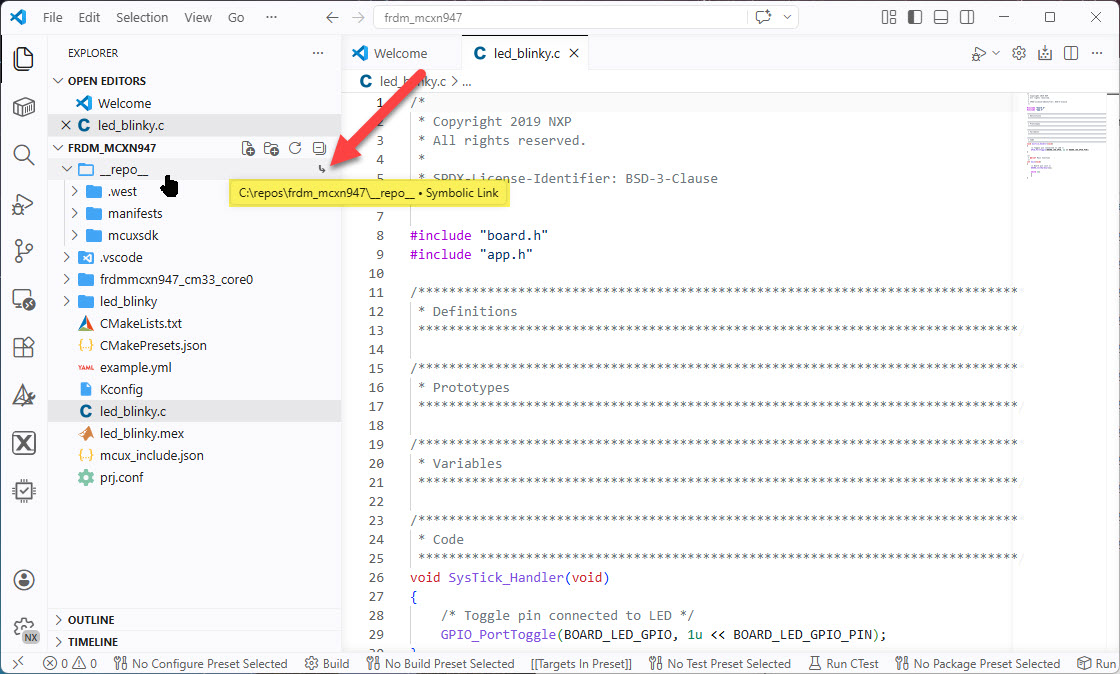
That symbolic link is a <JUNCTION> on Windows. We can see this with a command prompt/shell ‘dir’ command:
12.04.2026 18:27 <JUNCTION> __repo__ [c:\repos\sdk_25.12\mcuxsdk]
The junction is using an absolute path, making the project non-portable for another machine. As a consequence, we cannot use the project with a version control system.
What I want is to have the project as ‘self-contained’. all the necessary project files are inside the project. For this we move the SDK inside and local to the project.
SDK inside the project
The first step is to make the SDK local to the project. For this, we delete the symbolic link and move the SDK inside the project folder. And name the folder ‘sdk‘:
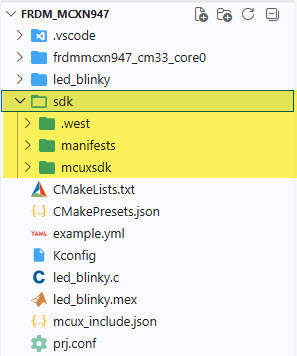
That way, everything is contained in the project, and we can easily use it with a repository, e.g. with git.
Because we changed the location of the SDK, it won’t build. For this we have to update the references in the SDK to the new location.
mcux_include.json
As we have changed the location of the SDK, we need to update the settings.
The first one is in mcux_include.json:
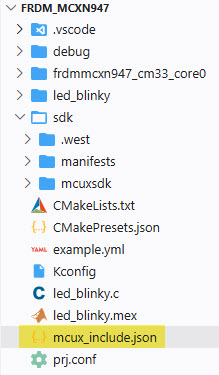
The project is using CMake presets with CMakePresets.json.
${SdkRootDirPath}
Let’s have a look first at the mcux_include.json. In my example, I have the following:
"SdkRootDirPath": "c:/repos/frdm_mcxn947/sdk",
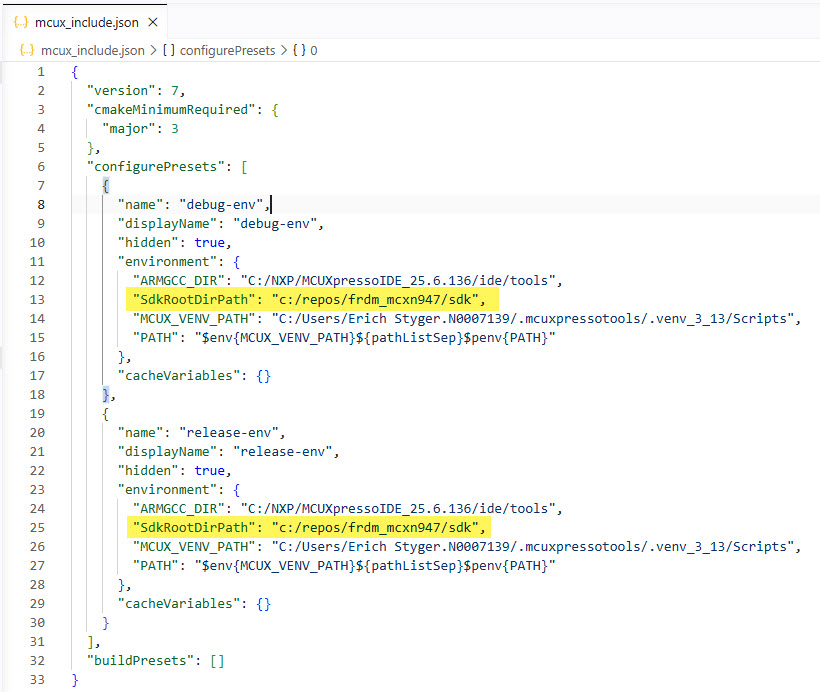
This is where I had the SDK prior moving it to the project folder.
Here again, that absolute path is not ‘gitable’. I can change the SdkRootDirPath variable to the following:
"SdkRootDirPath": "${fileDir}/sdk",
${fileDir} is the path to the directory with the CMake preset file. In our case this is the root directory of the project. That way we avoid an absolute non-portable path.
The other setting we have to change is the MCUX_VENV_PATH in mcux_include.json.
MCUX_VENV_PATH
The wizard has created inside mcux_include.json the MCUX_VENV_PATH with an absolute location. MCUX_VENV_PATH points to a Python virtual environment. The virtual environment is good, but not that absolute path.
Instead of
"MCUX_VENV_PATH": "C:/Users/Erich Styger.N0007139/.mcuxpressotools/.venv_3_13/Scripts",
I can use the following:
"MCUX_VENV_PATH": "${userHome}/.mcuxpressotools/.venv_3_13/Scripts",
${userHome} is a variable pointing the the current user home directory, making the path more portable. One more absolute path removed :-).
The next variable is for the location of the tool chain.
ARMGCC_DIR
The mcux_include_json has the ARMGCC_DIR variable, pointing to an ARM GCC toolchain:
"ARMGCC_DIR": "C:/NXP/MCUXpressoIDE_25.6.136/ide/tools",
It points to something like this:
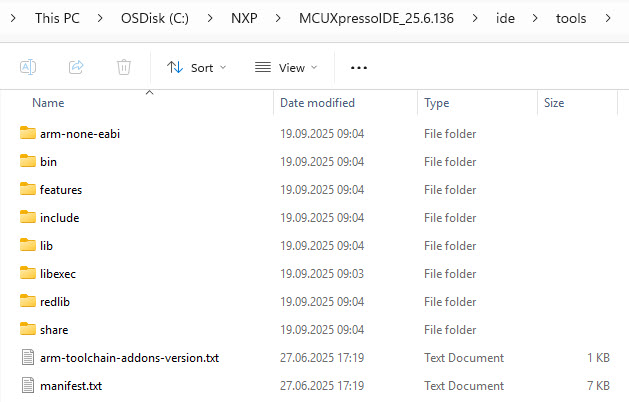
Instead, I prefer to use an environment variable too. As I have TOOLCHAIN_PREFIX pointing to my ARM toolchain, I can use that one instead:
"ARMGCC_DIR": "$env{TOOLCHAIN_PREFIX}",
I recommend that you create a similar environment variable pointing to your toolchain.
One more absolute path removed :-).
Final mcux_include.json
Below is my final mcux_include.json with above modifications:
{
  "version": 7,
  "cmakeMinimumRequired": {
    "major": 3
  },
  "configurePresets": [
    {
      "name": "debug-env",
      "displayName": "debug-env",
      "hidden": true,
      "environment": {
        "ARMGCC_DIR": "$env{TOOLCHAIN_PREFIX}",
        "SdkRootDirPath": "${fileDir}/sdk",
        "MCUX_VENV_PATH": "${userHome}d/.mcuxpressotools/.venv_3_13/Scripts",
        "PATH": "$env{MCUX_VENV_PATH}${pathListSep}$penv{PATH}"
      },
      "cacheVariables": {}
    },
    {
      "name": "release-env",
      "displayName": "release-env",
      "hidden": true,
      "environment": {
        "ARMGCC_DIR": "$env{TOOLCHAIN_PREFIX}",
        "SdkRootDirPath": "${fileDir}/sdk",
        "MCUX_VENV_PATH": "${userHome}/.mcuxpressotools/.venv_3_13/Scripts",
        "PATH": "$env{MCUX_VENV_PATH}${pathListSep}$penv{PATH}"
      },
      "cacheVariables": {}
    }
  ],
  "buildPresets": []
}
It does not contain any absolute or machine specific paths or settings.
Cleaning up ‘blinky’
Notice that the ‘New Project Wizard’ obviously has used a ‘blinky’ project as template.
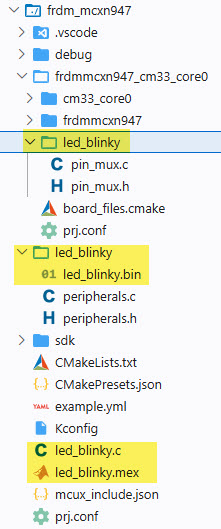
As such, there are references to ‘blinky’, and files named like that
In the next steps, we want to clean this up. With more neutral names and a cleaner directory structure.
led_blinky to main.c
Let’s use ‘main.c‘ instead of ‘led_blinky.c‘. Rename the file led_blinky.c to main.c. Additionally, update the reference to it in CMakeLists.txt:
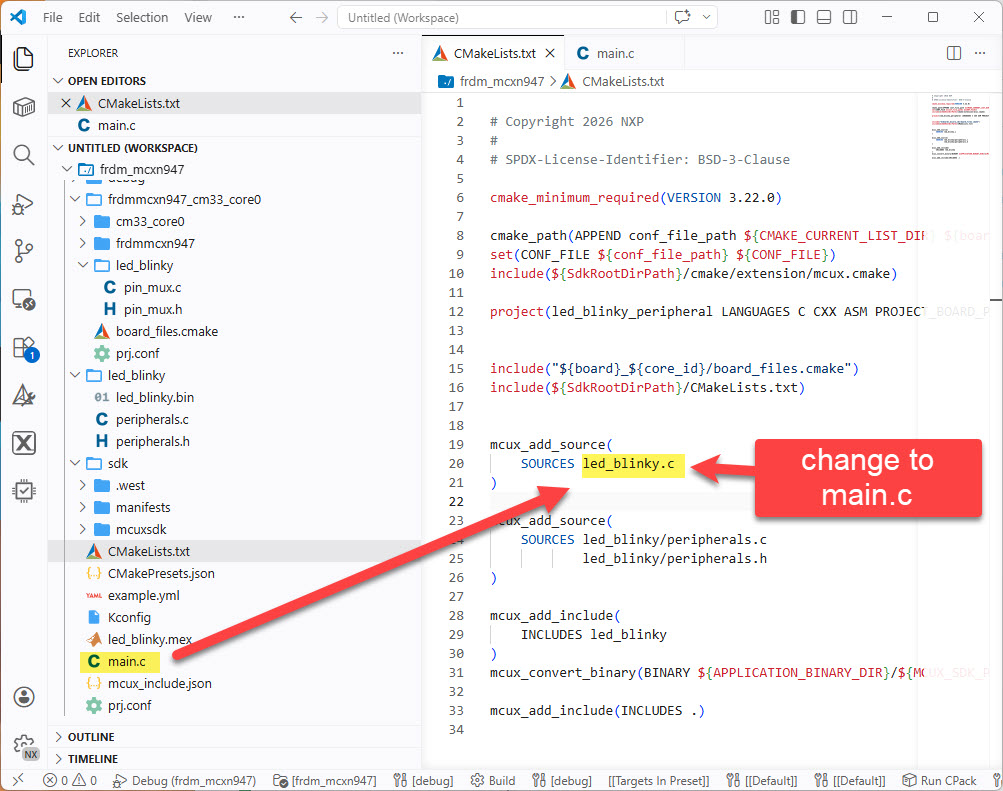
main.c
The original code (led_blinky.c renamed to main.c) looks like this:
/* * Copyright 2019 NXP * All rights reserved. * * SPDX-License-Identifier: BSD-3-Clause */ "board.h" "app.h"/******************************************************************************* * Definitions ******************************************************************************//******************************************************************************* * Prototypes ******************************************************************************//******************************************************************************* * Variables ******************************************************************************//******************************************************************************* * Code ******************************************************************************/void SysTick_Handler(void){ /* Toggle pin connected to LED */ GPIO_PortToggle(BOARD_LED_GPIO, 1u << BOARD_LED_GPIO_PIN);}/*! * @brief Main function */int main(void){ /* Board pin init */ BOARD_InitHardware(); while (1) { }}
We do not need that ‘blinky’ code with the timer intialization. Instead, the file main.c can be simplified to the following:
"board.h" "pin_mux.h" "peripherals.h"int main(void) { BOARD_InitPins(); BOARD_InitBootClocks(); BOARD_InitPeripherals(); /* application code here */ for(;;) {}}
It initializes first the hardware in steps. And then executes the application code.
Next, we have to reorganize and clean the board support.
Board files
The board and project specific files are all scattered into different folders. Additionally there are files not used by the project. In a next step I create a new folder named ‘board’ and consolidate and clean this up:
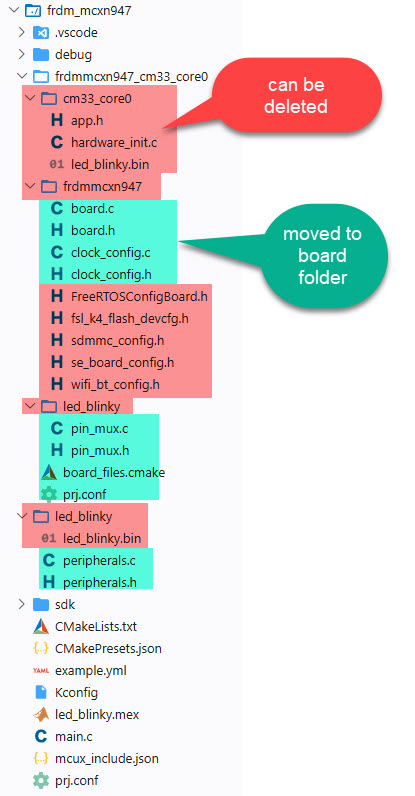
The board folder looks now like this:
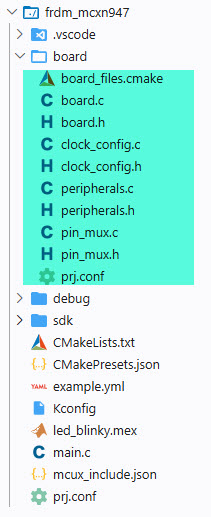
The file ‘app.h’ is included in ‘main.c’ and can be removed there too.
Configuration Tools
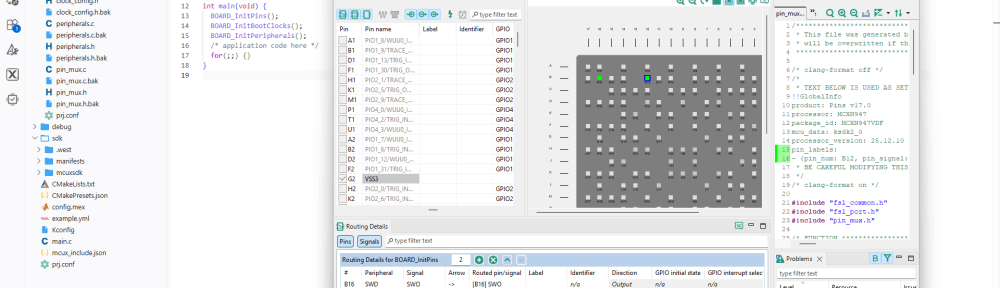
Another reason to have this ‘board’ folder: The configuration tools (Pins, Clocks, Peripherals, …) are using the ‘board’ folder in the project to store the code. If you do not change things as shown here, your project won’t work correctly with the Config tools.
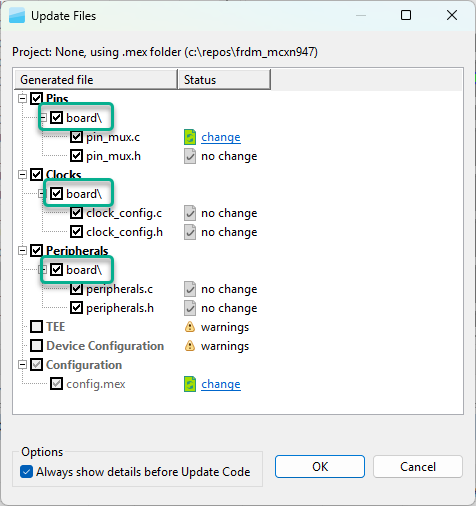
board_files.cmake
Inside the ‘board’ folder, we have a file named board_files.cmake.
This file is included from the main CMakeLists.txt:
include("${board}_${core_id}/board_files.cmake")
We will touch on this later on.
First, we can simplify board_files.cmake. From this:
# Copyright 2026 NXP
#
# SPDX-License-Identifier: BSD-3-Clause

mcux_add_configuration(
    CC "-DSDK_DEBUGCONSOLE=1"
    CX "-DSDK_DEBUGCONSOLE=1"
)


mcux_add_source(
    SOURCES frdmmcxn947/board.c
            frdmmcxn947/board.h
)

mcux_add_include(
    INCLUDES frdmmcxn947
)

mcux_add_source(
    SOURCES frdmmcxn947/clock_config.c
            frdmmcxn947/clock_config.h
)

mcux_add_include(
    INCLUDES frdmmcxn947
)

mcux_add_source(
    SOURCES led_blinky/pin_mux.c
            led_blinky/pin_mux.h
)

mcux_add_include(
    INCLUDES led_blinky
)

mcux_add_source(
    SOURCES cm33_core0/app.h
            cm33_core0/hardware_init.c
)

mcux_add_include(
    INCLUDES cm33_core0
)
To this:
# Copyright 2026 NXP
#
# SPDX-License-Identifier: BSD-3-Clause

mcux_add_configuration(
    CC "-DSDK_DEBUGCONSOLE=1"
    CX "-DSDK_DEBUGCONSOLE=1"
)

mcux_add_source(
    SOURCES
        board.c
        board.h
        clock_config.c
        clock_config.h
        peripherals.c
        peripherals.h
        pin_mux.c
        pin_mux.h
)

mcux_add_include(
    INCLUDES .
)
This makes it shorter and cleaner, and easier to extend if necessary.
Main CMakeLists.txt
The root CMakeLists.txt still contains references to ‘blinky’. Additionally we have to update it because we cleaned up the board file structure.
This is the original file:
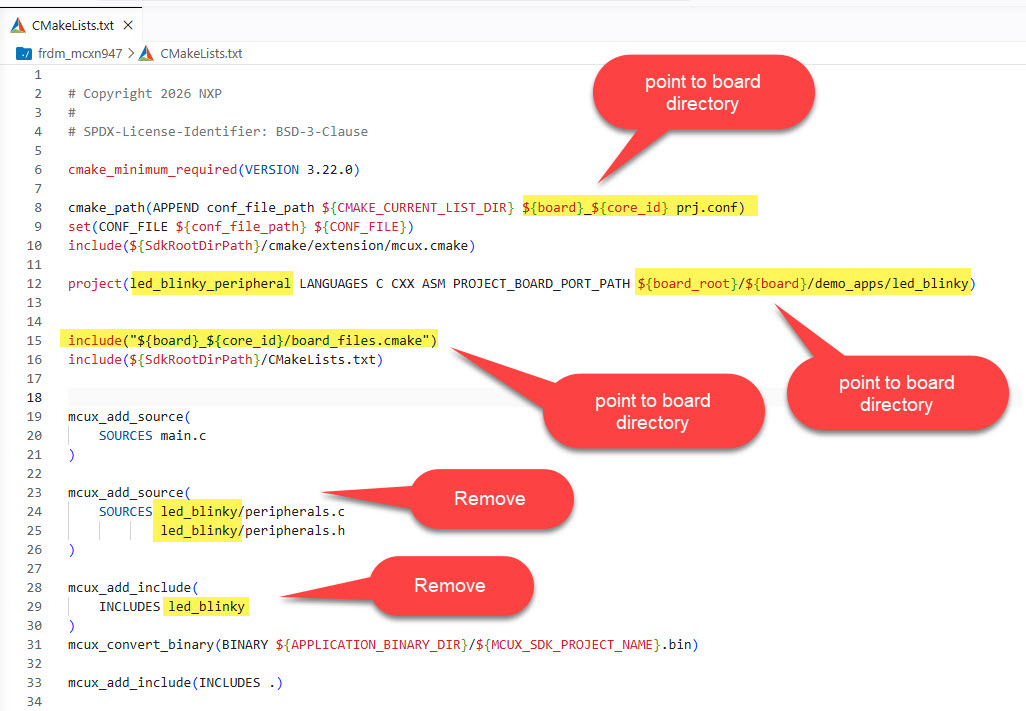
The new and annotated version I use is this:
# Copyright 2026 NXP
#
# SPDX-License-Identifier: BSD-3-Clause

cmake_minimum_required(VERSION 3.22.0)

# use local board configuration
cmake_path(APPEND conf_file_path ${CMAKE_CURRENT_LIST_DIR} board prj.conf)
set(CONF_FILE ${conf_file_path} ${CONF_FILE})

# Include all the MCUX CMake extension functions and defines
include(${SdkRootDirPath}/cmake/extension/mcux.cmake)

# set variables for directories
set(PROJECT_ROOT_DIR  "${CMAKE_CURRENT_SOURCE_DIR}")
set(SDK_DIR           "${PROJECT_ROOT_DIR}/sdk/mcuxsdk")
set(BOARD_DIR         "${PROJECT_ROOT_DIR}/board")

# set project name, board files path and languages supported
project(
  frdm-mcxn947                     # project name
  PROJECT_BOARD_PORT_PATH ./board  # where are the board files
  LANGUAGES C CXX ASM              # project languages
)

# include local board files cmake
include("${BOARD_DIR}/board_files.cmake")

# include local board files cmake
include("${BOARD_DIR}/board_files.cmake")

# assembly point for all CMake data for devices, board, drivers, components, and middleware.
include(${SdkRootDirPath}/CMakeLists.txt)

# list root folder source files
mcux_add_source(
    SOURCES main.c
)

# convert binary file
mcux_convert_binary(BINARY ${APPLICATION_BINARY_DIR}/${MCUX_SDK_PROJECT_NAME}.bin)

# list needed include paths
mcux_add_include(
  INCLUDES
    ./board
  )
With this, we are using a clean directory structure with board related files inside the board folder.
Size of the SDK
One overall goal was to have a self-containing project we can put on git. What is in the way now is the SDK itself:
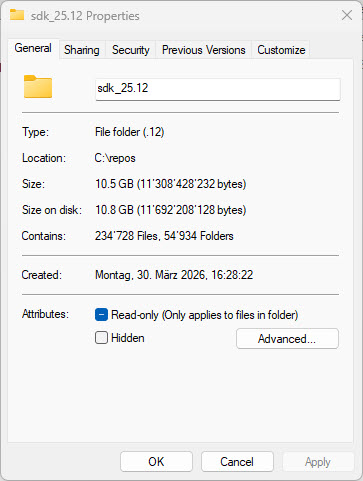
But by default, the NXP MCUXpresso SDK is 10GByte in size. With 236k files in 56k folders. This is not what you want to put on git. This will be subject of a next article.
Summary
The ‘New Project Wizard’ can be a good starting point for a project. With the current SDK, the project structure needs some cleanup and simplification. It is some extra work, but it will pay off immediately. We have a clean directory structure. We have removed any absolute paths. We can move the project. We have a self-containing project structure. And we have learned a lot about how the SDK is organized and how CMake with presets work. And as a side effect of our reorganization of files and directories, the NXP configuration tools work and use the correct files.
Beside of that: how does your ideal project look like? What is your experience with such projects? What are you tweaking or streamlining? What would you like to see or hear about? Post a comment!
Happy selfcontaining 🙂
Links
- Tutorial: Getting Started with MCUXpresso SDK – Tool Installation
- Tutorial: Getting Started with MCUXpresso SDK – west
- Tutorial: Getting Started with MCUXpresso SDK – Repositories with VS Code
- CMake: https://cmake.org/
- VS Code: https://code.visualstudio.com/
- NXP MCUXpresso SDK: https://www.nxp.com/design/design-center/training/TIP-GETTING-STARTED-WITH-MCUXPRESSO-FOR-VS-CODE
- NXP VS Code Extension: https://www.nxp.com/design/design-center/software/development-software/mcuxpresso-software-and-tools-/mcuxpresso-for-visual-studio-code:MCUXPRESSO-VSC


I don’t know NXP’s usage of west but I suppose you this is what west manifest is for. At least in zephyr, you simply commit a west manifest into your code and west will take case of the rest. So it will download the SDK in the required version on request…
This is still not portable. If you have the toolchain’s bin directory in a env-var I would recommend to do the same for the venv’s bin directory. For example, on unix like systems, there’s not Scripts directory…
LikeLike
Hi Martin,
yes, west is supposed to manage this. Did not play much with Zephyr, but with the MCUXpresso SDK using west I was able to get down to 2 GByte which still includes a lot more stuff then needed.
So in your case: how large is your Zephyr project?
About MCUX_VENV_PATH: yes, using an extra variable for this makes sense.
Thanks!
Erich
LikeLike
It is still huge.
But I’m not talking about size. It’s just about version control. If the west manifest is in version control, that would suffice as long as it contains (unique) references to the SDK.
Of course, then you are still dependent on those external repos…
LikeLike
Hi Martin,
Yes, that’s exactly the reason why putting the west manifest into the repository is not good enough: you have a dependency on that external repo you have no ownership or control. There is no guarantee that the referenced repos will exist in the future or are still accessible. Additionally such big repositories put a burden on CI/CD setups, because every time you need to pull the data, you have to pull a lot of files, taking a lot of bandwidth and disk space.
To me, for a development project like this, everything needs to be under control and not depending on external repos.
Thanks!
Erich
LikeLike
Very nice. Very interesting. I basically had Cursor do this for me months ago. I burned a lot of tokens, but I ended up with something that was pretty small and self-contained. I wasn’t following all the details of what it was doing though. This, on the other hand is a very good tutorial. Thank you.
LikeLike
Hi Chris,
Is there anything better in your setup than in that proposed solution in this article? I’m wondering if I have missed some improvements.
Thanks!
Erich
LikeLike
Better? Not really. What you’ve done is conceptually the same as what I’ve done. I was using a different SDK but essentially the same had the same problem: I didn’t have a simple, minimal, self-contained project I could share with my team.
I started with a vendor SDK’s example project that was the closest functionally to what I ultimately wanted. I kept adding and changing the example project until I had the foundation for the application I needed.
But by that point I had a bit of a mess on my hands. That’s when I asked Cursor to create a real directory structure, move SDK files, driver files, application code, headers, etc around, write some documentation, refactor some code, etc.
I guess one thing I did differently that I didn’t see you mention and was glad I did was add hardware design files to the project: schematic and layout pictures and SoC reference material exported to Markdown. I don’t use the vendor supplied hardware configuration software tools so for me, this was huge. Now when I prompt the AI I can say “hey, look at these design files and reference documentation when considering changes” And it really works, the AI tools find the hardware files and include data from those files into its “thinking” context.
Some other differences: My project is managed by a single Makefile, not CMake. And I only use VS Code as a fancy editor, not a true IDE. I do most of my file editing in the VS Code editor windows and most of everything else in a VS Code terminal pane. The instructions I give to users of my project is to install the toolchain (which is the same toolchain as some other projects, so this is usually skipped), set a couple of environment variables and just “make”, “make flash”, etc.
LikeLike
Good point about adding the hardware design files to the project. I typically do this for group projects. That way everyone has all the information (hardware plus software).
About using Make instead of CMake. I’m still using make for some legacy projects. But all new projects are using CMake with Ninja, because it is so fast compared to plain Make.
And with CMake you can do things like ‘flash’ etc too.
And VS Code is just a graphical front end and ‘basic editor with extensions’ for me too. It makes things like debugging more intuitive, but I do not try to depend on VS Code.
Everything can be command line driven or done with some kind of other editor too.
Thanks for you insights!
Erich
LikeLike