GNU ARM Eclipse & Segger J-Link Device Name Settings

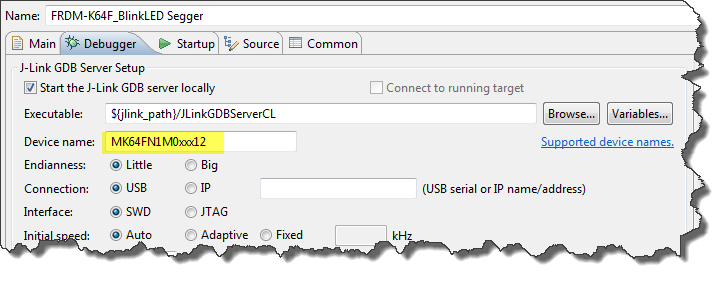
Thanks to the GNU ARM Eclipse plugins from Liviu it is easy to build and debug projects for all the different ARM cores. But I need to specify the device name in the debug configuration:

Device Name for Segger GDB Configuration

Device Name for Segger GDB Configuration

There must be an easier way for this? Yes, indeed, there is šŸ™‚

Continue reading →

Printing Code Size Information in Eclipse

For the GNU ARM tools it is easy to print out the code and date size information, see

But this is all for ARM cores. What if I use other architectures like S08 or ColdFire in Eclipse?

Code Size Information in Build Console

Code Size Information in Build Console

Continue reading →

Segger J-Link Firmware for OpenSDAv2

Segger just has released their OpenSDAv2 firmware. The OpenSDAv2 firmware is different from the OpenSDAv1 as it is using a different memory map and bootloader. The OpenSDAv2 e.g. is present on the new FRDM-K64F board. The availability of the Segger firmware is definitely good news for any owner of the FRDM-K64F board: so far only the CMSIS-DAP firmware was available (on top of the mbed bootloader). With this, it was not possible to use the board with CodeWarrior, except with using an external P&E Multilink or Segger J-Link. With that new Segger J-Link OpenSDAv2 firmware, I can now use the FRDM-K64F with any IDE which supports the Segger J-Link :-).

FRDM-K64F with Segger OpenSDAv2 Firmware

FRDM-K64F with Segger OpenSDAv2 Firmware

Continue reading →

FRDM with Arduino Ethernet Shield R3, Part 4: MinIni

I admit: my Ethernet Shield project got stuck because of too many urgent other priorities. I was not happy with the way the project was using configuration data from FLASH memory: I have now multiple ethernet shields in use, and configuring the IP address for each shield is a pain. I have not got DHCP working (yet), so why not using the SD card on the shield for configuration data? And right on time I received a tip from Marc about MinIni: perfect, exactly what I need!

Ethernet Shield with SD card

Ethernet Shield with SD card

Continue reading →

GNU Linker, can you NOT Initialize my Variable?

my students sometimes are afraid to ask questions, although I urge them ask any question. In my opinion there are no ‘dumb’ questions: only questioning things let us think and learn new things. I see that many readers of this blog are *not* afraid to comment or ask questions. The WordPress statistics shows 5’687 questions/comments for this blog (thank you all!), and the spam filter protected me from 202,341 items (ok, these *are* dumb) :-).

The ‘question of the week’ comes from Andy. That question caused me some serious head scratching, but the same time I have learned something important and useful for my next project: how to tell the ARM GNU linker *not* to initialize variables?
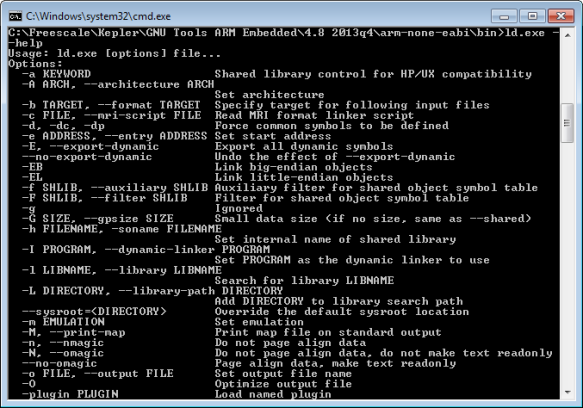
GNU ARM Embedded Linker Options

GNU ARM Embedded Linker Options

Continue reading →

Pin Muxing: Using the NMI Pin as GPIO Pin

Many modern microcontroller have a cool feature: Pin Muxing. What it means is that I can ‘mux’ the pins for different purposes: such as I can use a SPI or I2C pin as GPIO (General Purpose Pin) or vice versa. In an ideal world, I would be able to ‘route’ or ‘mux’ pins freely around. In practice these ‘way switches’ are more or less limited.

In “Using the Reset Button on the Freedom Board as User Button” I muxed the FRDM-KL25Z reset pin as GPIO pin. The same approach can be used for muxing the NMI (Non-Maskable Interrupt) pin for the Freescale Kinetis devices. I’m showing it here how to do this with Processor Expert as this allows me to do this with a few mouse clicks.

NMI Pin Used as GPIO Pin

NMI Pin Used as GPIO Pin

Continue reading →

Processor Expert (Driver Suite/Plugins/KDS) V10.4 with new Component Inspector

There has been a lot of new Freescale releases recently around FTF, and I’m trying to catch up. For me as a Processor Expert Lover, it is good news that there is now the new version 10.4 available. And it comes in different ways:

Microcontrollers Driver Suite v10.4

Microcontrollers Driver Suite v10.4

Continue reading →

The Zumo Bots at FTF 2014

I should have known it better, and I always teach my students that they should take the environment into account. And you know what? This time it was me who missed following that rule.

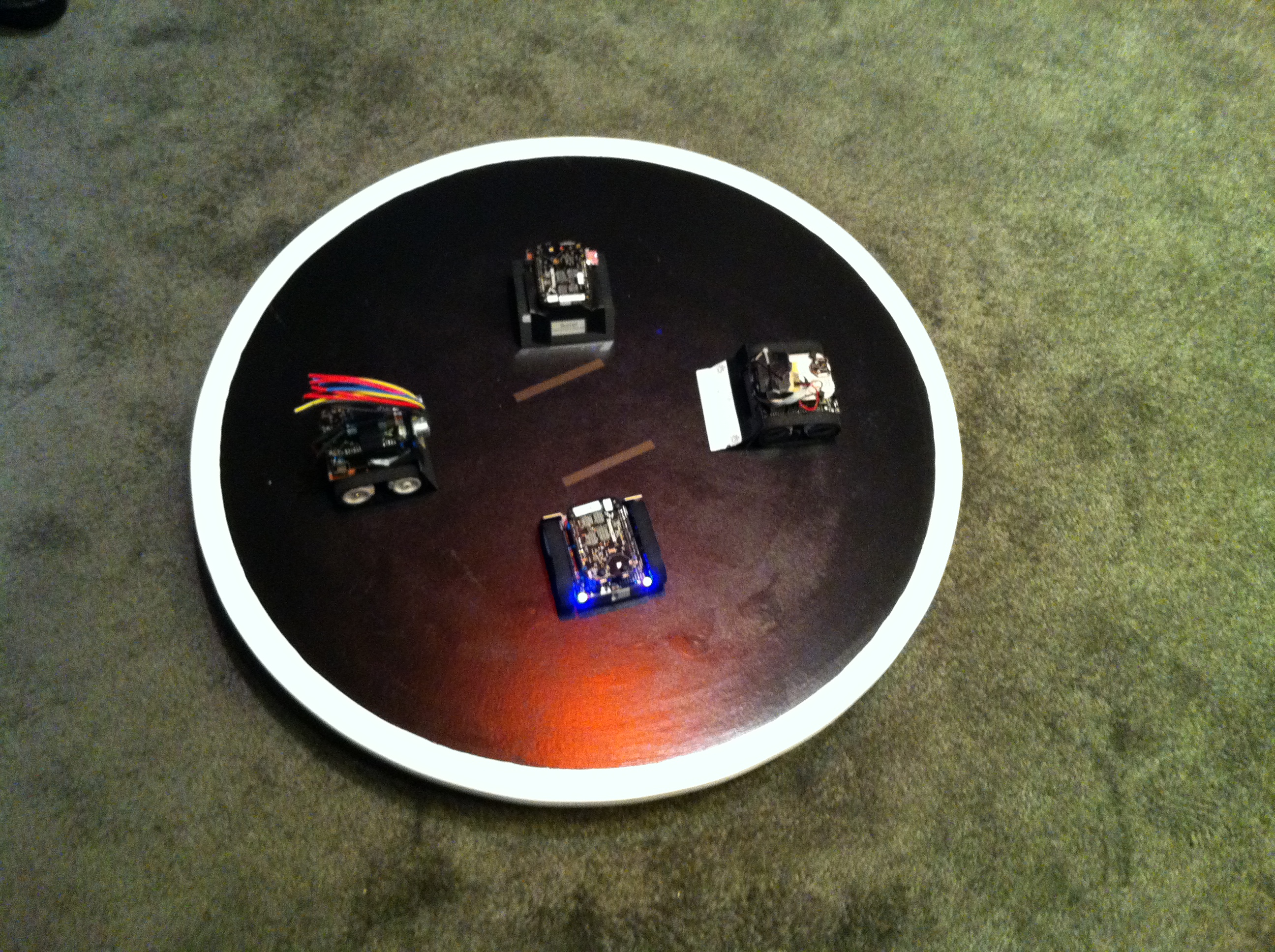
But from the beginning: For the Freescale Technology Forum (FTF) I brought 4 different Zumo Robots to show developing with the Freedom board and Processor Expert. Clark (thanks again, Clark!) has built and brought the Sumo Dojo, and I brought the bots:

Zumo Bots at FTF

Four Zumo Bots at FTF

Continue reading →

FTF: FRDM-K64F, Kinetis Design Studio and Kinetis SDK

I’m attending the Freescale Technology Forum (FTF) in Dallas this year: As they say here: “everything is bigger in Texas”, that’s the motto of this conference ;-). The conference is packed, and I have a hard time to keep up with all the things going on. My focus is obviously everything around Eclipse and ARM microcontroller. The conference started yesterday afternoon with hands-on labs, and I was in the one were Freescale presented the new ‘Kinetis Design Studio’: a free of charge/unlimited Eclipse tool chain based on Eclipse Kepler, GCC and GDB. Freescale presented their new software library ‘Kinetis SDK’. And: There is a new Freedom board which gets handed out to the attendees: the FRDM-K64F :-).

Texas Style Glass Coverage

Texas Style Glass Coverage

Continue reading →