Porting Processor Expert Projects to MCUXpresso IDE

The McuOnEclipse GitHub repository hosts many Processor Expert projects and is very popular (cloned more than 1000 times, thank you!). Processor Expert is a powerful framework which generates driver and configuration code, simplifying application development for a wide range of microcontroller and families. But Processor Expert won’t be developed further by NXP and is not part of MCUXpresso IDE. While it is possible to install Processor Expert into MCUXpresso IDE 10.2, how can these projects used ini an IDE *without* Processor Expert? This article describes how to port an existing Processor Expert project into the NXP MCUXpresso IDE.
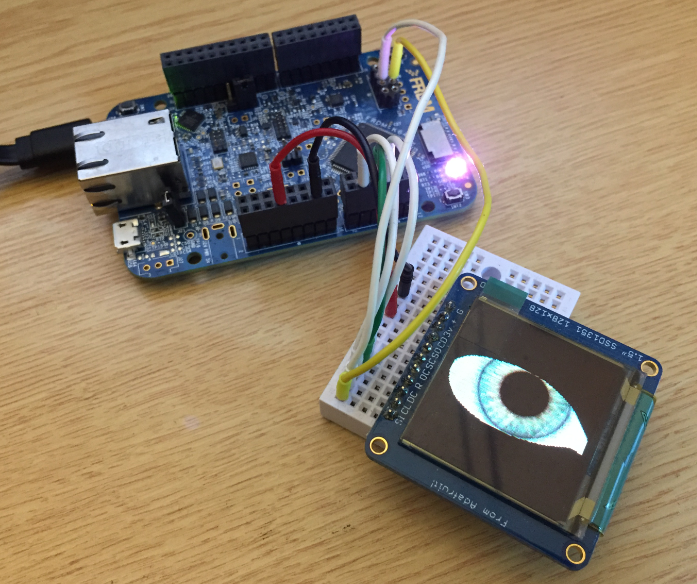
Adafruit SSD1351 with FRDM-K64F

Ported Project with FRDM-K64F using Adafruit SSD1351 and Processor Expert

Continue reading →

Adding a Rocktech Capacitive Touch LCD to the NXP i.MX RT1052 EVK

It is never too early to start thinking about Halloween projects :-).

rended Eyes with i.MX RT

rendered Eyes with i.MX RT

When I ordered originally the MIMXRT1050-EVK from Mouser, it was without the LCD display (see “MCUXpresso IDE V10.1.0 with i.MX RT1052 Crossover Processor“. I ordered the LCD for the board soon after writing that article, but I was too busy with the university lectures and exams to get a hand on it. Finally I have spent a few hours at night and I proudly can say: the display is working šŸ™‚

Continue reading →

Execute-Only Code with GNU and gcc

“There is no ‘S’ for Security in IoT” has indeed some truth. With all the connected devices around us, security of code should be a concern for every developer. “Preventing Reverse Engineering: Enabling Flash Security” shows how to prevent external read-out of critical code from device. What some microcontroller have built in is yet another feature: ‘Execute-Only-Sections‘ or ‘Execute-Only-Memory‘. What it means is that only instruction fetches are allowed in this area. No read access at all. Similar like ‘read-only’ ‘execute-only’ it means that code can be executed there, but no other access from that memory is allowed.

Locked Code

Locked Code

In this article I describe the challenges for a toolchain like the GNU gcc, and how to compile and link code for such an execute-only memory.

Continue reading →

Creating Disassembly Listings with GNU Tools and Eclipse

In many cases it is very useful to see the generated assembly code produced by the compiler. One obvious way to see the assembly code is to use the Disassembly view in Eclipse:

Disassembly View

Disassembly View

But this requires a debug session. An easier way is to use command line options to generate the listing file(s).

Continue reading →

Eclipse Debugging with Pointers and Arrays

In the C programming language it is good practice to pass values by reference (using a pointer), especially for large set of data. For example the following function takes a message string and pointer to integer data which then is printed to the console:

static void printData(const char *msg, const int *intBuf, size_t bufSize) {
  puts(msg); /* print message */
  for(int i=0; i<bufSize;i++) {
    printf("buf[%i] = %i\n", i, intBuf[i]);
  }
}

Continue reading →

Tutorial: FreeRTOS 10.0.1 with NXP S32 Design Studio 2018.R1

NXP not only sells general purpose microcontroller, but as well a portfolio of automotive devices which includes the S32K which is ARM Cortex based. For this device family, they offer the S32 Design Studio (or S32DS) with its own Eclipse distribution and SDK. The interesting part is that the S32DS includes Processor Expert (which is a bit different from the ‘mainstream’ Processor Expert). It comes with its own components for the S32K SDK which includes a component for FreeRTOS. But that component in S32DS 2018.R1 comes with an old V8.2.1 FreeRTOS component:

FreeRTOS 8.2.1 in S32DS 2018.R1

FreeRTOS 8.2.1 in S32DS 2018.R1

So what to do if I want to use the latest FreeRTOS (currently 10.0.1) with all the bells and whistles?

Continue reading →

McuOnEclipse Components: 1-July-2018 Release

I’m pleased to announce that a new release of the McuOnEclipse components is available on SourceForge. This release includes several smaller bug fixes and initial component support for the NXP S32 Design Studio and SDK.

SourceForge

SourceForge

Continue reading →

Show FreeRTOS Threads in Eclipse Debug View with SEGGER J-Link and NXP S32 Design Studio

By default, the FreeRTOS threads do not show up with the SEGGER J-Link debug connection in the Eclipse based NXP S32 Design Studio IDE. But don’t worry: Here is how to get it working with SEGGER J-Link debug connection:

FreeRTOS Threads in Eclipse Debug View

FreeRTOS Threads in Eclipse Debug View

Continue reading →

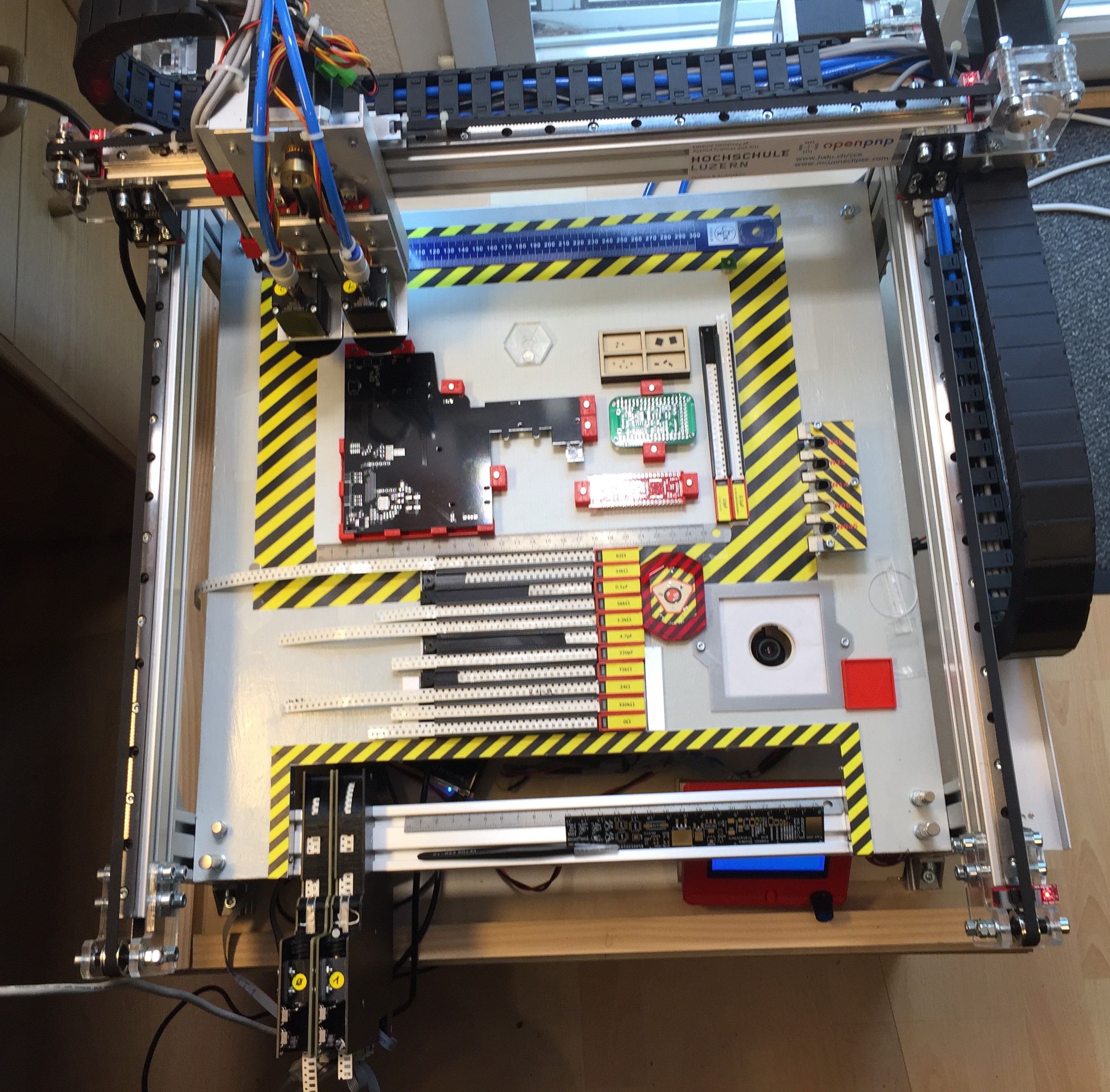
Building a DIY SMT Pick&Place Machine with OpenPnP and Smoothieboard (NXP LPC1769)

This article is about a project I have started back in January 2018. As for many of my projects, it took longer than anticipated.But now it is working, and the result is looking very good: a DIY automated pick and place machine to place parts on circuit boards. In the age of cheap PCBs, that machine closes the gap for small series of boards which have to be populated in a time consuming way otherwise.

OpenPnP Pick&Place Machine

OpenPnP Pick&Place Machine

Continue reading →