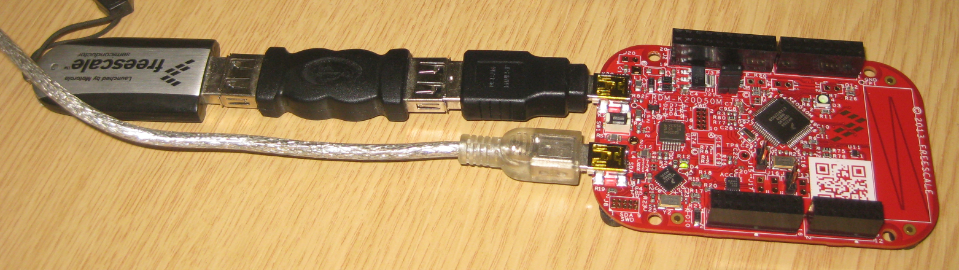
The Freedom boards FRDM-KL25Z RevE and FRDM-K20D50M make it easier to use it as USB Host device, as they come with a special jumper to provide 5V to the USB device, so my earlier ‘hack’ is not needed any more :-). After I had USB MSD Host working for the FRDM-KL25Z, it was much harder to get the USB stack working for the FRDM-K20D50M board, because somehow the example Freescale provided with their USB stack refused to work properly on my board. After debugging it for several nightly hours, I decided to take my working Processor Expert project for KL25Z and added support for the K20. And the good news is: since tonight this is working :-).
Category Archives: Tips & Tricks
FreeRTOS Heap with Segmented Kinetis K SRAM
While working on a project for the FRDM-K20D50M, I faced a problem: I was running out of SRAM for my application. The GNU linker reports: “section `.bss’ will not fit in region `m_data'”: 😦
But my device has 16 KByte of SRAM, and I knew I use much less than 10 KByte. So what is the problem? Continue reading
Using the FRDM-KL25Z as USB Keyboard
I miss my old DELL laptop. Ok, the new one I received from IT services is not bad. It is faster and has a better screen. But I’m not really happy with the new keyboard. With the previous keyboard I was able to do a ‘PrtnScrn’ with a single key press. With the new one I need to press Fn + PrntScrn. And this is impossible to do with one hand:
Yes, I have two hands ;-). But many times I need to do ‘print screen’ while having my other hand on the mouse :-(.What else can I do?
Using Keil µVision 4 (ARM-MDK) with Processor Expert Driver Suite
❗ This article has been written for the version 4 of µVision. There is an update for version 5 of µVision here: “Using Keil μVision 5 with Processor Expert“
The good thing with using ARM microcontroller is: there are plenty of tool choices. Even myself, I’m using multiple different tool chains. And while I’m heavily using Eclipse, there are non-Eclipse tool chains which have their advantages too.
The cool thing with CodeWarrior is that beside of Eclipse based, it comes with Processor Expert integrated. And I’m using Processor Expert a lot in my projects. But using Processor Expert does not mean I’m limited to CodeWarrior or Eclipse. So I can use CodeRed or IAR as tool chain with it. And this post is about using Processor Expert with the µVision tool chain from Keil/ARM.
5V Generation from V_IN on the Freedom Board RevE
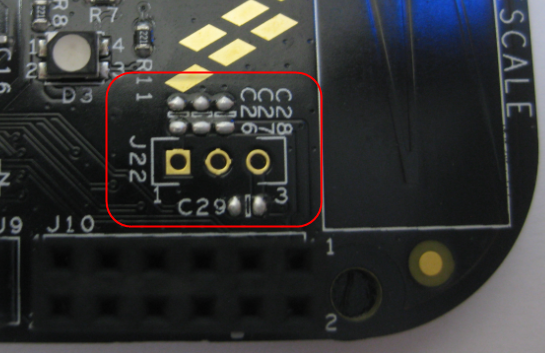
The Freescale Freedom boards like the FRDM-KL25Z feature an Arduino header so I can stack shields on it. Unfortunately, the Freedom board does not generate 5V if not connected to the USB cable. This makes it not possible to be used with many shields like the Adafruit Motor Shield: such shields expect that the Arduino board is providing 5V through the Arduino header (Pin 10 on J9 on the FRDM-KL25Z). So I had to do hardware changes to generate that 5V if I used my board disconnected from USB, e.g. running from batteries through V_IN (pin16 (P5-9V_IN) on the FRDM-KL25Z.
The good news is that the Rev.E of the Freedom FRDM-KL25Z board has now a header J22 to make things easier:
Using the HC-06 Bluetooth Module
After my first post using a Bluetooth module, things have evolved a bit. The challenge with these Bluetooth modules is: they look the same, but having different firmware. I did not fully realize that until I have ordered another bluetooth module from dx.com:
That module comes already on a carrier, so I assumed I can use the same driver as for my other module. I was wrong :-(.
Bricking and Recovering FRDM-KL25Z Boards: Reset, SWD Clock and Low Power
I’m working with a student on building a small autonomous robot platform, based on the FRDM-KL25Z board. We integrated new software modules, compiled and linked, and then downloaded the application to the board. While debugging and stepping through the application startup, I had this:
Outsch! That’s not good. Even worse, trying to connect again to the board failed :-(. What happened?
Adding Quadrature Encoder to the Zumo Chassis
The Pololu Zumo chassis is nearly perfect for my needs: it is small and compact, and neatly works with the FRDM-KL25Z board. I’m able to use it for line following or maze solving. But it lacks a position (quadrature) encoder on the wheels which is either very useful or even required for the lecture assignments for my next class. The Pololu Zumo chassis mainly has been designed for Robot-Sumo competitions, where such quadrature sensors are not really needed. Pololu offers optical quadrature sensors for their 42×19 mm wheel which I used in this project. So why not adding these sensors to the Zumo chassis?
Eclipse Problems View: Only Show Problems for Project
Having many projects open the same time, and working on them in parallel is a challenge. Ok, the human brain is not built for multitasking, but I still try ;-). What I typically I end up in my Eclipse Problems View to have entries from multiple projects mixed up:
How to show it that I can fix the problems for ony project only, and not showing all problems from all projects?
Traps and Pitfalls: No Hex/Bin/S19 File Created with GNU?
I stumbled now twice over a problem, and only after a lot of head scratching (you should see my head now 😉 ) I have found the cause (and solution) for it. In the hope that I can save the readers of this blog some time, here is what happened.
I described in earlier posts how to enable GNU build tools to generate hex/bin/S19 files, or to write the code size to the console view. That works fine for me. But then I received a project were obviously this does not work: even with the project settings configured properly, there is no S19 file, and no code size printed. What’s wrong?