First tinyK22 Board with NXP K22FN512 ARM Cortex-M4F

The NXP Freedom boards are very popular. Many of them are inexpensive (less than $20), include a debug interface and can be easily extended with extra shields or boards. Especially the FRDM-KL25Z is very popular: I’m getting told because of Processor Expert and tutorials available on web sites like this one ;-).

Unfortunately there are no small or breadboard friendly Kinetis boards available. There is the NXP LPC800-DIP but with no onboard debugger and without Processor Expert support. We have the tinyK20, but projects tend to use more CPU power, FLASH and RAM space than what the tinyK20 board (50 MHz, 128 KByte FLASH, 16 KByte RAM) can provide. So we ended up designing the big brother of the first tinyK20: the tinyK22 with 120 MHz, 512 KByte of FLASH and 128 KByte of RAM.
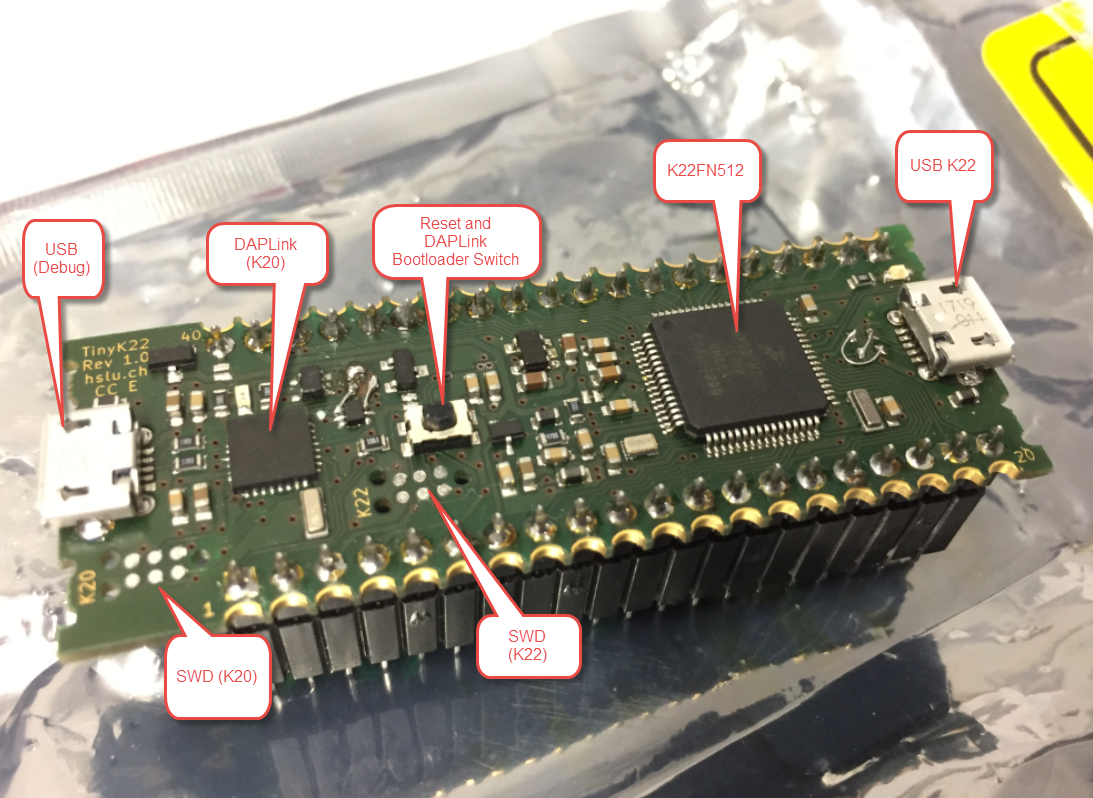
tinyK22 Overview
tinyK22 Overview

Continue reading

Eclipse MCUXpresso IDE 10.1 with integrated MCUXpresso Configuration Tools

Back in March 2017, NXP had rolled the MCUXpresso IDE starting with Version 10.0.0. With the intent to unify the SDK, LPCXpresso, CodeWarrior, Kinetis Design Studio and Processor Expert into one unified and integrated set of tools. V10.0.0 was a good start. The MCUXpresso IDE V10.0.2 in July was more of a smaller update, and the Pin and Clock configuration tools were not integrated, no added tool for peripheral configuration.

A week ago the MCUXpresso V10.1.0 has been released which shows where the journey is going: an free-of-charge and code size unlimited Eclipse based integrated set of tools to configure, build and debug Cortex-M (Kinetis, LPC and i.MX RT) microcontroller/processor based applications.

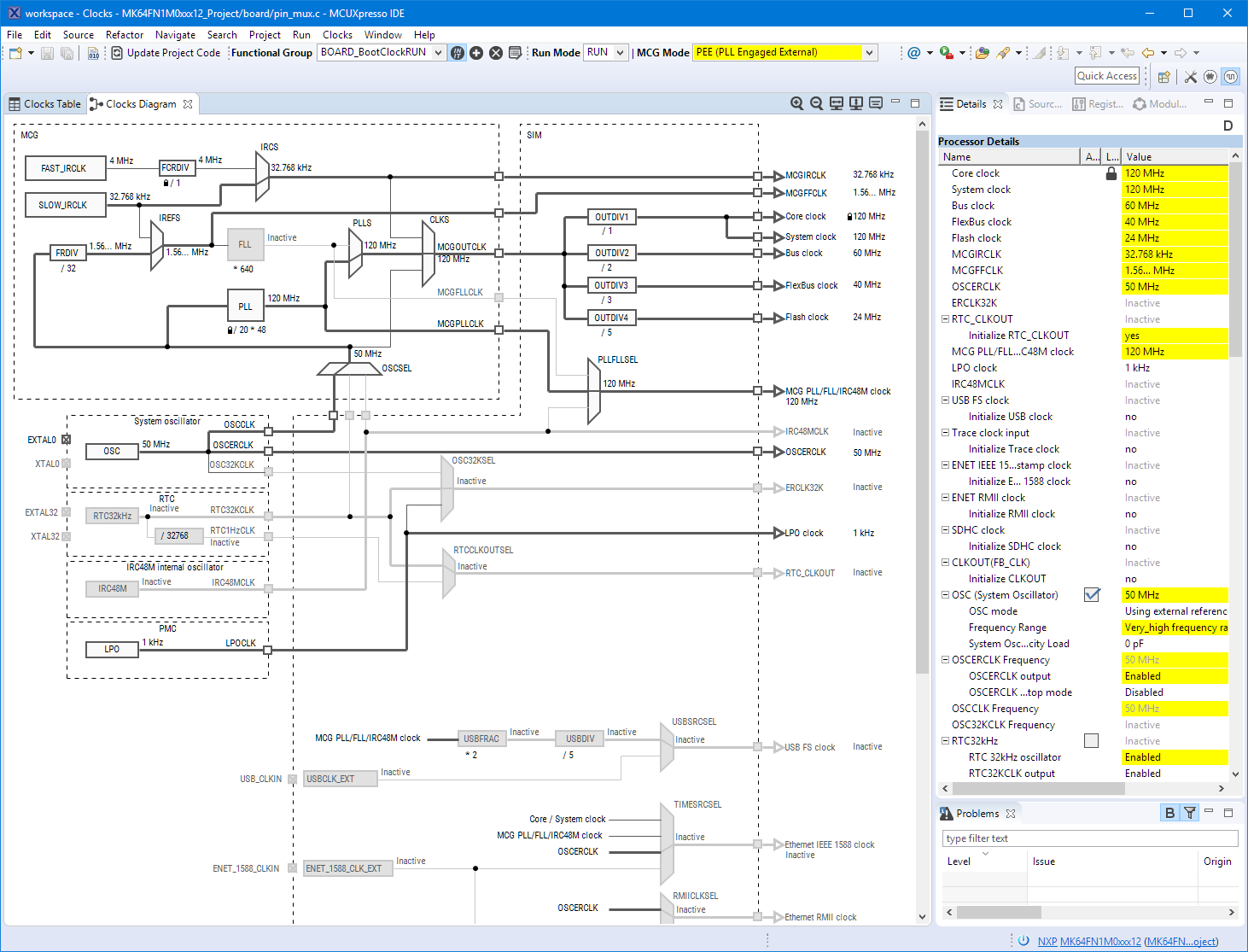
Clock Tool inside MCUXpresso IDE

Clock Tool inside MCUXpresso IDE

I have used it for a week, and although many things are still new, I thought I’m able to give an overview about what is new.

Continue reading

Exploring a Microcontroller and Software and Tools for the next Project

I’m using many microcontroller in my projects. And a lot more are available out there in the ecosystem. Like many others, I tend to select what I am familiar with. But is this the correct approach to select the hardware and tools for a next project?

Microcontroller Boards

Microcontroller Boards

Continue reading

Adding a Delay to the ARM DAPLink Bootloader

The ARM mbed USB MSD bootloader which is used on many silicon vendor boards has a big problem: it is vulnerable to operating systems like Windows 10 which can brick your board (see “Bricking and Recovering OpenSDA Boards in Windows 8 and 10“). To recover the board, typically a JTAG/SWD programmer has to be used. I have described in articles (see links section) how to recover from that situation, including using an inofficial new bootloader which (mostly) solves the problem. The good news is that ARM (mbed) has released an official and fixed bootloader. The bad news is that this bootloader does not work on every board because of a timing issue: the bootloader mostly enters bootloader mode instated executing the application.

DAPLink in Bootloader Mode

DAPLink in Bootloader Mode

Continue reading

EmbSysRegView 0.2.6 for NXP Kinetis Design Studio V3.2.0

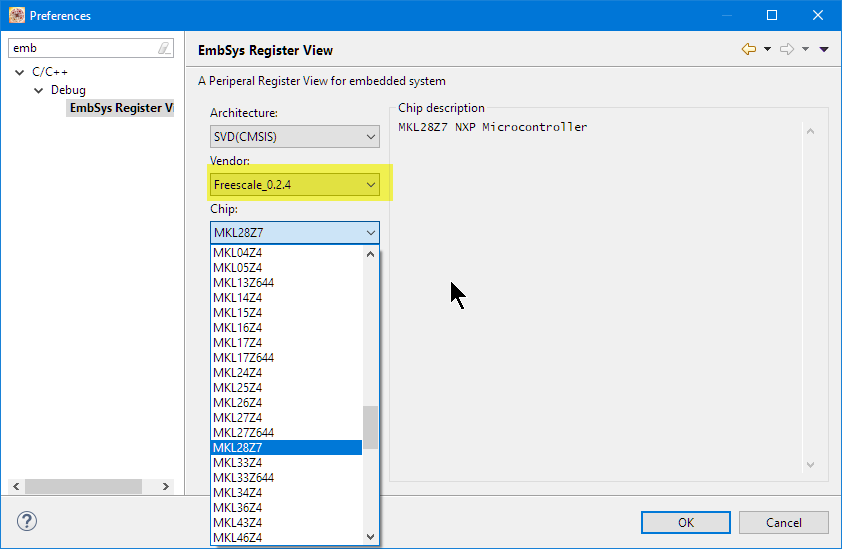
Kinetis Design Studio by default uses an older version of EmbSysRegView. This article explains how to upgrade to the latest and greatest version 0.2.6. And how it is possible to use the latest NXP update for the 0.2.4 version:

Installed Files in Eclipse

Installed Files in Eclipse

Continue reading

Using Serial Terminal and COM Support in Eclipse Oxygen and Neon

Most of the time I’m using a dedicated terminal program like Termite or PuTTY to connect to a board using virtual or non-virtual COM port. Another way is to use the Eclipse built-in Terminal view: that way no extra program is needed to communicate with a real or virtual COM port to my target device:

Terminal Command Output

Terminal Command Output

Continue reading

McuOnEclipse Components: 25-Sept-2017 Release

I’m pleased to announce that a new release of the McuOnEclipse components is available in SourceForge. In this release more ARM Cortex devices/vendors are supported with different SDKs, plus it comes with several FreeRTOS enhancements for debugging highly optimized code.

SourceForge

SourceForge

Continue reading

Why you should not use Arduino for Professional Work

Have a read at http://embedded.fm/blog/2017/8/12/dont-use-arduino-for-professional-work.

I love the Arduino ecosystem, and it is great for getting something up and running quickly for a ‘proof of concept’. But it stops at that point.

I think it should be obvious why Arduino (code and libraries) should not be used for professional work. Especially the lack of proper debugging support makes it nearly impossible to solve the problems of the real world.’printf()’ style of debugging is simple, but it is a huge waste of time. I have seen too many student projects failing because the inability to properly debug the system and solve the problems.

Even equally important for professional work is the topic of IP and licensing. Be aware of the licensing terms and conditions as pointed out by above article. If not, your product easily get GPL’d which might not want you want.

Arduino

Arduino

Happy Arduinoing 🙂

Adding CMSIS-SVD Files to EmbSysRegView 0.2.6.r192 and Eclipse

In “EmbSysRegView 0.2.6 for Eclipse Neon and Oxygen” I have described how to add CMSIS-SVD register detail files to Eclipse using the EmbSysRegView plugin.

But what I need to add vendor or any other SVD files to it? Here is how:

EmbSys Registers View

EmbSys Registers View

Continue reading

Breathing with Oxygen: DIY ARM Cortex-M C/C++ IDE and Toolchain with Eclipse Oxygen

Last month (June 2017), the latest version of Eclipse “Oxygen” has been released, and I have successfully used it in several embedded projects. Time to write a tutorial how to use it to build a custom Do-It-Yourself IDE for ARM Cortex-M development: simple, easy, unlimited and free of charge. While the DIY approach takes a few minutes more to install, it has the advantage that I have full control and I actually know what I have.

Eclipse Oxygen

Eclipse Oxygen

Continue reading