All‑in‑One Docker Image for NXP MCUXpresso, VS Code and CI/CD Pipeline

Working with different toolchains, different versions and targets can be very challenging. To simplify the setup and distribution of the development environment I’m using the concept of containers.

I’m using different Docker images and containers for development and automated CI/CD integration. In the past weeks I have extended, simplified and consolidated my work flows. For example I have now an image with the MCUXpresso tools, with everything running in a container: both locally on my machine with Docker, with VS Code, and the same integrated in the CI/CD pipeline:
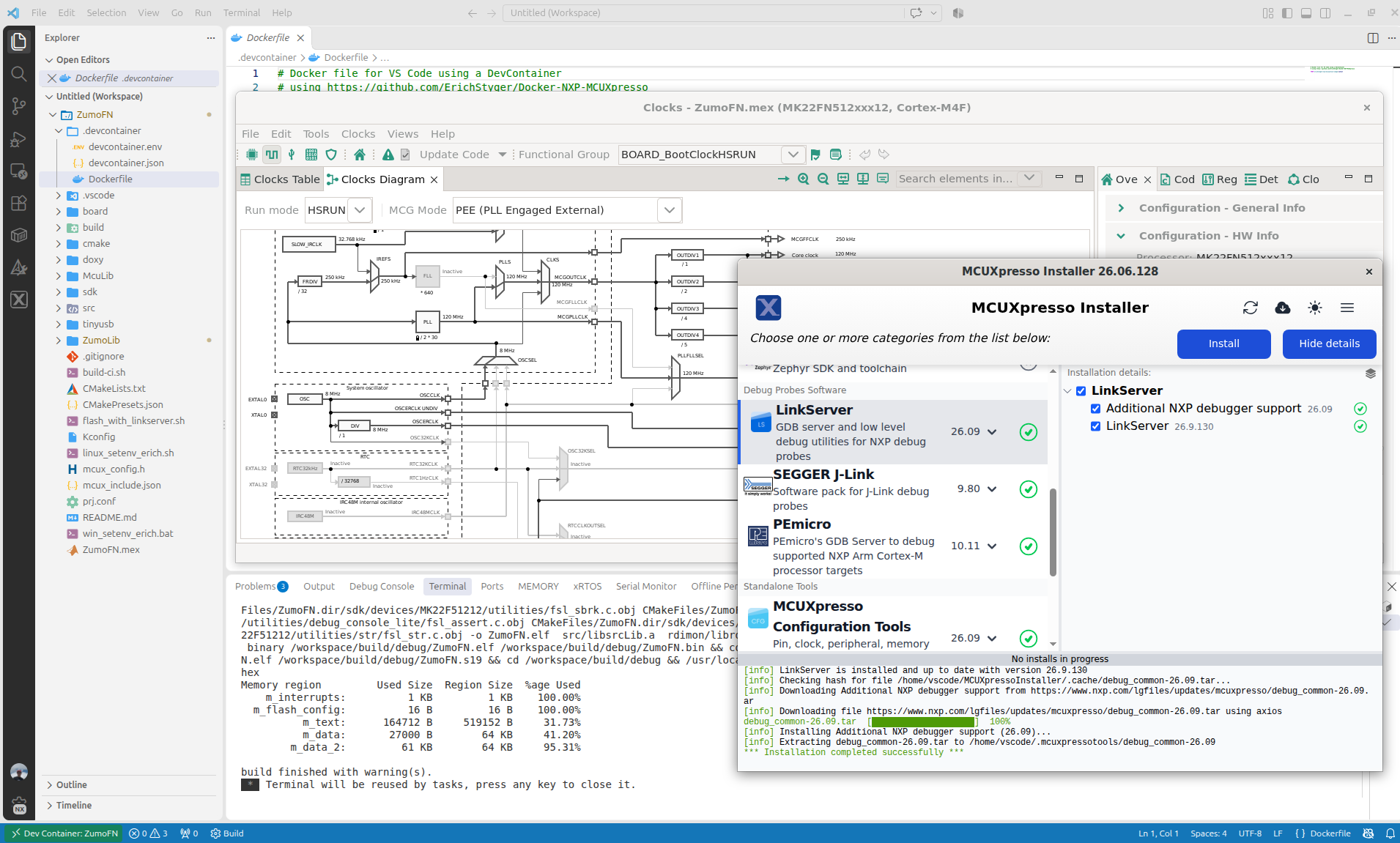
Running MCUXpresso Tools in Container

It not only simplifies my development flow: the same way I can easily deploy the installation and setup for a class room lab environment: basically everything is only one click away.

Continue reading →
NXP LinkServer Adds Standalone Power & Energy Measurement

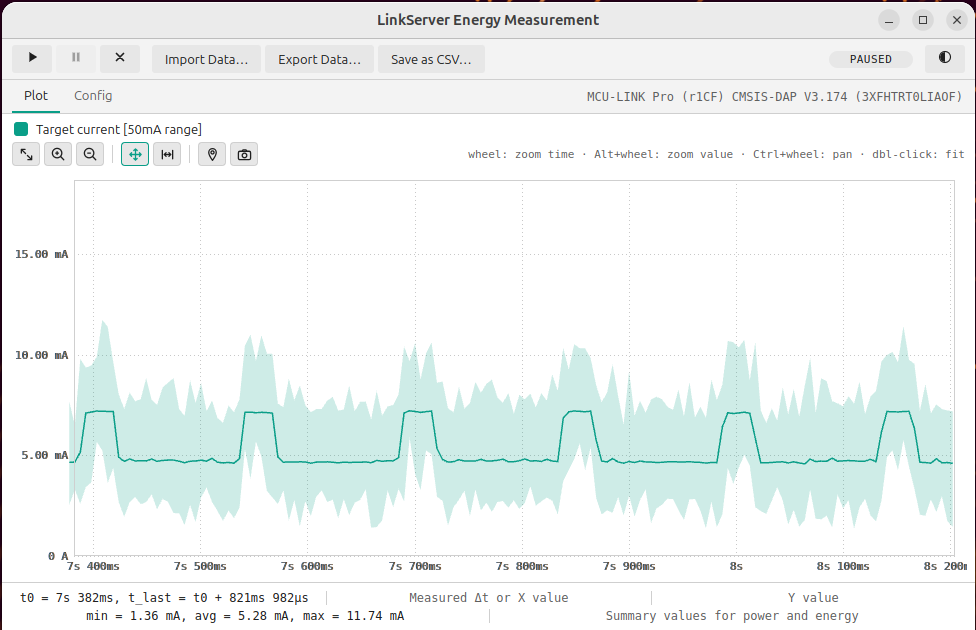
NXP has released a new LinkServer v26.9.130. And it comes with a major new feature: it now includes power and energy measurement:

LinkServer standalone measurement GUI

Additionally, it has a command line interface for this, making it ideal for AI agent usage or for automated tests in a CI/CD environment.

Continue reading →

NXP LinkServer Now Supports ARM 64-bit for Enhanced Development

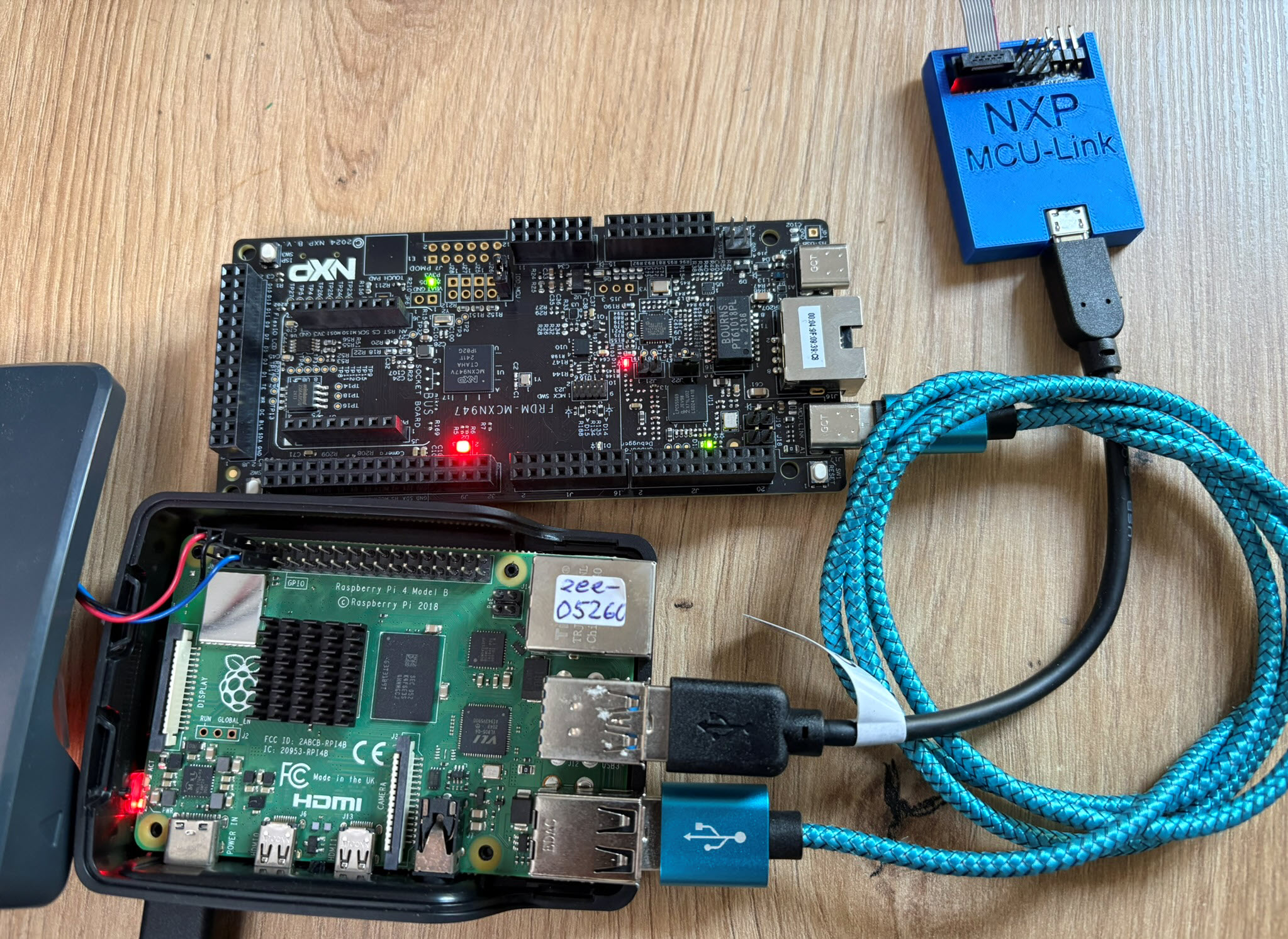
The latest release of the NXP LinkServer supports ARM 64bit (Debian) besides Windows, Linux and MacOS. With this, I can now develop on an NXP i.MX board. Plus, this enables an inexpensive way for automated on-target tests and CI/CD.

LinkServer running on Raspberry Pi
Continue reading →

Using Git Submodules in GitLab CI/CD Pipelines

Git Submodules allow me to keep a git repository as a sub-directory in another git repository. This let me clone another repository into my project and keep sources in and libraries/SDKs in sync.

This can be a challenge if using CI/CD runners. They have to clone the repositories in a recursive way. It gets more complex if the sub-modules are not public. Because the CI/CD runner does not have access rights to the non-public repositories.

GitLab CI/CD Pipeline with successful private submodule usage

In this article I explain how I’m using git sub-modules in my CI/CD GitLab pipeline, both for public and private repositories

Continue reading →

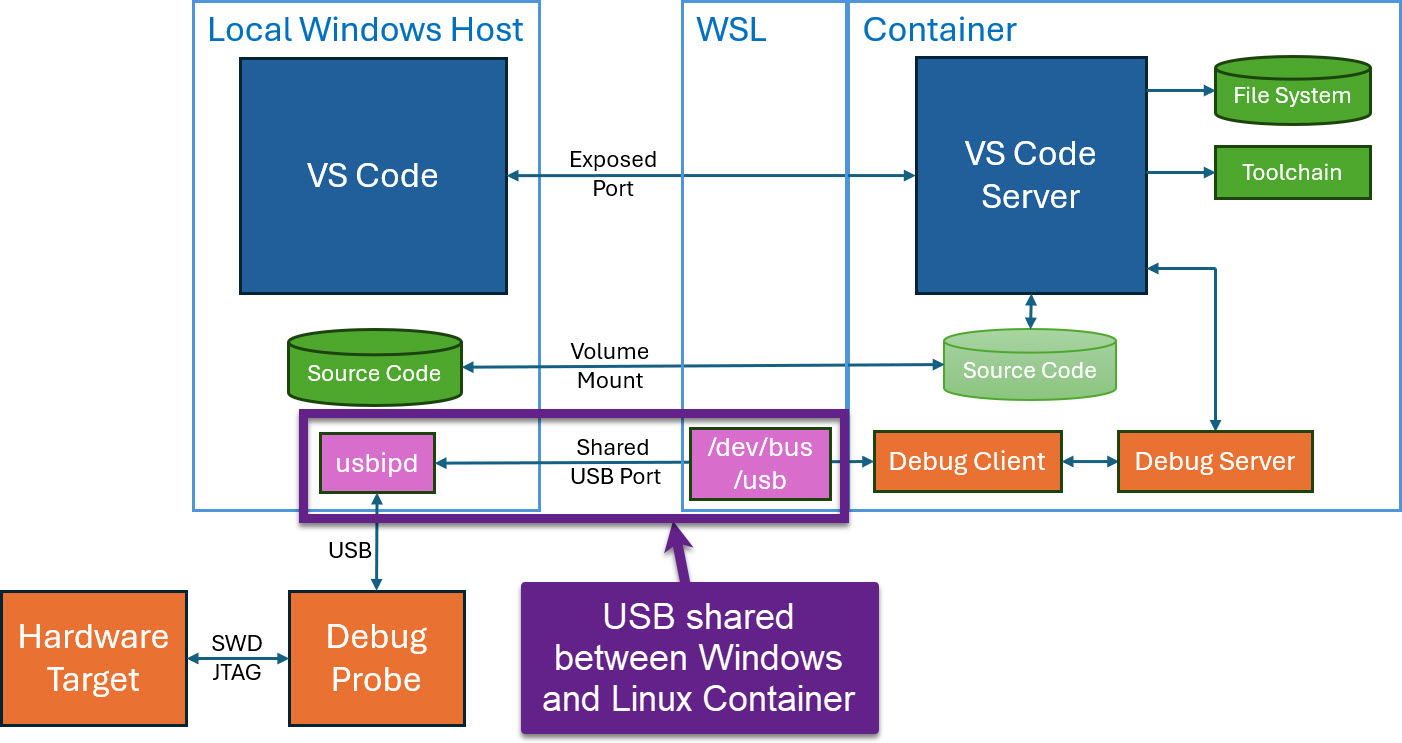
Using Windows USB Devices and Debug Probes inside Docker Dev Container

Docker or Development Container are great for isolation. And they work very well with things outside which are TCP/IP based. But most debug probes are USB only. Docker container don’t work well with USB. In Remote Debugging with DevContainer and VS Code, I showed how to use USB based debug probes. I demonstrated using them with an IP connection. In this article I show how Windows USB devices can be used from a container, with the help of usbipd.

usb shared between windows and linux container
USB shared between windows and Linux container
Continue reading →

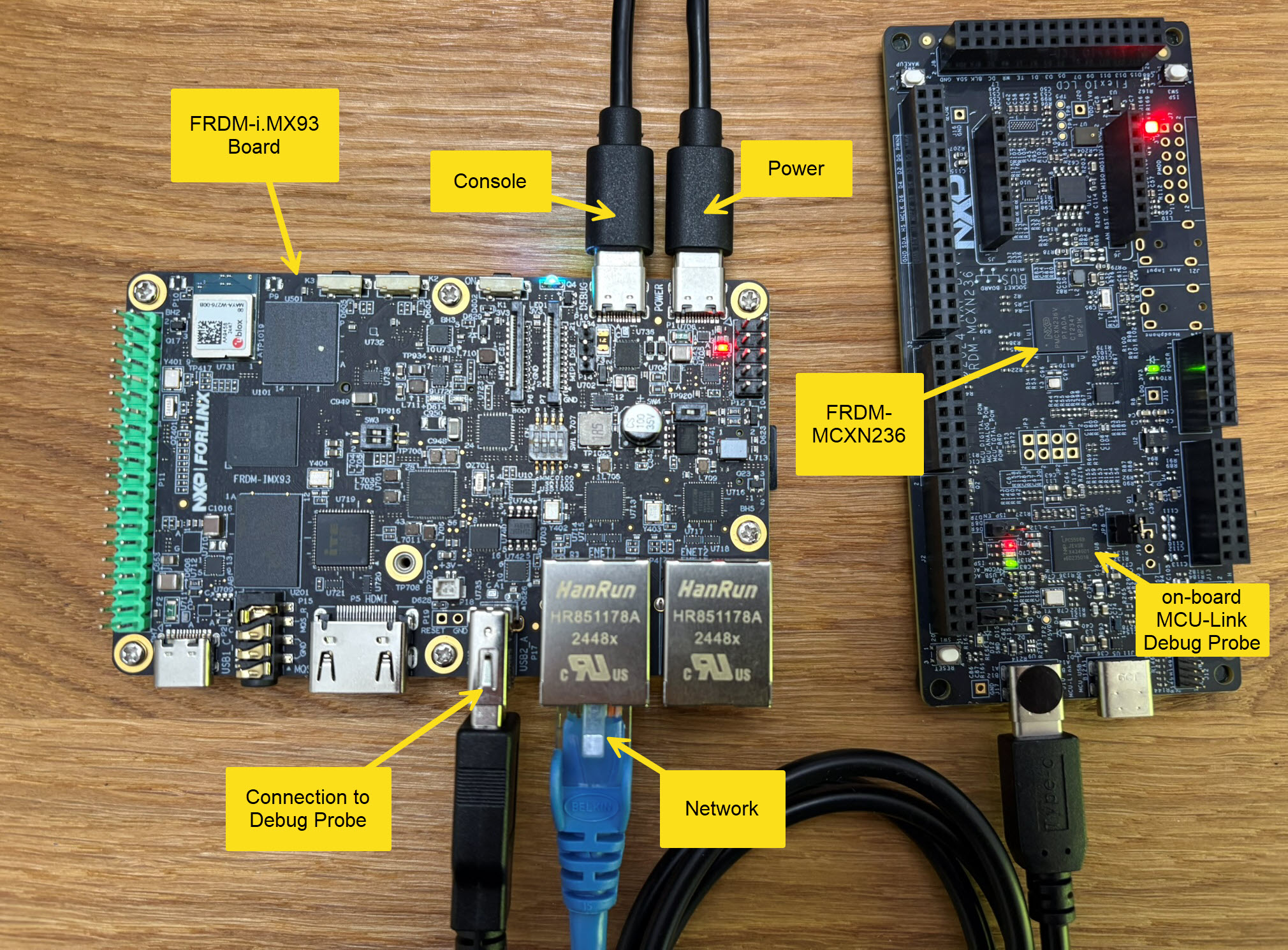
Setup Guide for FRDM-IMX93 as Debug Server

In Using Raspberry Pi and MCU-Link for Remote Embedded Debugging I created a remote server for debugging. I did order the NXP FRDM-IMX93 a few weeks ago, and did not had a chance to use it. So why not doing the same?

FRDM-i.MX93 with MCU-Link

Here is how it can be uses as remote debug server,

Continue reading →

Running On-Target Tests with Coverage in VS Code

Test coverage is a very useful metric: it tells how much of your code has been covered by tests. Or the other way: it helps identifying areas of my code which has not been running tests. A new CMake extension in VS Code is available. It works with the new NXP LinkServer test runner to allow running tests on an embedded target. The really cool thing is: it collects and visualizes test data with coverage information in a single step:

Test Data combined with Coverage in VS Code
Continue reading →

Optimizing Embedded Development with VS Code and DevContainer

Embedded System have a lifetime of 10 or 15 years. During that time the software and tools has to be maintained. This can be very challenging. Who knows if that compiler or tool used is still available in 10 years from now? Additionally installing and configuring the tool chain and environment for a new team member is difficult. Even worse: using a different host operating system for the cross development can produce different results or introduce issues.

VS Code running with DevContainer

One solution for all these problems is to use Docker images and containers. I can pack all the necessary tools and software into a virtual environment and container. But developing inside a container comes with many challenges. In this article I’ll show how Visual Studio Code or VS Code makes working with containers very easy. In this article I show how easy it is to use modern development tools and methodologies for embedded development.

Continue reading →

Standalone Semihosting Host-Target Console with CI/CD Runner and CMSIS-DAP

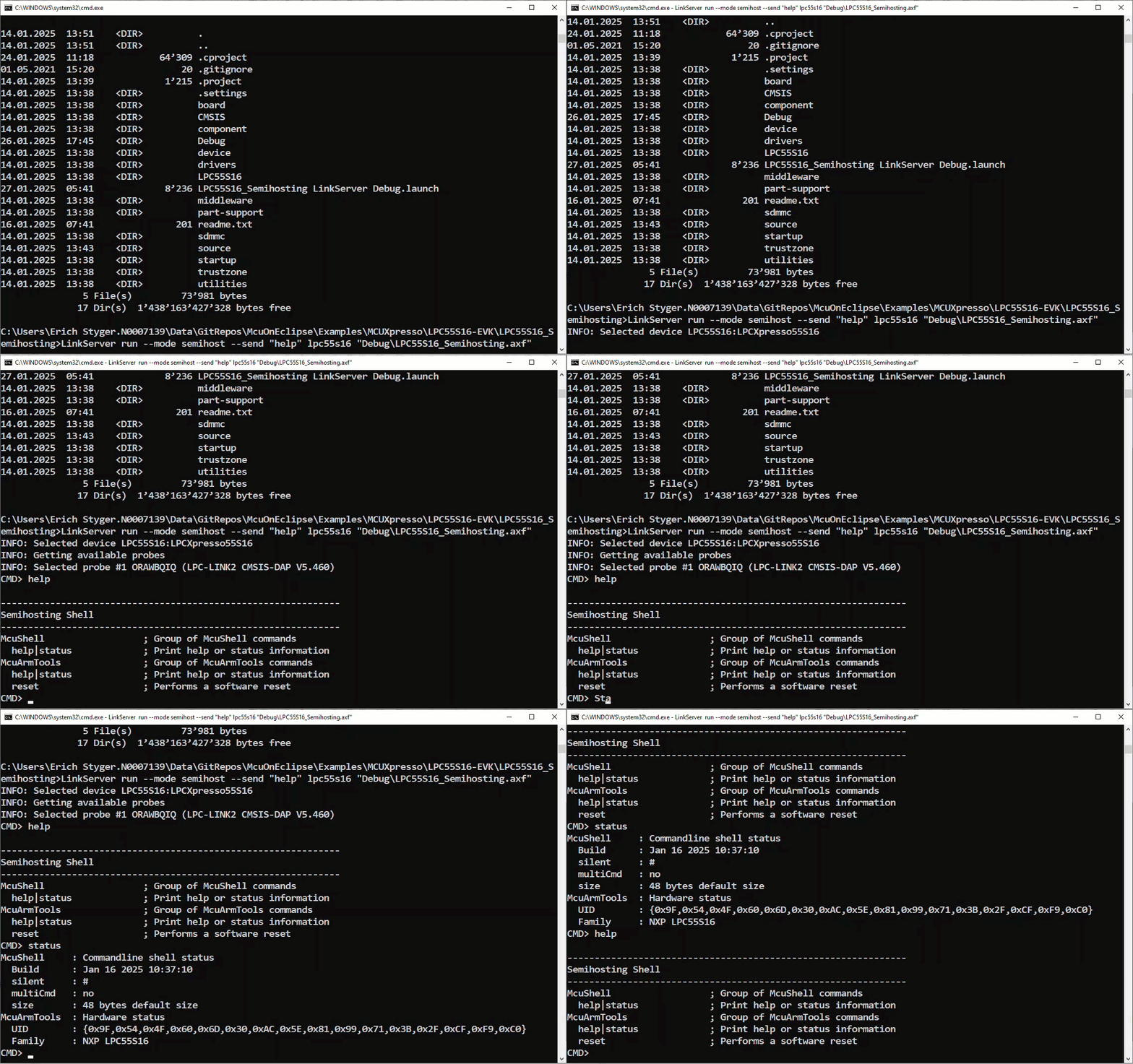
NXP has released a new LinkServer software. It includes an interesting feature. The LinkServer test runner has been extended with a Semihosting console. This is not only very useful for on-target testing. With the Semihosting console, I have a bidirectional communication channel with the target. And I do not need any hardware pins or to run a debug session. All what I need is the CMSIS-DAP connection with the NXP LinkServer runner to have a command line shell:

Target Console with Semihosting
Continue reading →

GitLab Automated CI/CD Embedded Multi-Project Building using Docker

In CI/CD for Embedded with VS Code, Docker and GitHub Actions, I used GitHub to build a pipeline. This setup supports continuous integration within a CI/CD environment.

This time, let’s do a similar thing. But instead of GitHub, I use GitLab with VS Code. And I use it for a project where three different MCUs are used: the Raspberry Pi Pico-W, an Espressif ESP32 plus the NXP K22FX512 on the Sumo robot:

Raspberry Pi Pico-W, Espressif ESP32 and Robot with NXP K22FX512
Continue reading →