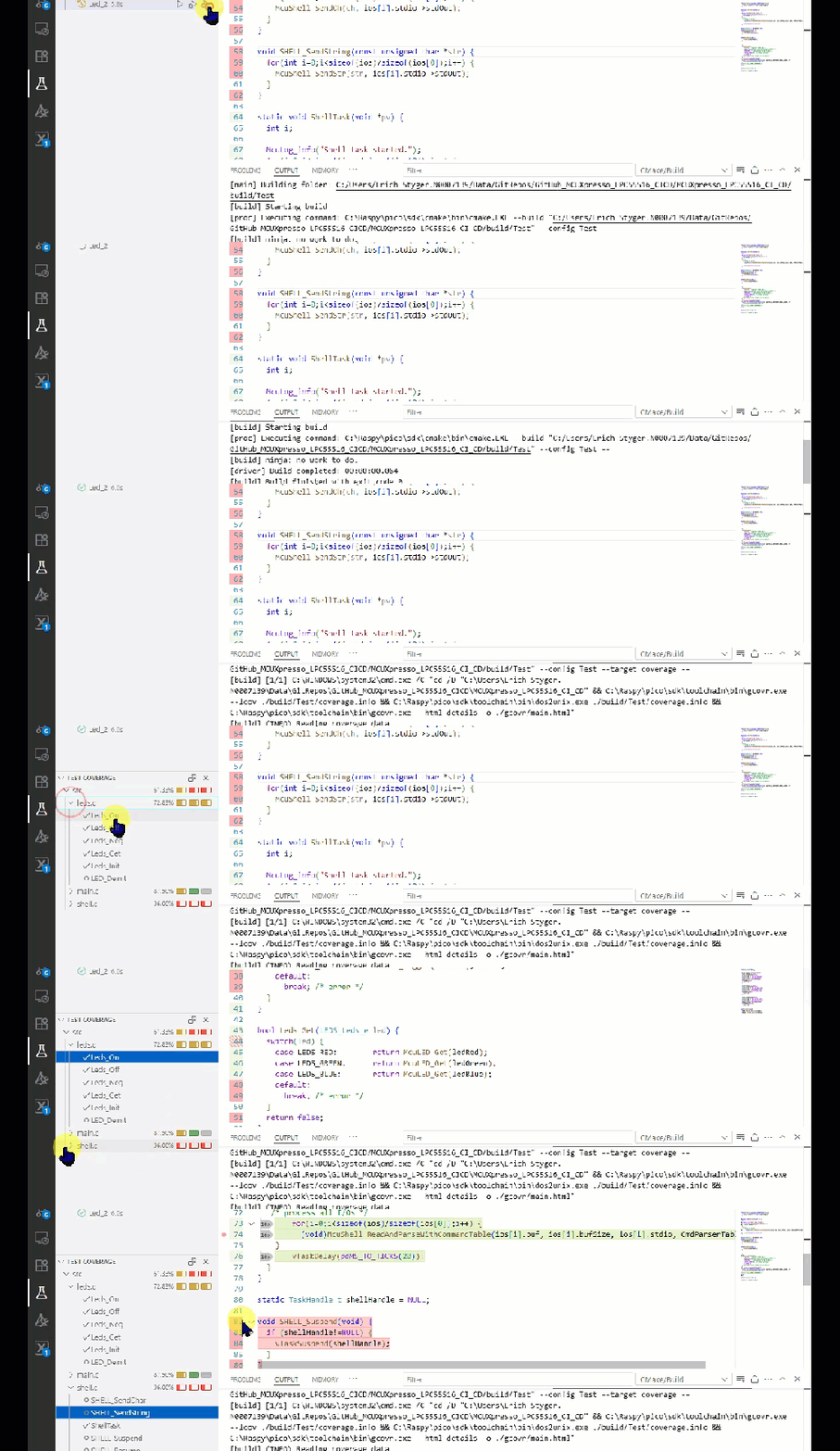
Test coverage is a very useful metric: it tells how much of your code has been covered by tests. Or the other way: it helps identifying areas of my code which has not been running tests. A new CMake extension in VS Code is available. It works with the new NXP LinkServer test runner to allow running tests on an embedded target. The really cool thing is: it collects and visualizes test data with coverage information in a single step:

Outline
Running modern on-target tests with a test runner like LinkServer and Unity is one thing. Collecting coverage metrics is another challenge for an embedded target. Now finally everything can be combined in VS Code, in an easy and simple user interface:

In this article I’m using the following:
- NXP LPC55S16-EVK with on-Board debug probe (any external MCU-Link debug probe works too)
- NXP LinkServer for Microcontrollers v25.6.131
- Visual Studio Code v1.101.2
- CMake Tools Extension v1.20.53
- NXP Extension v25.6.97
- gcovr v8.3
- dos2unix v2025-05-19
- GNU gcov and ARM toolchain v13.2.1 20231009

The approach is using a unique combination of CMake with VS Code, in combination with a CMSIS-DAP debug probe. The NXP LinkServer test runner is unique as it supports file I/O to the host with semihosting. File I/O with semihosting is a requirement to run GNU gcov with an embedded target.
I have described semihosting, running GNU gcov with ctest in previous articles. Please have a look at the list of links at the end of this article.
You can find the project on GitHub.
VS Code Test with Coverage
The new CMake and CTest integration in VS Code has an added icon/action to do test with coverage:
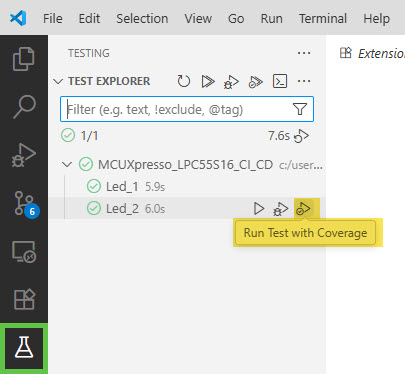
This action will run all tests or a selected tests. The tests need to generate coverage (gcov) data. At the end of the test run, VS Code reads coverage information file. The coverage information file is what is used to present the test results
Coverage Information File
If VS Code cannot find the coverage information file, it will report it with a message in the output:
[ctest] No coverage info files for CMake project <project name>. No coverage data will be analyzed for this project.
Which file should be used needs to specified in the .vscode/settings.json like this:

    "cmake.coverageInfoFiles": [
        "${workspaceFolder}/build/Test/coverage.info"
    ]
This file needs to be in the lcov format, as described in https://github.com/linux-test-project/lcov/blob/07a1127c2b4390abf4a516e9763fb28a956a9ce4/man/geninfo.1#L989. Additionally, this file needs to have LF (Linux!) line endings! CRLF (Windows!) file endings are not supported in VS Code at the time of this article!
Generating Coverage Information File
One way to generate the coverage information file is using gcovr:
gcovr --lcov ./build/Test/coverage.info
On a windows machine, this will use CRLF line endings. On Windows, I use the dos2unix tool to convert the line endings:
dos2unix ./build/Test/coverage.info
Post Runner for Automation
To automate the coverage information generation, I’m using a CMake post-runner. For this, I add the following to the settings.json:
"cmake.postRunCoverageTarget": "coverage",

That ‘coverage‘ target is what I have defined in the CMakeLists.txt:
if(ENABLE_COVERAGE)
  # find required tools
  find_program(GCOVR gcovr REQUIRED)
  find_program(DOS2UNIX dos2unix REQUIRED)

  # add coverage target
  add_custom_target(coverage
    # gather data
    COMMAND ${GCOVR} --lcov ./build/Test/coverage.info
    # convert to Unix format
    COMMAND ${DOS2UNIX} ./build/Test/coverage.info
    # generate report
    COMMAND ${GCOVR} --html-details -o ./gcovr/main.html
    WORKING_DIRECTORY ${PROJECT_ROOT_DIR})
endif()
The above generates the coverage information, converts the line endings plus at the end generates a HTML report.
User Interface in VS Code
If I run now tests with coverage, the coverage information is directly visible in VS Code:
Additionally, the explorer view shows the test coverage percentage. The source view shows executed source lines in green and not executed ones in red. Additionally each executed line has a number indicating the number of execution:

Summary
The NXP LinkServer test runner in combination with VS Code can now collect and visualize test data with test coverage. No need to collect coverage information in separate runs. The LinkServer runner can both run the tests and do file I/O with semihosting. Semihosting is used both to control the tests an read/write coverage information on the host.
I can run everything in an automated test environment on the command line. Or I can conveniently use VS Code to get direct feedback what my tests are covering (or not).
How are you running on-target tests with collecting coverage information? Let me know in the comments section.
Happy testing 🙂
Links
- Project on GitHub: https://github.com/ErichStyger/MCUXpresso_LPC55S16_CI_CD
- gcovr: https://gcovr.com/en/stable/
- dos2unix: https://sourceforge.net/projects/dos2unix/
- VS Code Test Coverage: https://code.visualstudio.com/docs/debugtest/testing#_test-coverage
- NXP LinkServer: https://www.nxp.com/design/design-center/software/development-software/mcuxpresso-software-and-tools-/linkserver-for-microcontrollers:LINKERSERVER
- CI/CD for Embedded with VS Code, Docker and GitHub Actions
- Optimizing Embedded Development with VS Code and DevContainer
- Standalone Semihosting Host-Target Console with CI/CD Runner and CMSIS-DAP
- GitLab Automated CI/CD Embedded Multi-Project Building using Docker
- Modern On-Target Embedded System Testing with CMake and CTest

