Enable Default FreeRTOS Debugging for LinkServer Debug Connections

Most of my projects are using FreeRTOS, and I’m using different Debug Probes (SEGGER, P&E and LinkServer) to debug NXP devices.

The NXP LinkServer debug connection is able to show the RTOS threads in Eclipse/MCUXpresso IDE which is incredibly helpful:

FreeRTOS Thread Aware Debugging with LinkServer Connection

FreeRTOS Thread Aware Debugging with LinkServer Connection

However, by default this is turned off. In this article I show how to turn this on by default.

Continue reading →

Ways to apply Eclipse CDT C/C++ Project Settings

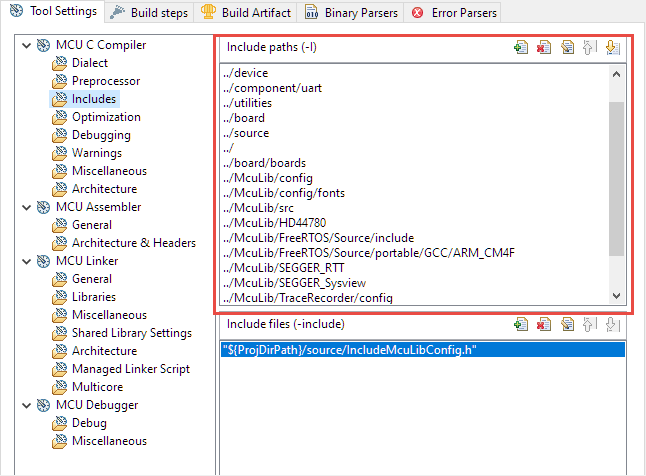
Eclipse with its CDT managed Make system makes it easy to build projects, because it can handle a lot of the background tasks and settings between the project and the build setting. It can get a bit difficult if I want to include a library or other sub-source project for which I have to add extra compiler #define or add extra includes path settings.

Eclipse project settings for incliude paths

Eclipse project settings for include paths

This article show the different ways I have found to make such imports (and exports) easier.

Continue reading →

Listing Code and Data Size for all Files with the GNU size Utility in a Post-Build Action

The GNU size utility which is part of the GNU build tools shows code and data size for archive or object files. It is usually used as a post-build step in Eclipse CDT to show text, data and bss at the end of the build:

Detailed size information for each file

Detailed size information for each file

Continue reading →

Implementing FreeRTOS Performance Counters on ARM Cortex-M

When using an RTOS like FreeRTOS, sooner or later you have to ask the question: how much time is spent in each task? The Eclipse based MCUXpresso IDE has a nice view showing exactly this kind of information:

FreeRTOS Runtime Information

FreeRTOS Runtime Information

For FreeRTOS (or that Task List view) to show that very useful information, the developer has to provide a helping hand so the RTOS can collect this information. This article shows how this can be done on an ARM Cortex-M.

Continue reading →

Using SEGGER J-Link with QSPI FLASH on NXP i.MX Boards

In “Seeed Studio Arch Mix NXP i.MX RT1052 Board” and “Debug and Execute Code from FLASH on the Seeed Arch Mix NXP i.MX RT1052 Board” I have used the NXP LPC-Link2 to debug the Seeed Arch Mix board with the NXP i.MX RT1052, because the SEGGER J-Link does not work out-of-the box with the i.MX RT using QSPI Flash. This article shows how the J-Link connection can be changed from HyperFlash to work with QSPI Flash.

J-Link EDU Mini with Seeed i.MX RT1052

J-Link EDU Mini with Seeed i.MX RT1052

Continue reading →

JTAG Debugging the ESP32 with FT2232 and OpenOCD

In “Eclipse JTAG Debugging the ESP32 with a SEGGER J-Link”  I used a SEGGER J-Link to debug an ESP32 device with JTAG. I looked at using one of the FTDI FT2232HL development boards which are supported by OpenOCD. The FT2232HL is dual high-speed USB to UART/FIFO device, and similar FTDI devices are used on many boards as UART to USB converters. With OpenOCD these devices can be turned into inexpensive JTAG debug probes. This article shows how to use a $10 FTDI board as JTAG interface to program and debug the Espressif ESP32.

FTDI JTAG Connection

Continue reading →

Linking Bootloader Applications with Eclipse and FreeMarker Scripts

Bootloaders are a fine thing: With this I can load any applications I like. Power comes with some complexity, and a bootloader alone is a complex thing already. But this applies to the application part too: I need to link the application to a certain offset in the memory space so it can be loaded by the bootloader, plus the application typically needs to add some extra information to be used by the bootloader. This article describes how to build a bootloader application with Eclipse (MCUXpresso IDE) using the MCUXpresso SDK.

Build Configuration for Bootloader Application

Continue reading →

Stack Canaries with GCC: Checking for Stack Overflow at Runtime

Stack overflows are probably the number 1 enemy of embedded applications: a call to a a printf() monster likely will use too much stack space, resulting in overwritten memory and crashing applications. But stack memory is limited and expensive on these devices, so you don’t want to spend too much space for it. But for sure not to little too. Or bad things will happen.

The Eclipse based MCUXpresso IDE has a ‘Heap and Stack Usage’ view which can be used to monitor the stack usage and shows that a stack overflow happened:

Heap and Stack Usage

Heap and Stack Usage

But this is using the help of the debugger: how to catch stack overflows at runtime without the need of a debugger? There is an option in the GNU gcc compiler to help with this kind of situation, even if it was not originally intended for something different. Continue reading →

Eclipse JTAG Debugging the ESP32 with a SEGGER J-Link

When Espressif released in 2014 their first WiFi ESP8266 transceiver, they took over at least the hobby market with their inexpensive wireless devices. Yet again, the successor ESP32 device is used in many projects. Rightfully there are many other industrial Wi-Fi solutions, but Espressif opened up the door for Wi-Fi in many low cost projects. Many projects use the ESP devices in an Arduino environment which basically means decent debugging except using printf() style which is … hmmm … better than nothing.

What is maybe not known to many ESP32 users: there *is* actually a way to use JTAG with the ESP32 devices :-). It requires some extra tools and setup, but with I have a decent Eclipse based way to debug the code. And this is what this article is about: how to use a SEGGER J-Link with Eclipse and OpenOCD for JTAG debugging the ESP32.

Roboter with ESP32 and JTAG Debug Port

Robot with ESP32 and JTAG Debug Port

Continue reading →