If doing embedded development, then the debugging solution is probably the most important single tool in the development chain. Because very debugging probe has its pros and cons, I usually have at least three different debug probes on my desk, simply to get the job done in all aspects.
What is true for the hardware debugging probes, is true for the gdb client and server side. I’m using mostly the P&E, SEGGER and CMSIS-DAP plugins (e.g. NXP LinkServer) and OpenOCD from the Eclipse IDE side. But there are more choices, for example pyOCD.
When developing with C or C++ an application, then you mostly focus on your own code. You don’t want to bother with the details how input/output functions like printf() or scanf(), and you might just use these functions and helpers and that’s it.
The implementation is part of the ‘C Standard Library’ (or C++ Standard Library). In the world of Linux, this is usually the ‘glibc’ or ‘GNU C Library, and one usually link with ‘libc’. That provides the implementation of printf(), or use ‘libm’ if using math functions like sin() or cos().
In the embedded world, things are much more complex, with plethora of choices, for example in the MCUXpresso IDE:
The year 2022 is coming to an end, and I have spent some time today on a little side project. It is about making an Electrical Vehicle (EV) wallbox charger accessible over Modbus RTU. It is not finished yet, and I plan to publish more articles on it, but I can share that I’m able to access and control the Heidelberg EV charger with a Raspberry Pi Pico W (Dual Core Cortex M0+), NXP K22FN512 (Cortex M4F) and LPC845 (Single Core Cortex M0+):
It is already December 1st, and time for a new Advent Calendar. This year the design includes birch plywood with PMMA, SK6812 RGBW LEDs running with a Raspberry Pi Pico board, building a small village.
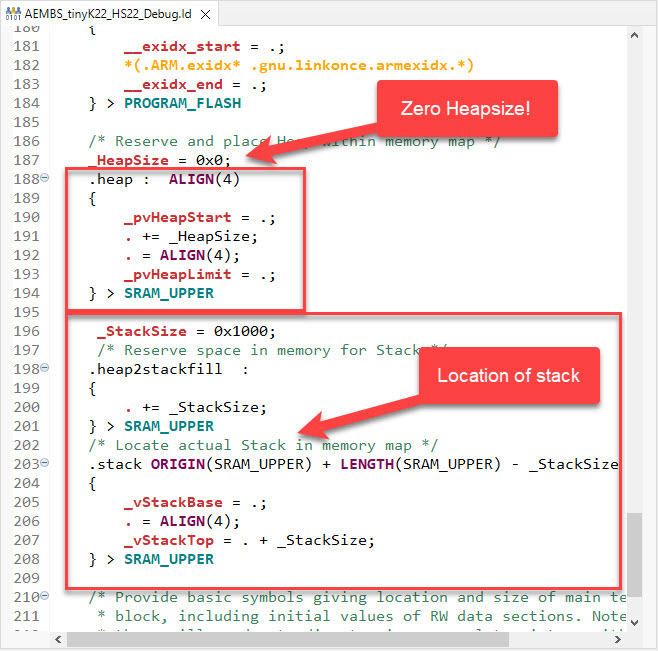
In many embedded applications, it is mandatory that memory allocation is static and not dynamic. Means that no calls to things like malloc() or free() shall be used in the application, because they might fail at runtime (out of memory, heap fragmentation).
But when linking with 3rd party libraries or even with the C/C++ standard libraries, how to ensure no dynamic memory is used? The problem can occur as well for C++ objects, or a simple call to printf() which internally requires some dynamic memory allocated.
In this time where many micro-controllers have 100+ weeks estimated delivery time, it makes sense to look at alternatives. So it is not a surprise that the Raspberry Pi RP2040 gets used more and more in projects. It is not only inexpensive, it is (at least for now) available which makes all the difference. The RP2040 is the first microcontroller from Raspberry Pi: a dual-core ARM Cortex-M0+ running up to 133 MHz, 264 KByte on-Chip RAM and up to 16 MByte external FLASH.
Raspberry Pi Pico with J-Link, with a NXP sensor board
It is a very versatile microcontroller, with a rich eco-system and set of tools. It can be easily used with C/C++ or MicroPython, and the Raspberry Pi Pico board only costs around $5. There are plenty of tutorials out there, for example how to use the Pico board as debug probe to debug another Pico board. While this is great, there is an easy way to use any existing J-Link and Eclipse IDE too, so this is what this article is about.
One great thing with the Eclipse Gnu Make Builder (aka ‘auto make’ or ‘auto build’) feature: just add source files (*.c, *.cpp, …), and with kind of magic, they all get compiled and linked properly.
But for something easy and convenient: is it hard to use custom file extensions? So what if I want to use a different file extension for my source files, different from the standard ones? Actually Eclipse CDT can do this too, it just takes two settings to recognize, compile and link source files with custom extension.
Split-flap displays are electromechanical display devices, which were common in airports or railway stations a few years ago.Unfortunately, most of them are gone and replaced by LED displays. Why not create a DIY version of it?
I’m pleased to announce a new release of the McuOnEclipse components, available on SourceForge. This release includes several bug fixes, support for more devices, and updated components like FreeRTOS, MinINI, Percepio Tracealyzer and SEGGER SystemView.