Creating Disassembly Listings with GNU Tools and Eclipse

In many cases it is very useful to see the generated assembly code produced by the compiler. One obvious way to see the assembly code is to use the Disassembly view in Eclipse:

Disassembly View

Disassembly View

But this requires a debug session. An easier way is to use command line options to generate the listing file(s).

Continue reading

Eclipse Debugging with Pointers and Arrays

In the C programming language it is good practice to pass values by reference (using a pointer), especially for large set of data. For example the following function takes a message string and pointer to integer data which then is printed to the console:

static void printData(const char *msg, const int *intBuf, size_t bufSize) {
  puts(msg); /* print message */
  for(int i=0; i<bufSize;i++) {
    printf("buf[%i] = %i\n", i, intBuf[i]);
  }
}

Continue reading

Tutorial: FreeRTOS 10.0.1 with NXP S32 Design Studio 2018.R1

NXP not only sells general purpose microcontroller, but as well a portfolio of automotive devices which includes the S32K which is ARM Cortex based. For this device family, they offer the S32 Design Studio (or S32DS) with its own Eclipse distribution and SDK. The interesting part is that the S32DS includes Processor Expert (which is a bit different from the ‘mainstream’ Processor Expert). It comes with its own components for the S32K SDK which includes a component for FreeRTOS. But that component in S32DS 2018.R1 comes with an old V8.2.1 FreeRTOS component:

FreeRTOS 8.2.1 in S32DS 2018.R1

FreeRTOS 8.2.1 in S32DS 2018.R1

So what to do if I want to use the latest FreeRTOS (currently 10.0.1) with all the bells and whistles?

Continue reading

Show FreeRTOS Threads in Eclipse Debug View with SEGGER J-Link and NXP S32 Design Studio

By default, the FreeRTOS threads do not show up with the SEGGER J-Link debug connection in the Eclipse based NXP S32 Design Studio IDE. But don’t worry: Here is how to get it working with SEGGER J-Link debug connection:

FreeRTOS Threads in Eclipse Debug View

FreeRTOS Threads in Eclipse Debug View

Continue reading

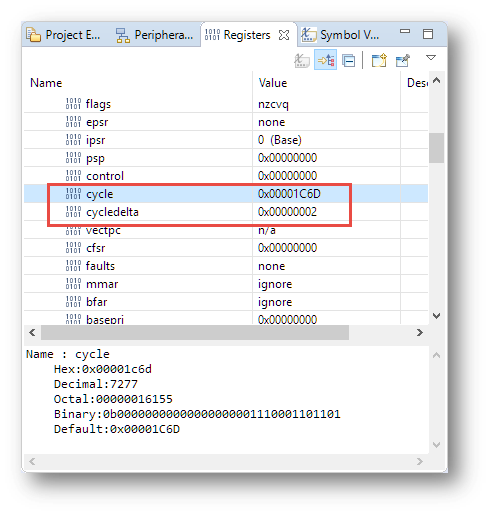
Measuring ARM Cortex-M CPU Cycles Spent with the MCUXpresso Eclipse Registers View

The ARM DWT (Data Watchpoint and Trace) is an optional feature of the ARM-Cortex-M, and many Cortex-M3, M4 and M7 devices have it implemented. With it comes a cycle counter which counts the cycles spent. In Cycle Counting on ARM Cortex-M with DWT I described an approach how the application on the target can access the cycle counter.

The MCUXpresso IDE shows that cycle counter in the Eclipse Registers view:

Cycle Counter in Register View

Cycle Counter in Register View

Continue reading

GNU Link Time Optimization finds non-matching Declarations

By default, the GNU compiler (gcc) optimizes each compilation unit (source file) separately. This is effective, but misses the opportunity to optimize across compilation units. Here is where the Link Time Optimization (LTO,  option -flto) can help out: with a global view it can optimize one step further.

The other positive side effect is that the linker can flag possible issues like the one below which are not visible to the compiler alone:

type of '__SP_INIT' does not match original declaration [enabled by default]
Warning by LTO

Warning by LTO

Continue reading

Tutorial: Understanding and Using FreeRTOS Software Timers

Hardware Timers are essential to most embedded applications: I use them mostly for triggering actions at a given frequency, such as acquiring data from a  sensor. With using an RTOS I can do a similar thing using a task: the task will run with a given frequency and I can periodic work in it. However, using a task might be too much overhead doing this. The good news is that there is a much more efficient way to do this in FreeRTOS with Software Timers. And this is what this tutorial is about: how to use Software Timers with FreeRTOS.

FreeRTOS Software Timers

FreeRTOS Software Timers

Continue reading

Understanding FreeRTOS Task Stack Usage and Kernel Awareness Information

When using the FreeRTOS Task List in the Eclipse based MCUXpresso IDE, it shows the list of tasks with their stack size used. But with the default FreeRTOS settings it is not able to determine the correct stack size and shows a warning icon:

Warning for Stack Usage

Warning for Stack Usage

Continue reading

Overview of MCUXpresso IDE v10.2.0

Decisions, decisions! Such long weekends like Pentecost are a real challenge for a family with engineers:

  1. Should we join that record long traffic jam to Italy and be stuck for more than 4 hours and analyze it?
  2. Or: should we stay home, turn the BBQ smoker engine on fire, load it with baby back pork rib racks for a slow-and-low smoke treatment, while doing some on-the-side IDE and technology exploration?

Well, my family vote was kind of clear: they have chosen that second option. Not to mention that hidden technology piece in it, but that was part of the deal ;-).

And I’m sorry: this article is not about BBQ (for this see “Smoking BBQ Baby Back Ribs – Swiss Style“), it is about technology: I’m using the NXP MCUXpresso IDE and tools for many of my projects (see “Eclipse MCUXpresso IDE 10.1 with integrated MCUXpresso Configuration Tools“). Right before the this extended weekend, NXP has released the new v10.2.0 version, so here is where that technology exploration piece comes into play. Checking the release notes, this version number change includes so many cool stuff I decided to have a look and to check it out. Of course always having an electronic eye on the baby back ribs!

MCUXpresso IDE v10.2.0

MCUXpresso IDE v10.2.0

Continue reading