IAR ARM v6.7 comes with improved Processor Expert Support

This week I saw on the IAR website that they have released the new IAR Embedded Workbench v6.7 for ARM. I was still on 6.5 using the free code size limited ‘Kickstart’ version), so I thought it would be a good time to upgrade to the v6.7. And there are good reasons as the connection to Processor Expert makes things much easier now.

Continue reading →

S-Record Manipulation with GNU objcopy and Burner Utility

In my earlier post “S-Record Generation with gcc for ARM/Kinetis” I documented how to have the ARM GNU gcc toolchain to produce a S19 (Motorola (or now Freescale) S-Record) file. Here are a few more tips on that subject:

  1. Changing length of S-Records
  2. Only using 32bit addresses
  3. Combining S19 files

Continue reading →

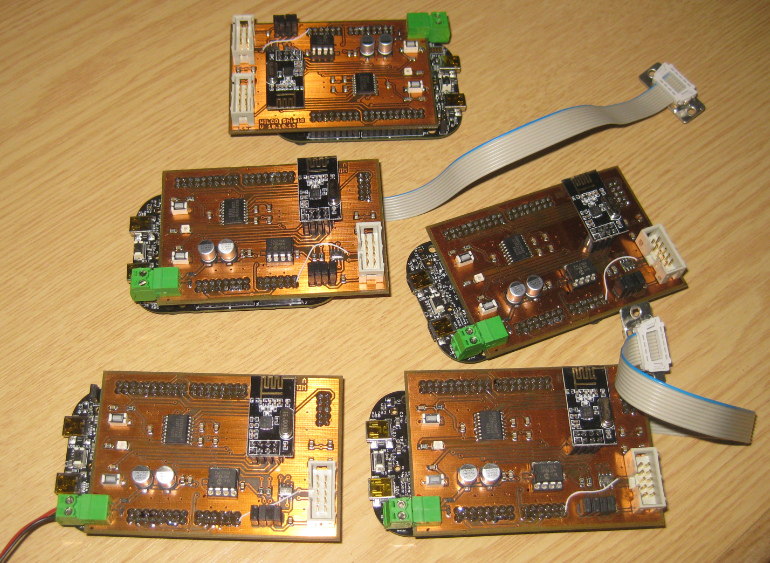
First Set of nRF24L01+ Wireless Sensor Nodes with FRDM-KL25Z

If you were wondering why I am pushing the FRDM-KL25Z boards hard to the micro-amps, then have a look at this:

nRF24L01+ Network Nodes

nRF24L01+ Network Nodes

The five boards are the first set of prototypes with a FRDM-KL25Z for a battery operated wireless sensor network based on the nRF24L01+ 2.4GHz transceiver.

Continue reading →

Eclipse Command Line Code Generation with Processor Expert

Eclipse based IDE’s have typically one limitation: the IDE has not much scripting capabilities. Yes, I can use things like JUnit for testing, but if it comes to build and debug C/C++ applications, then support gets really rare. An exception to this is CodeWarrior for MCU which features a command line version of the IDE which can be used for test automation as I used it in one of my tutorials. What I missed so far is to have a command line interface for Processor Expert to generate code. This is now possible with CodeWarrior for MCU10.5 :-).

Continue reading →

Tutorial: Using the FRDM-KL25Z as Low Power Board

The FRDM-KL25Z is a great board: inexpensive (around US$15), small form factor, has easily accessible pins, and has a low power (capable, at least) microcontroller, and comes with an embedded debugging interface. So why not using this board right away ‘as is’ for a low power battery operated device? Great idea, you think? Yes, I thought too. Only to find out that the board needs 20 mA out of the box.

The good news is: It is possible on a week-end to get this 150 times better down to 132 μA, with an RTOS running all the time :-). I invite you to join a journey with board modifications, jumpers, schematics and many multi-meter pictures ;-)….

132 micro amps

132 micro amps!

Continue reading →

How to Avoid Slow Processor Expert Projects

The Eclipse IDE is in my view the best IDE in the world :-). But it is not the fastest one: All the functionality and comfort has a price, and such a Java and highly flexible IDE requires its resources. The Eclipse community is continuously addressing that concern, and for example the Eclipse Juno 4.2 IDE in CodeWarrior for MCU10.5 shows this nicely: things are much smoother compared to the Eclipse Indigo 3.7 in MCU10.4. But if you feel that you do not want to use Processor Expert because it is too slow, then I have a trick how to improve performance by a factor of 10 :-).

Continue reading →

Link Order: Using Multiple Definitions with ARM GNU Linker and Eclipse

Sometimes I have ‘multiple definitions’ in my projects: this means that I have functions defined in one source files, and I need to ‘overwrite’ one or more with a version in another source file.  For example I have a source file with utility functions (Utility.c), and I want to overwrite some of these functions with a different implementation in a different file (MyUtility.c). How can I do this?

Continue reading →

Optimized BitIO_LDD Programming with Processor Expert

In my tutorial “Bits and Pins with Kinetis” I showed how to use the BitIO_LDD approach for Bit I/O access. I do not like this LDD (logical device driver) approach for several reasons:

  1. It requires an extra ‘device handle’ passed to the functions, even if such a device handle is not needed or desired.
  2. The code efficiency/size is negatively impacted by this.

Luckily, there is a way to hack around this 🙂

Continue reading →

Zumo Robot Chassis PCB arrived!

Excellent news: I received this week the 40 INTRO Zumo Robot Base/Chassis PCBs, ready to bring the Zumo Robot project based on the FRDM-KL25Z board from Freescale to the next level:

Intro Zumo PCB TopSide

Intro Zumo PCB TopSide

Continue reading →

Mini Sumo Robot with Proximity Sensors

The new semester is approaching fast! And I’m under pressure to get everything lined up and ready. This time, I want the students of the INTRO (Infotronic) course at the Lucerne University of Applied Sciences and Arts to have some fun with building and programming Mini-Sumo Robots 🙂

Opponent View

No chance to escape!

Continue reading →