Using CAN FD for Remote Hardware Debugging of Cortex-M Devices

Today’s projects and systems get more and more complex. Many systems include multiple MCUs, connected with a field bus or network, for example CAN. For example there can be up to 70 CAN nodes in modern cars. Such larger and connected systems are a challenge for debugging.

Traditional hardware debugging requires a hardware debug probe, connected with a dedicated SWD/JTAG debug cable to the target device. This needs dedicated pins on the target device plus physical access to the device itself. In many cases, this is not possible in the final product. The hardware debug probes, cables, pins and high speed signals are costly. And worse they can introduce new problems and are prone to interference.

If there is a field bus like CAN connecting all the MCUs, why not use it for hardware debugging? Hardware debugging meaning programming the FLASH memory, halt the MCU, inspect the memory and registers, and step through the code?
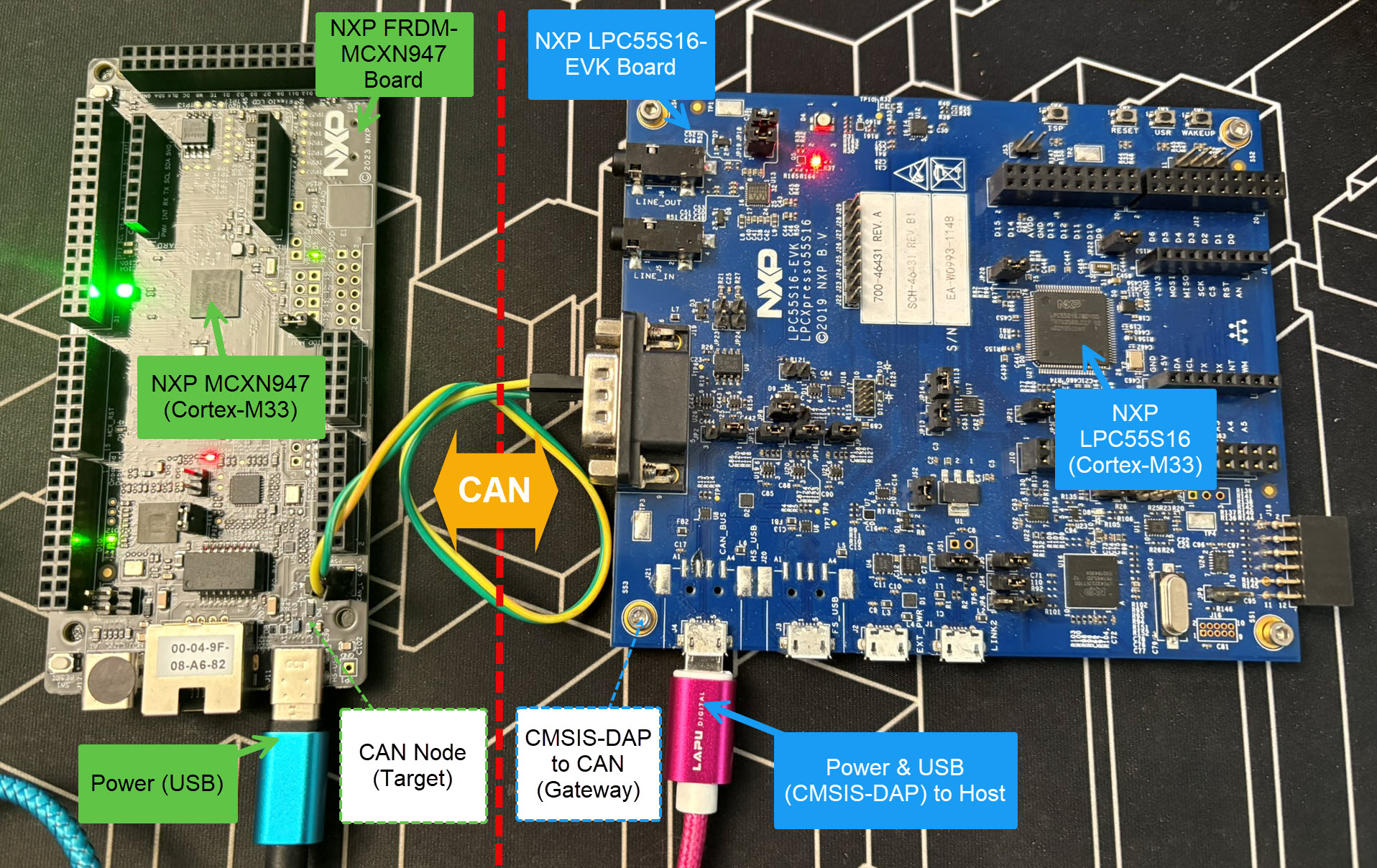
Cortex-M Hardware Debugging over CAN

Yes, we can! With the help of a rather unknown hardware feature on ARM Cortex-M devices. We can use the ARM DebugMonitor Interrupt to control and debug the target system. As we would use a JTAG/SWD connection. Instead, we use the CAN bus :-).

Continue reading

GitLab Automated CI/CD Embedded Multi-Project Building using Docker

In CI/CD for Embedded with VS Code, Docker and GitHub Actions, I used GitHub to build a pipeline. This setup supports continuous integration within a CI/CD environment.

This time, let’s do a similar thing. But instead of GitHub, I use GitLab with VS Code. And I use it for a project where three different MCUs are used: the Raspberry Pi Pico-W, an Espressif ESP32 plus the NXP K22FX512 on the Sumo robot:

Raspberry Pi Pico-W, Espressif ESP32 and Robot with NXP K22FX512
Continue reading

VS Code: Importing pre-v2.13.0 MCUXpresso SDK Projects

In my previous article I showed how to import, build and debug MCUXpresso SDK projects in VS Code. In my lectures and labs we are using a robot based on the NXP Kinetis K22FX512 ARM Cortex-M4F microcontroller, and there is only the v2.13.0 SDK available.

INTRO Sumo Robot
Sumo Robot with K22FX512

The software on the robot uses the latest NXP MCUXpresso SDK v2.3.1. The he Eclipse based MCUXpresso IDE 11.8.0 works fine with all the 2.x SDKs, up to the latest 2.13.0 one.

Continue reading

Building a Triumvirate: From Eclipse CDT to CMake, CMD and Visual Studio Code

A Triumvirate is or Triarchy is built by three individuals which lead or rule something. In this article I want to rule a project with Eclipse CDT, Visual Studio Code and with building it from the command line for automated builds.

So what if I have an Eclipse project (say MCUXpresso IDE and SDK), and want to build it on a build server, and and I want to use the same time the project with Eclipse IDE and Visual Studio code?

Key to this is CMake: I’m keeping the Eclipse CDT features, adding CMake with Make and Ninja to the fix, and have it ‘ruled’ by three different ’emperor’: Eclipse, Visual Studio Code and from a shell console:

MCUXpresso SDK CDT project with CMake for Eclipse, Visual Studio Code and Command Line Building
Continue reading

NXP MCUXpresso IDE 11.7.0

It is the exam and grading time at the university, and the same time I’m preparing the lectures and labs for the new semester starting mid of February. I’m always heading for using the latest and greatest tools in my labs. A few days ago, NXP released the new version of the MCUXpresso IDE, version 11.7.0. Time to check it out…

NXP MCUXpresso IDE 11.7.0
Continue reading

Tutorial: Creating Bare-bare Embedded Projects with CMake, with Eclipse included

MCU vendors offer SDKs and configuration tools: that’s a good thing, because that way I can get started quickly and get something up and running ideally in a few minutes. But this gets you into a dependency on tools, SDK and configuration tools too: changing later from one MCU to another can be difficult and time consuming. So why not get started with a ‘bare’ project, using general available tools, just with a basic initialization (clocking, startup code, CMSIS), even with the silicon vendor provided IDE and basic support files?

In this case, I show how you easily can do this with CMake, make and Eclipse, without the (direct) need of an SDK.

NXP LPC55S69-EVK with LoRa Shield
Continue reading

Silicon Shortage and Semihosting with NXP MCUXpresso SDK on FRDM-KE02Z

The silicon shortage is still going on. While the NXP Kinetis KE devices might not be my first choice, they still seem to be available, in at least in lower quantities. This has been recognized by others, as I’m getting more and more questions and requests for the KE and KV family. This is why I un-dusted my old FRDM-KE02Z to be used with the latest MCUXpresso SDK and IDE.

FRDM-KE02Z Board

And in case you want to use that board or device with semihosting, I have you covered.

Continue reading

DIY Split-Flap Display

Split-flap displays are electromechanical display devices, which were common in airports or railway stations a few years ago.Unfortunately, most of them are gone and replaced by LED displays. Why not create a DIY version of it?

2×10 Split-Flap Display
Continue reading

LoRaWAN with NXP LPC55S16 and ARM Cortex-M33

LoRaWAN is getting more an more popular, both for terrestrial and increasingly with low-orbit satellite systems. The ‘Long Range’ in ‘LoRa’ makes it an ideal solution for low-power and low data rate applications. For a university research project we selected the Semtech SX1261/62 transceiver together with the NXP LPC55S16 mikrocontroller. Because the board used for that project is not available for the public (yet), I share here how you can run the LoRaWAN stack with the NXP LPC55S16-EVK.

LoRaWAN with Semtech SX126x and NXP LPC55S16
Continue reading

McuOnEclipse Components: 26-Dec-2021 Release

I’m pleased to announce a new release of the McuOnEclipse components, available on SourceForge. This release includes several bug fixes, support for more devices, and updated components like FreeRTOS, MinINI, Percepio Tracealyzer and SEGGER SystemView.

SourceForge

SourceForge

Continue reading