My First DIY Smoked Beef Brisket: Day 1 – Preparation

Ahhhh, I truly love the Texas BBQ (see “BBQ Smoker Monitoring Robot“)! And what I love the most is Beef Brisket. Unfortunately, I cannot travel each time to the US to get some brisket. So good or bad, I have to make the brisket myself :-). The challenge is that outside of Texas, ‘Brisket’ probably is an unknown thing, especially in my area. In the usual grocery stores and supermarket, if I ask for a brisket, they they just shake their heads and ask “brisket what?”. Of course, my local butcher (Messerli, Metzger meines Vertrauens!) in Steinen knew exactly what I need for a Brisket :-): a special cut of beef from the lower chest of beef.

On Tuesday, I sent my wife to pre-order my cut of beef, and this morning we picked it up in the butcher’s store. An excellent piece, already trimmed, 1.662 kg:

Raw Beef Brisket

Raw Beef Brisket

Continue reading

Failed to Debug with GDB: Breakpoints or Expressions on non-existing Locations

Sometimes, there are ugly bugs in tools, and without knowing about them, it is likely to spend hours and hours, and of course to be frustrated. Knowing about these issues does not remove the issue, but at least helps to cut time to deal with it. And here is one which was nagging on me for a while with the GNU GDB debugger in Eclipse…..

πŸ’‘ I have used the Q4 2014 GNU ARM Embedded (launchpad) toolsuite/gdb (4.9-2014-q4-major), and I have found that with that gdb version the issue described is fixed. If you are using Kinetis Design Studio, see “Switching ARM GNU Tool Chain and Libraries in Kinetis Design Studio” how to upgrade the tool chain.

I was happily debugging my project, making some changes, and suddenly I cannot debug it any more. What happens is that I can download the binary with GDB, but it immediately terminates and disconnects:
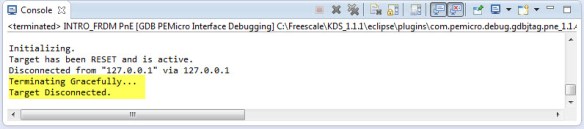
Terminating Gracefully Target Disconnected

Terminating Gracefully Target Disconnected

After digging and doing some trial and errors, I have found what is causing this.

Initializing.
Target has been RESET and is active.
Disconnected from "127.0.0.1" via 127.0.0.1
Terminating Gracefully...
Target Disconnected.

Continue reading

Putting Code of Files into Special Section with the GNU Linker

The GNU Linker (ld) is very, very powerful. This time I wanted to put all my Processor Expert generated code into its own dedicated section. This is useful for example to have a bootloader or a library inside a special area in FLASH. It was not obvious to me how to do this with the linker, with some search on the internet and some trial and errors, I finally managed that. And as always with exploring things, I have learnt something :-). So here is how I’m able to put the code of arbitrary files into its own dedicated section.

Code Section for Generated Code

Code Section for Generated Code

Continue reading

Unlocking and Erasing FLASH with Segger J-Link

When using a bootloader (see “Serial Bootloader for the Freedom Board with Processor Expert“), then I usually protect the bootloader FLASH areas, so it does not get accidentally erased by the application ;-). When programming my boards with the P&E Multilink, then the P&E firmware will automatically unlock and erase the chip. That’s not the same if working with the Segger J-Link, as it but requires extra steps.

Protected FLASH Pages with Processor Expert

Protected FLASH Pages with Processor Expert

Continue reading

Emulating Eclipse ‘Run’ with ‘Debug’ Configuration

Student: “Professor, my application does not work!”
Professor: “What is the problem?”
Student: “I don’t know, but the LED on my board is not blinking.”
Professor: “Can you step through the port initialization sequence and check if the clocks are initialized correctly?”
Student: “I have pressed the ‘Run’ button, I’m not debugging”.
Professor: “Why are you not debugging?”
Student: “I always do a ‘Run’, and I do ‘Debug’ only if needed.”
Professor: “Ahhhhhhrrrrgggg!”

Run and Debug in Eclipse

Run and Debug in Eclipse

Clearly, I’m not immune to the ‘dΓ©formation professionelle‘. I very rarely use ‘Run’, because it simply does not offer much value compared to ‘Debug’ during development. If using ‘Run’ and then there is a problem, I have to ‘Debug’ anyway, why not ‘Debug’ from the beginning? It is simply not an efficient way to work for me. Or I’m missing something?

Continue reading

BBQ Smoker Monitoring Robot

I have to admit: I’m not a vegetarian. I love BBQ, and no offense to vegetarians! Today is perfect day for another BBQ session, and this time I plan to enhance it with electronics. No, not eating electronics, but doing BBQ with a little DIY electronic helper. There are different ways to cook meat on an open fire pit, and each region of the world has its own way to do it. Traditionally, in my area we are ‘grilling’ the meat: high temperature, for a few minutes, done! I like that ‘fast food way’ too, but there is an even better version: Slow food smoking!

I’m gifted that I had the opportunity to experience the Texas BBQ culture: slowly cooking the meat, at low temperature, and ‘smoking’ it: Cooking the meat around 80Β°C prevents that it gets dry (because the water does not vaporize, see this article on Wikipedia). There are different ways how to do this, but I love the way how it is done at the Salt Lick in Austin/TX with an open fire pit:

BBQ Pit in Austin Texas

BBQ Pit in Austin Texas

Continue reading

Executing Multiple Commands as Post-Build Steps in Eclipse

The GNU ARM Eclipse plugins from Liviu already offer several built-in actions which can be performed at the end of a build: creating flash image, create listing file and printing the code and data size:

GNU ARM Eclipse Extra Post Build Steps

GNU ARM Eclipse Extra Post Build Steps

But what if I need different things, or even more things?

Continue reading

How to Add Existing Files to Eclipse Projects

This Tip sounds very basic, but still: I get asked about this about once a week. So it must be something non-obvious in Eclipse then ;-): how to add existing files to an Eclipse project. As with many things in Eclipse, there is not a single way to do something. There are two basic ways to do this:

  1. Import
  2. Drag & Drop
  3. Copy & Paste

The first is the ‘official’ way in Eclipse, the other two are much faster and easier :-).

1. Import

To import one or multiple files, select the folder/project where I want to add the files, then use the menu File > Import:

Menu File Import

Menu File Import

Continue reading

Building Projects with Eclipse from the Command Line

Eclipse has a great user interface (UI). But what if I want to do things from the command line, without the GUI? For example to build one or more projects in the workspace without using the Eclipse UI? With this, I can do automated check-outs and do automated builds.

Performed a command line project build with Eclipse

Performed a command line project build with Eclipse

Continue reading

Semihosting with GNU ARM Embedded (LaunchPad) and GNU ARM Eclipse Debug Plugins

In “Semihosting with Kinetis Design Studio” I used printf() to exchange text and data between the target board and the host using the debug connection. Kinetis Design Studio (KDS) has that semihosting baked into its libraries. What about if using the GNU ARM Embedded (launchpad) tools and libraries (see “Switching ARM GNU Tool Chain and Libraries in Kinetis Design Studio“)? Actually it requires two more steps, but is very easy too.

Semihosting Output

Semihosting Output

Continue reading