Debugging Failure: Check List and Hints

I think the biggest frustration point for any new or even seasoned engineer is the debugging phase: my application finally builds fine, but I’m not able to connect and download it to the target board :-(. In my view the debugging part is the most fragile part of the development process. I’m always very relieved if I can connect to a brand new board, because I know if it does not work, then the problem could be a very bad one, costing my several hours or even days to overcome it.

Remote Communication Error

Remote Communication Error, what now?

Continue reading →

RAM Target with Kinetis Design Studio and FRDM-K64F

Newer microcontroller have increase RAM areas, making it suitable to run the application from RAM instead of FLASH. For the FRDM-K64F board and the Kinetis Design Studio (V1.1.1), I have explored how to run the application out of RAM instead of FLASH memory, both for P&E and Segger connections.

MK64FN1M0VLL12

MK64FN1M0VLL12

Continue reading →

Processor Expert Value Proposals

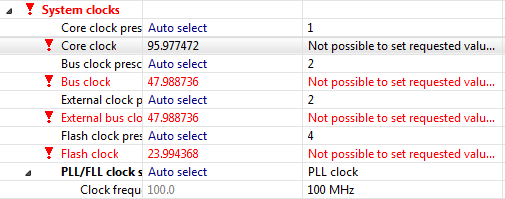
The cool thing with Processor Expert is that it gives me guidance through the settings. And there is a nice (rather hidden feature) which proposes me values I can enter:

šŸ’” First, switch to the non-Tabs (classic) view, as the classic view is using the screen real estate better, and shows you *all* the information needed, and does not hide some.

So if you have some values to correct because other settings have changed:

Values to Enter

Values to Enter

Continue reading →

Illustrated Step-by-Step Instructions: Updating the Freescale Freedom Board Firmware

I have received a bunch of Freescale FRDM boards to be used in an Embedded Systems programming crash course. There are multiple issues with the boards coming from the factory:

  1. They come with an old bootloader which is not compatible with Windows 8.x
  2. They have an old and outdated firmware on the board only supports a MSD bootloader

This post is a step-by-step instruction how to update Freescale FRDM boards (e.g. FRDM-KL25Z) to the latest firmware.

FRDM Board

FRDM Board

Continue reading →

1000 Days of Blogging: Numbers and Tips for You

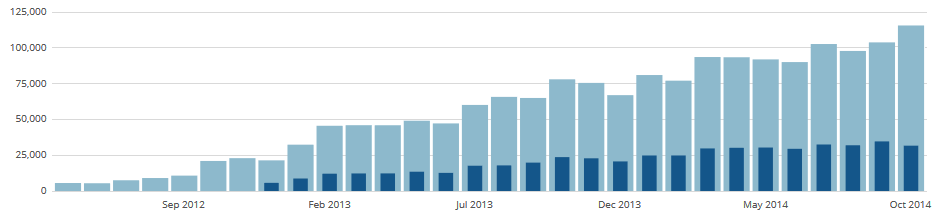
Surprise, surprise: I have completed my first 1000 days of blogging on McuOnEclipse :-). And *finally* I have completed today the Compendium. When I started the blog back at Feb 1st 2012, it was the beginning of a journey to the unknown. And yes, it is still Kevin’s fault ;-). During these days (actually: nights) of that project, I have learned a lot, so let me share some of the data.

Wordpress statistics

WordPress Statistics (dzone not included)

Continue reading →

Export and Import Processor Expert Component Settings

When I create a new Processor Expert project for a board I already have the components configured, then an easy way to transfer components from one project to another is to copy-paste the components. In the ‘source’ project I select the components I want to use, choose Copy (or CTRL+C shortcut on Windows):

Copy of Processor Expert Components

Copy of Processor Expert Components

Continue reading →

C++ with Kinetis Design Studio

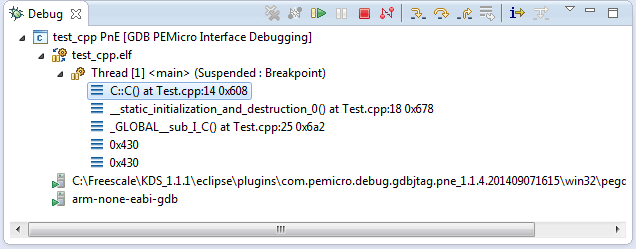
Unlike CodeWarrior, the Kinetis Design Studio (at least in V1.1.1) does not offer a choice between C and C++ projects. That makes sense with the GNU ARM Eclipse plugins, other than the CodeWarrior gcc integration, there is no need for setting up a special tool chain for C++ (see “Compiling C Files with GNU ARM G++“). While this is great, things are not perfect yet, so I’m providing in this post the information needed to properly setup a C++ project with Kinetis Design Studio V1.1.1.

Debug View of Startup Code Calling C++ Constructors

Debug View of Startup Code Calling C++ Constructors

Continue reading →

USB CDC with the FRDM-K64F, finally!

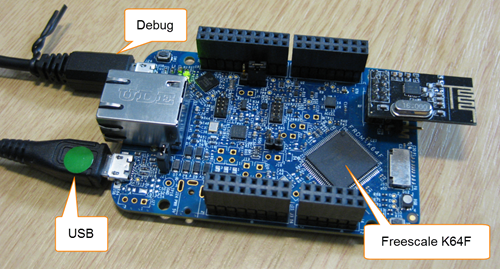
Sometimes I think that a problem should be solvable in a few minutes, and then it turns out that it lingers around for months. Very, very frustrating! Such a thing is getting the USB 4.1.1 stack running on the FRDM-K64F board. I have that board since April 2014, and it took me 7 months to get the FSL USB stack running on it :-(.

FRDM-K64F Board

FRDM-K64F Board

Continue reading →

Cheap and Simple WiFi with ESP8266 for the FRDM Board

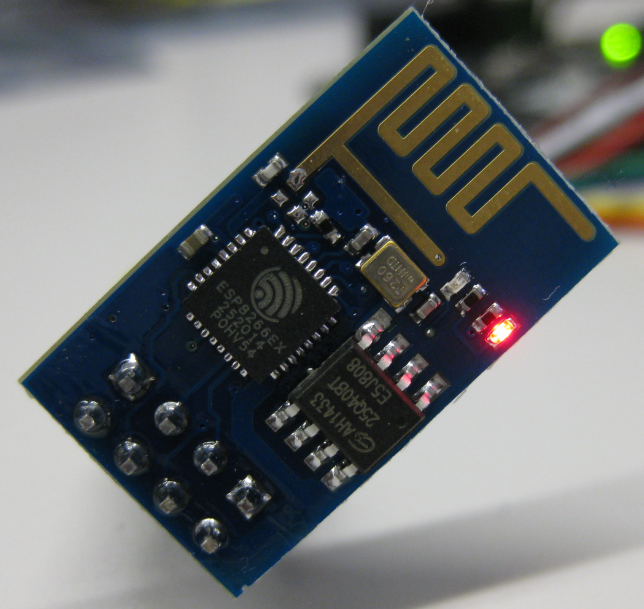
How cool would it be to add WiFi support to any projects or IoT? Why not using WiFi with a microcontroller which has only few KBytes of RAM and FLASH. For less than US$5? Dreams came true, and intrigued by an article at Hack-A-Day, I searched a supplier for that ESP8266 module. And this evening I have found the four ESP8266 modules I have ordered for $4.50 each from ElectroDragon in my mailbox. Of course I did not want to wait for the week-end, so I hooked it up to my FRDM-KL25Z board.

ESP8266 Module

ESP8266 Module for US$ 4.50

Continue reading →

How NOT to Solder Headers on a Board

There are two basic strategies in teaching:

  1. Teach and show how things should be done.
  2. Teach and show how things should NOT be done.

I usually do the first method. But there is a lot of value in the second method too!

When I asked all student groups to solder the headers on the Freescale FRDM-KL25Z board, I received one report that the board does not work any more. A quick inspection of the board showed this:

Soldering the FRDM Board Headers

How NOT to Solder the FRDM Board Headers

Continue reading →