Using Keil µVision 4 (ARM-MDK) with Processor Expert Driver Suite

❗ This article has been written for the version 4 of µVision. There is an update for version 5 of µVision here: “Using Keil μVision 5 with Processor Expert

The good thing with using ARM microcontroller is: there are plenty of tool choices. Even myself, I’m using multiple different tool chains. And while I’m heavily using Eclipse, there are non-Eclipse tool chains which have their advantages too.

The cool thing with CodeWarrior is that beside of Eclipse based, it comes with Processor Expert integrated. And I’m using Processor Expert a lot in my projects. But using Processor Expert does not mean I’m limited to CodeWarrior or Eclipse. So I can use CodeRed or IAR as tool chain with it. And this post is about using Processor Expert with the µVision tool chain from Keil/ARM.

Keil uVision Splash Screen

Keil uVision Splash Screen

Continue reading

Bricking and Recovering FRDM-KL25Z Boards: Reset, SWD Clock and Low Power

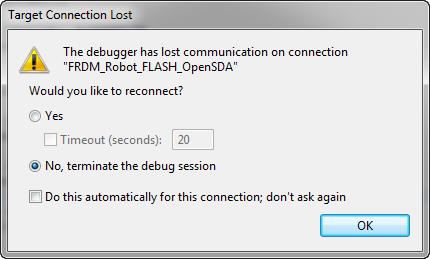
I’m working with a student on building a small autonomous robot platform, based on the FRDM-KL25Z board. We integrated new software modules, compiled and linked, and then downloaded the application to the board. While debugging and stepping through the application startup, I had this:

The Debugger has lost communication on connection

The Debugger has lost communication on connection

Outsch! That’s not good. Even worse, trying to connect again to the board failed :-(. What happened?

Continue reading

CMSIS-DAP with IAR and the KL25Z Freedom Board

Beside of USBDM, there is another Open Source implementation of a debug interface for the Freedom Board OpenSDA: CMSIS-DAP.

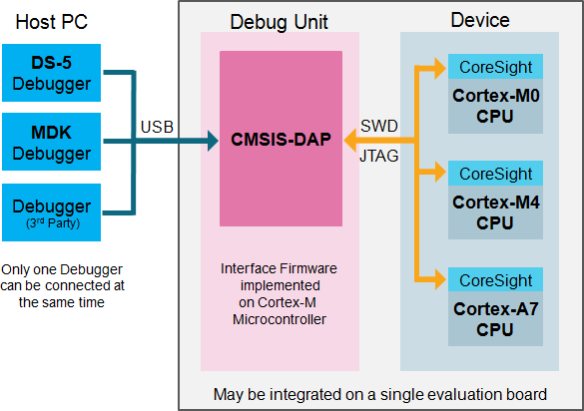
CMSIS-DAP stands for ‘Cortex Microcontroller Software Interface Standard – Debug Access Port’) has been published by ARM Inc. With this, there is an open source alternative to proprietary implementation (e.g. P&E OpenSDA or Segger OpenSDA).
Beside of the ARM MDK IDE, CMSIS-DAP is supported by Coocox and IAR. And IAR is what I’m using in this post.

Continue reading

Freedom Board with Segger OpenSDA Debug Firmware

Looks like there is some movement on the ‘OpenSDA Front’: After CodeRed has released their RedProbe OpenSDA firmware, now Segger has released an OpenSDA firmware.

With this, I get a low-cost debugging solution similar to the well-known J-Link run control devices. The OpenSDA Segger Firmware is something like a J-Link-lite.

FRDM-KL25Z with Segger OpenSDA Debug Firmware

FRDM-KL25Z with Segger OpenSDA Debug Firmware

Continue reading

USBDM 4.10.5 supports now MCU10.4

Wow, that was fast! The SourceForge USBDM project has added support for MCU10.4 (see as well this post) in release 4.10.5 available here, announced in the Freescale Forum.

USBDM 4.10.5 Installer

USBDM 4.10.5 Installer

Continue reading

Adding USBDM to CodeWarrior for MCU10.4

If you are following my recent posts, then you know I started using USBDM on OpenSDA as an alternative run control solution. Now with the advent of MCU10.4, the question is: how to use USBDM with it, because the USBDM installer obviously only knows the version up to MCU10.3?

USBDM 4.10.4a Installer

USBDM 4.10.4a Installer

Continue reading

Can MCU10.4 recover a bricked OpenSDA Freedom Board?

Ok, this one might not work for everyone. And maybe I’m seeing a ghost. But a nice and real one, at least for me :-). It seems that with the new CodeWarrior for MCU10.4 installation I was able to recover a bricked OpenSDA FRDM-KL25Z board 😯

Recovered OpenSDA Board

Recovered OpenSDA Board

Continue reading

Review of CodeWarrior for MCU10.4

Freescale has released this week an updated version of CodeWarrior: version 10.4. I’m usually not switching a tools version in the middle of a university semester. Unless I see a real benefit, and the risk is low. Well, I have used it now for a few days, and I have decided to move my projects from 10.3 to 10.4. Why? Read on…

CW for MCU10.4

CW for MCU10.4

Continue reading

Debugging FRDM-KL05Z with USBDM

I mentioned in “Debug External Processors with USBDM and Freedom Board” post that I had a problem to debug the FRDM-KL05Z with USBDM. Well, after a long night with some sleep, with more thinking and searching, finally I have it resolved: I can debug my FRDM-KL05Z with USBDM 🙂

FRDM-KL05Z Debugging with USBDM

FRDM-KL05Z Debugging with USBDM

Continue reading