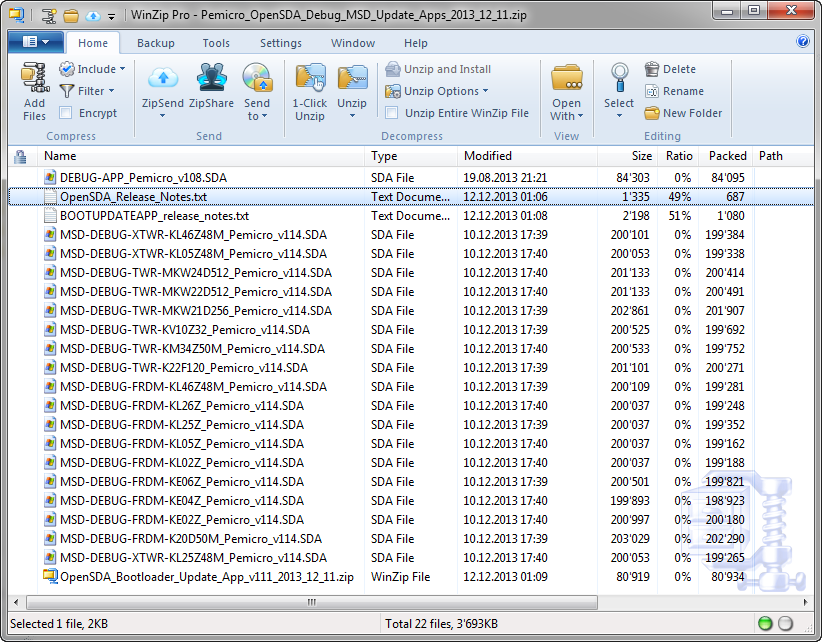
Good news for everyone having Windows 8.1: P&E has released Dec 11th 2013 a new FRDM board firmware which solves the bootloader issue found with Windows 8.1. The new firmware can download from https://www.pemicro.com/opensda/.
Tag Archives: Debugging
Review: ThunderBench with the Freescale FRDM Board and Processor Expert
For the Eclipse and Processor Expert lovers of this world: there is another Eclipse based IDE you can use: ThunderBench made by Emprog:
They support a range of ARM based devices, including the Freescale ones I’m using. So I downloaded the v3.24 30 day trial from their download page last week. Finally I have found some time to try it out. Could this be an alternative to use my Freescale FRDM boards with Processor Expert?
Eclipse Command Line Code Generation with Processor Expert
Eclipse based IDE’s have typically one limitation: the IDE has not much scripting capabilities. Yes, I can use things like JUnit for testing, but if it comes to build and debug C/C++ applications, then support gets really rare. An exception to this is CodeWarrior for MCU which features a command line version of the IDE which can be used for test automation as I used it in one of my tutorials. What I missed so far is to have a command line interface for Processor Expert to generate code. This is now possible with CodeWarrior for MCU10.5 :-).
Using the FRDM-KL25Z with CMSIS-DAP to program non-Freescale ARM Microcontrollers
Freescale might not have thought about this: how to use Freescale boards and silicon to develop for non-Freescale silicon? 😉
I tinkered around using the FRDM (e.g. FRDM-KL25Z) board as a general purpose programming or debugging device. See the links to the posts at the end of this article. I have used it to program and debug other Freescale ARM processors. It requires board changes and the usage of a different OpenSDA firmware which has its own limitations (no USB CDC serial bridge). But for about $15-20 I have a device to program my own external boards :-).
If you are using Keil tools, then the good news is: With CMSIS-DAP you can debug any other (even non-Freescale) ARM device as long it is supported by the IDE :mgreen:
FRDM-KL25Z debugging the nRF51422-DK (Source: Keith Wakeham)
Changing Initialization Sequence in Processor Expert
Now I have implemented a watchdog with Processor Expert for my system. But what I have found out? I ended up with a looping system, and the watchdog did not fire 😦
What went wrong?
The Freescale OpenSDA Trap: “No Device Available”, or something like that….
Self-Motivation: I write this post in the hope to cut the number of ‘please help me’ emails in my inbox ;-):
If you want to debug one of the Freescale boards with OpenSDA (FRDM-KL25Z, FRDM-K20, FRDM-KL05Z, FRDM-KL46Z48M, FRDM-KL02Z, TWR-KL47Z48M, …), and if you get this dialog …
… then read on.
Tutorial: FreeMASTER Visualization and Run-Time Debugging
“A picture says more than 1000 words.”
I don’t know the source of that quote, but for sure it is true for every developer and engineer too. Engineers need to work a lot with numbers. But numbers can be transformed into pictures and graphs which can make complex things and relationships easier to understand. Verifying proper functionality of a PID closed loop controller or watching sensor values with a nice plot is definitely something very useful. Would it not be great to watch sensor data changing over time in a chart like the one below?
One way is to export data and then show it e.g. in Excel (which has been great chart functions). But even better, if this could be done directly with data provided from the target board? If you think this is hard to do, then I can show you how this can be done in a few steps with the help of a very nice tool: FreeMASTER 🙂
DIY Free Toolchain for Kinetis: Part 6 – Linux Host with OpenOCD and CMSIS-DAP
For everyone who wants to build a Do-It-Yourself toolchain for Kinetis on Linux, I recommend to read the following excellent post by Karibe:
Setting up Linux opensource build and debug tools for freescale freedom board FRDM-KL25Z
He describes how to get OpenOCD with CMSIS-DAP working with Eclipse on Ubuntu to debug the FRDM-KL25Z board.
List of Tutorials
- Part 1: Setting up ARM GNU tool chain
- Part 2: Setting up Eclipse IDE
- Part 3: Setting up the debugger (P&E and Segger)
- Part 4: Setting up Processor Expert
- Part 5: Setting up FreeRTOS Kernel Awareness
- Part 6: Linux Host Support with OpenOCD and CMSIS-DAP
- Part 7: GNU ARM Eclipse Plugins
- Part 8: Processor Expert with GNU ARM Eclipse Plugins
- Part 9: DIY Free Toolchain for Kinetis: Part 9 – Express Setup in 8 Steps
- Part 10 – Project Creation with GNU ARM Eclipse 2.1.1
Happy Linuxing 🙂
DIY Free Toolchain for Kinetis: Part 5 – FreeRTOS Eclipse Kernel Awareness with GDB
So far I have covered in this tutorial series how to install ARM GNU gcc, adding Eclipse, followed by adding GNU GDB debugger, and then adding Processor Expert. I’m using FreeRTOS a lot in my projects, and luckily there is a Kernel Awareness Plugin available for FreeRTOS for GDB in Eclipse. This tutorial is about how to install and use it.
DIY Free Toolchain for Kinetis: Part 3 – Debugger (GDB Server with P&E and Segger)
This is the third part of a tutorial series how to ‘do-it-yourself’ a tool chain for the Freescale Kinetis microcontroller, with the FRDM-KL25Z as example. The tool chain is using GNU ARM gcc plus Eclipse Kepler release. So far I have the following parts:
List of Tutorials
- Part 1: Setting up ARM GNU tool chain
- Part 2: Setting up Eclipse IDE
- Part 3: Setting up the debugger (P&E and Segger)
- Part 4: Setting up Processor Expert
- Part 5: Setting up FreeRTOS Kernel Awareness
- Part 6: Linux Host Support with OpenOCD and CMSIS-DAP
- Part 7: GNU ARM Eclipse Plugins
- Part 8: Processor Expert with GNU ARM Eclipse Plugins
- Part 9: DIY Free Toolchain for Kinetis: Part 9 – Express Setup in 8 Steps
- Part 10 – Project Creation with GNU ARM Eclipse 2.1.1
So far things are very generic. But with debugging it means different hardware, and different hardware connections. And for this connection we need a GDB Server.
GDB Server
Eclipse CDT features a GNU Debugger (GDB), and this is what I want to use here: debugging my microcontroller with GDB inside Eclipse. In order to debug the microcontroller, I need two other things: a GDB Server and a Debug Probe.