To write a program using KDS with Kinetis SDK!!

Starting from the baby steps for our project seems like a good idea but not very helpful though. Learning and understanding Kinetis SDK seems like a lot of work. Meanwhile, I would like to share an important piece of information that I found on my path of working on this project. Many of you might already know, but being a first time user of Kinetis SDK 1.2.0, I found that there are few differences between Kinetis SDK 1.1.0 and Kinetis SDK 1.2.0. I was trying my hands on to use the KDS with KSDK.

So, In order to create a KDS project with Kinetis SDK, I need to create new folders, add different files and the libraries to my project. I didn’t look into all this with much detail before. I would recommend all to go through this link in order to understand using KDS with Kinetis SDK1.1.0 and Kinetis SDK 1.2.0.

This is how it looks after you have added everything:
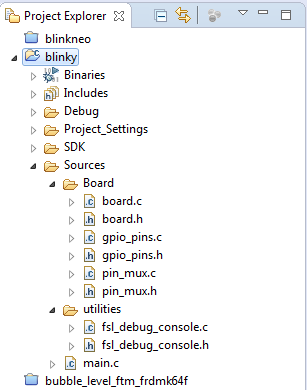
Project Explorer view

Project Explorer view

  Continue reading →

FRDM K64F Data Logger using FatFs with KSDK 1.2.0

Check out the article by Wesley Hunter about how to use the FRDM-K64F as a data logger. He describes all the steps how to use the Kinetis SDK v1.2.0 with FatFS.

Happy Logging 🙂

Centaurian's avatarCentaurian

This blog is a guide on how to setup using the FatFs library included with the Kinetis SDK 1.2.0 using mostly the Processor expert within Eclipse Luna. FatFs is a generic FAT file system module for small embedded systems written by Chan. I prefer to use Processor Expert when possible as this will often generate code that is smaller in size than using the KSDK library files direct. I experienced many gotcha’s and complication setting this up and wanted to share how I finally managed to get it to work.

  1. Prerequisites
  2. Create New Project
  3. Open Processor Expert
  4. Add SD card component
  5. Add Init_Port component
  6. Add GPIO component
  7. Configure the clock
  8. Import FatFs
  9. Add Card detection code
  10. FAT file appender function
  11. Disable the MPU

Prerequisites

Before you begin please make sure your development environment is setup and you can already compile and debug code using KSDK 1.2.0 on Eclipse Luna…

View original post 2,197 more words

Unboxing the Freescale FRDM-KL43Z Board

I’m preparing for the next semester at the university starting in September this year. As part of that, I’m currently evaluating the Freescale Kinetis FRDM-KL43Z board:

FRDM-KL43Z Board Unpacked

FRDM-KL43Z Board Unpacked

Continue reading →

Freescale Freedom Board Tutorials on Element14

I have found several excellent tutorials created by Bheema Rao on element14: He uses many of the McuOnEclipse components, features Kinetis Design Studio/Eclipse and shows how to use the Kinetis SDK, toggling/dimming LED’s on Freescale Freedom Boards.

element14

element14

Continue reading →

Using Kinetis Design Studio V3.0.0 with the Launchpad 4.9-2015-q2 Release

The Kinetis Design Studio v3.0.0 comes with the GNU/GCC ARM Embedded (launchpad) version 4.8-2014-q3. End of June 2015, ARM released a new version, the 4.9-2015-q1.So why not using that newer release?

Release GCC ARM Embedded 4.9 update 2

Release GCC ARM Embedded 4.9 update 2

  1. It comes with GDB version 7.8 and has the ‘return of function display’ feature.
  2. GDB has Phyton scripting support.
  3. It fixes that nasty GDB bug ‘breakpoint on removed code’ issue.

Is that already enough to make that switch?

Continue reading →

Not done yet!! :P

Hi again to all the amazing readers of this blog! Well guess what, I am still stuck with the programming code of my NeoMatrix Demo. I think it all started with a bad choice of importing the program and libraries from the mbed to KDS. 😦

You can refer to https://mbed.org/ for other programs if you guys want to try.

Well in my last blog I told you about importing the projects and then building them. Well that was what I was trying to do but it turns out that it is not a good idea. I still have a compilation error which is there probably because of a missing assembly. Debugging the code can sometimes be really frustrating for me.  😐 So, I have decided to start from the scratch and write the code in Kinetis Design studio with the help of the Kinetis SDK. There is already the gpio example for FRDM-K64F available under the driver examples folder in KSDK_1.2.0

b7f1 Continue reading →

How to use Kinetis Design Studio!!

Getting the hands on an embedded project has always been exciting for me. So, here I am again with my blog trying to provide you with an easy to use guide for the Kinetis Design Studio 3.0.0 (KDS_3.0.0). Well, as you all know I am an intern at Freescale working for the first time on KDS, I will tell you what all we can do to start working on it with a perspective of a novice. But personally I feel KDS is one of the most encouraging IDE you can work on. So how do I start with my code for our NeoMatrix board? I am currently working with one of the demo codes for the NeoMatrix:

https://mcuoneclipse.com/2015/07/10/lets-play-with-freescale-frdm-k64f/

So, my first task is to write the code in KDS for the NeoMatrix_Demo. How do I do that? After opening the KDS 3.0.0, I need to go to File and select New and then Kinetis Project. You can see that the New Kinetis Project wizard appears once you click the File>New> Kinetis Project. Type a name and click next.

b6f10 Continue reading →

Hrad Veveří Castle

I’m visiting Brno in the Czech Republic which is the second largest city of the country. A bit outside of the town there is the is the Veveří Castle. Got there in the evening, and the castle was about to be closed to the public, so I was able to take a few pictures only. The sunlight painted the castle in a nice color:

Castle Veveri Bridge

Castle Hrad Veveří

Continue reading →