Investigating ARM Cortex® M33 core – DSP Acceleration 3 (PowerQuad FFT Tutorial)

I’ve always felt that the Fourier Transform (and in particular the embedded implementation Fast Fourier Transform) is the GOAT* of the DSP algorithms. The ability to convert a time-domain signal into a frequency-domain signal is invaluable in applications as diverse as audio processing, medical electrocardiographs (ECGs) and speech recognition.

So this week I’ll show you how to use the Transform engine in the PowerQuad on LPC55S69 to calculate a 512-point FFT. All of the difficult steps are very easily managed and the PowerQuad does all of the very heavy lifting.

Data from PowerQuad – 512-point real FFT on 400 Hz input signal with 1200 Hz harmonic
Continue reading

OpenPnP Solder Paste Dispensing Video

OpenPnP (see “Building a DIY SMT Pick&Place Machine with OpenPnP and Smoothieboard (NXP LPC1769)“) is a cool open source framework to run Pick&Place machines. I have mentored and supported Tobias Mailänder who extended the PnP machine with the ability to dispense solder past on PCBs. Below a video (courtesy of Tobias Mailänder) which shows the machine in action:

It is still a prototype, but things are working very well.

Continue reading

World Stepper Clock with NXP LPC845

I really love clocks. I think this is I am living here in Switzerland. Beside of that: clock projects are just fun :-). After I have completed a single clock using stepper motors (see “DIY Stepper Motor Clock with NXP LPC845-BRK“), I wanted to build a special one which is able to show up to four different time zones: Below an example with London (UK), New York (USA), Beijing (China) and Lucerne (Switzerland):

Stepper Clock

Stepper Clock

Continue reading

Open Source LittlevGL GUI Library on Adafruit Touch LCDs with NXP LPC55S69-EVK

The NXP LPC55S69-EVK is a versatile board. In this article I show how it can be used with Adafruit TFT LCD boards, both with resistive and capacitive touch. For the software I’m using the open source LittlevGL GUI.

LPC55S69-EVK with Adafruit Touch LCD

LPC55S69-EVK with Adafruit Touch LCD

Continue reading

Open Source FTDI FT2232 JTAG and UART Adapter Board

In JTAG Debugging the ESP32 with FT2232 and OpenOCD I have used a FTDI FT2232 breakout board to JTAG debug with OpenOCD. With an adapter board on top of the TDI FT2232 the wiring is much easier and simpler to use:

JTAG Debugging the ESP32 with FT2232

JTAG Debugging the ESP32 with FT2232

Continue reading

Using SEGGER J-Link with QSPI FLASH on NXP i.MX Boards

In “Seeed Studio Arch Mix NXP i.MX RT1052 Board” and “Debug and Execute Code from FLASH on the Seeed Arch Mix NXP i.MX RT1052 Board” I have used the NXP LPC-Link2 to debug the Seeed Arch Mix board with the NXP i.MX RT1052, because the SEGGER J-Link does not work out-of-the box with the i.MX RT using QSPI Flash. This article shows how the J-Link connection can be changed from HyperFlash to work with QSPI Flash.

J-Link EDU Mini with Seeed i.MX RT1052

J-Link EDU Mini with Seeed i.MX RT1052

Continue reading

JTAG Debugging the ESP32 with FT2232 and OpenOCD

In “Eclipse JTAG Debugging the ESP32 with a SEGGER J-Link”  I used a SEGGER J-Link to debug an ESP32 device with JTAG. I looked at using one of the FTDI FT2232HL development boards which are supported by OpenOCD. The FT2232HL is dual high-speed USB to UART/FIFO device, and similar FTDI devices are used on many boards as UART to USB converters. With OpenOCD these devices can be turned into inexpensive JTAG debug probes. This article shows how to use a $10 FTDI board as JTAG interface to program and debug the Espressif ESP32.

FTDI JTAG Connection

Continue reading

Investigating ARM Cortex® M33 core with TrustZone® – transition from non-secure to secure world

You might purchase a Cortex® M33 microcontroller with TrustZone® where the supplier has installed a secure ROM. Or you might be an IOT developer using LPC55S69 in your own application where you have partitioned the code into secure and non-secure partitions. At some point with Cortex® M33 core with the TrustZone® security extension you’ll want to transition from non-secure into the secure world. Or (put more elegantly), you’ll want to call one of the secure functions supported when the Cortex® M33 core is in the Secure state.

That’s the topic for this week’s video.

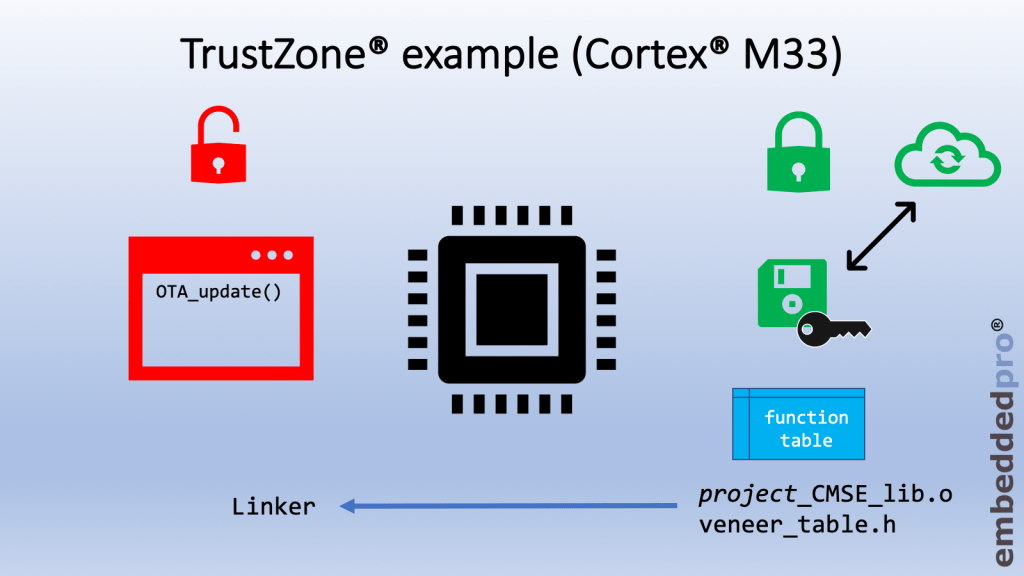
How will you know what secure functions are available? And what parameters are necessary to call these functions? You’ll be provided with a header file veneer_table.h and a secure object library named project_name_CMSE_lib.o. Together these 2 modules describe everything that you need to know to call a secure function and transition from the Non-Secure to the Secure state.

Just two objects – *.o and *.h define resources available in the Secure world
Continue reading

Investigating ARM Cortex® M33 core with TrustZone® – running TrustZone® example projects in MCUXpresso IDE

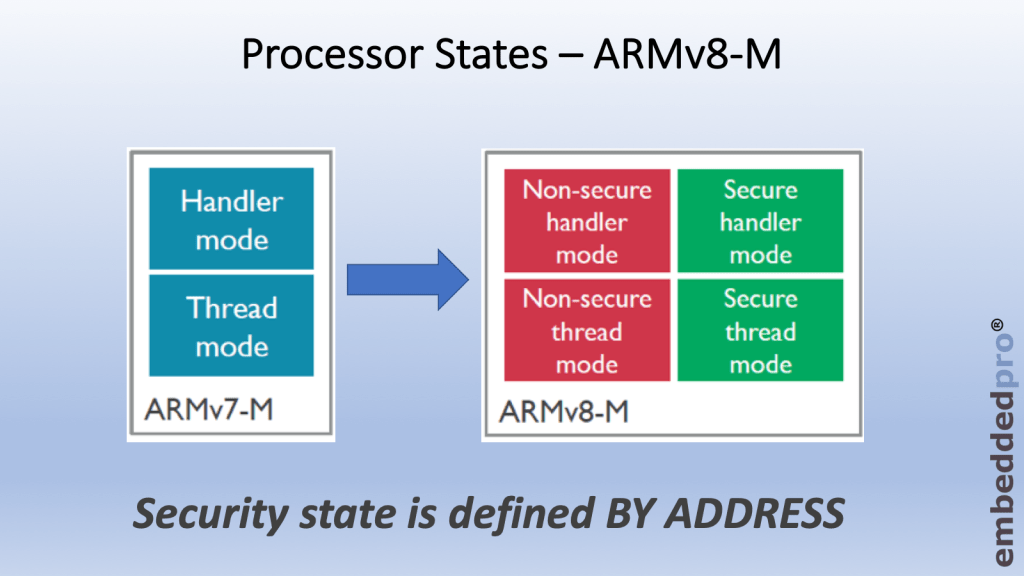
Last week I wrote about why we need the TrustZone® security extension for ARMv8-M. There are software use-cases where it can be very helpful to partition the software into 2 separate worlds, secure and non-secure. TrustZone® acts as the gatekeeper between these two worlds and manages how the core transitions between the worlds. The ARMv8-M architecture introduces two new States for the core – secure and non-secure. Cortex® M33 core (and M23 core also) is implemented to ARMv8-M standard and of course supports the two new states.

ARMv8-M architecture introduces 2 states for the core – secure and Non-secure
Continue reading

Linking Bootloader Applications with Eclipse and FreeMarker Scripts

Bootloaders are a fine thing: With this I can load any applications I like. Power comes with some complexity, and a bootloader alone is a complex thing already. But this applies to the application part too: I need to link the application to a certain offset in the memory space so it can be loaded by the bootloader, plus the application typically needs to add some extra information to be used by the bootloader. This article describes how to build a bootloader application with Eclipse (MCUXpresso IDE) using the MCUXpresso SDK.

Build Configuration for Bootloader Application

Continue reading