During Embedded World 2017 in Nürnberg I was lucky to get a handful LPC800-DIP boards. To get all students who were lucky to get one, here is a tutorial to make that very exciting ‘blinky’ application on that board:
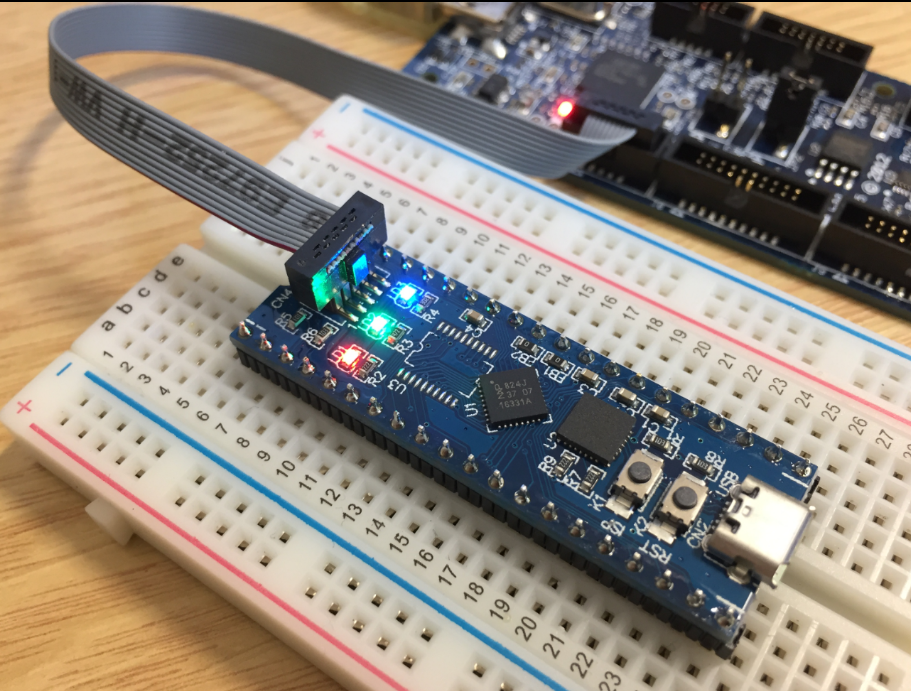
Blinky on the NXP LPC800-DIP

During Embedded World 2017 in Nürnberg I was lucky to get a handful LPC800-DIP boards. To get all students who were lucky to get one, here is a tutorial to make that very exciting ‘blinky’ application on that board:
Blinky on the NXP LPC800-DIP
Eclipse for C/C++ (CDT) offers two different ways to get out of a debug session: Terminate and Disconnect:

Terminate and Disconnect
The terminate and disconnect behaviour is not standardized, and varies between Eclipse distributions and debug connection. This article is about how things are handled in MCUXpresso IDE, and how I can influence the behaviour.
I’m pleased to announce that a new release of the McuOnEclipse components is available in SourceForge, with the following changes and updates:

SourceForge
I’m using Eclipse based IDE’s to develop and debug my embedded applications. This works great, as Eclipse has all the necessary tools to edit, build and debug it. But when it comes just to download/flash a binary to the board, then things are pretty much specific to the tools used. With the advent of the new MCUXpresso IDE, here is how that Eclipse IDE can be used for this.

LinkServer GUI Flash Programmer
The MCUXpresso IDE (see “MCUXpresso IDE: Unified Eclipse IDE for NXPs ARM Cortex-M Microcontrollers“) has one great feature: it includes debug support for the popular LPC-Link2 debug probes. That way I have yet another powerful debug probe with extra features for ARM based boards. That LPC-Link2 circuit is present on many LPCXpresso boards from NXP. So why not using it to debug it my custom hardware?

Debugging Custom Hardware with LPCXpresso Board
I believe in ‘life-long-learning’. With this I continue to learn and discover new things every day. I’m writing tutorials to give something back to the community from which I have learned so much.
On top of this, I receive emails on a nearly daily basis, asking for help. Many articles have the origin in such requests or questions. I prefer questions or comments in a public forum, because that way I feel all others can benefit from it. Last week Alessandro contacted me with this:
“Hi Erich,
I hope this find you well! I’m starting to using ARM processors, but I find them quite complicated on the configuration side. I started in the past with PIC micro (PIC16) with asm, and I found them quite straightforward to be configured (clock, IO, peripherals, …). Then I moved myself on C language, and on PIC18 without any big issues.
Now I would really like join the ARM community, I see that these processors are what I’ve always looking for, on energy, calc power, peripherals, and FINALLY on IDE (editor, toolchain and utilities)… AMAZING!!!”
The topic is about how to start learning developing for ARM. Alessandro agreed to make this public, so I thought this might be a good topic for an article?
Firmware
Looking for a small, inexpensive ($25-30) ARM development board (say 120-180 MHz ARM Cortex-M4 with FPU, 512kB-1MB of FLASH and 256 KByte of RAM? Then have a look at the Teensy 3.5 and Teensy 3.6 by PJRC/Paul Stoffregen:
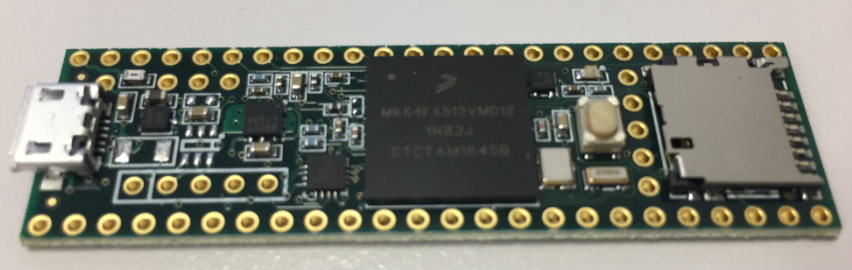
Teensy 3.5 with NXP K64F ARM Cortex-M4F
The only problem? it is not possible to debug it :-(. At least not in the traditional sense. This article is about how to change the board to use it with any normal SWD debugging tool e.g. Eclipse and the Segger J-Link :-).
In “Tutorial: Secure TLS Communication with MQTT using mbedTLS on top of lwip” I already used TLS for a secure communication, but I had not enabled server certificate verification. This article is about closing that gap.

Secure MQTT running on NXP FRDM-K64F with lwip and mbed TLS
I love to commute by train, and I use three different Swiss train companies for my daily work commute to the Lucerne University of Applied Sciences in Horw, near Lucerne. Returning this evening, I enjoyed a beautiful view to the snow-covered mountains from my home destination. I’m lucky, and this is yet another reason why I love my commute:

View from Train Station
One of the most important aspects of the ‘IoT’ world is having a secure communication. Running MQTT on lwip (see “MQTT with lwip and NXP FRDM-K64F Board“) is no exception. Despite of the popularity of MQTT and lwip, I have not been able to find an example using a secure TLS connection over raw/native lwip TCP :-(. Could it be that such an example exists, and I have not found it? Or that someone implemented it, but has not published it? Only what I have found on the internet are many others asking for the same kind of thing “running MQTT on lwip with TLS”, but there was no answer? So I have to answer my question, which seems to be a good thing anyway: I can learn new things the hard way :-).

Block diagram MQTT Application with TLS using lwip
 MCU on Eclipse