printf() and scanf() with GNU ARM Libraries

In “Semihosting with Kinetis Design Studio” I’m using the debugger with semihosting to output text with printf(). But how to use a physical serial connection instead?

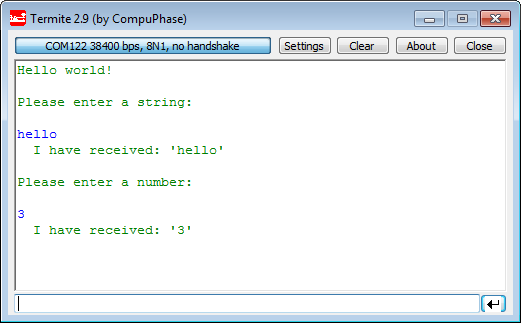
printf() and scanf() in action

printf() and scanf() in action

This post is about how to enable and use printf() and scanf() with GNU ARM libraries. I show it both for the Freescale Kinetis Design Studio (KDS) and for stock Eclipse Kepler with the GNU GCC ARM Embedded (launchpad) toolchain and libraries. The principles are the same, just the details are different ;-).

Continue reading

Step-by-Step: Updating OSBDM/OSJTAG Debug Firmware

While new Freescale boards come with the OpenSDA debug firmware, I still students using boards with the OSBDM/OSJTAG. And with new CodeWarrior tools, it might be that there is a new OSBDM/OSJTAG firmware, and when I download to a board with an older firmware, the tool will prompt me to update the firmware. To me, after doing this several times, not a big deal. But for someone who sees this the first time, it might not be that easy. So to avoid any further questions, here we go with a step-by-step tutorial how to update the OSBDM/OSJTAG firmware.

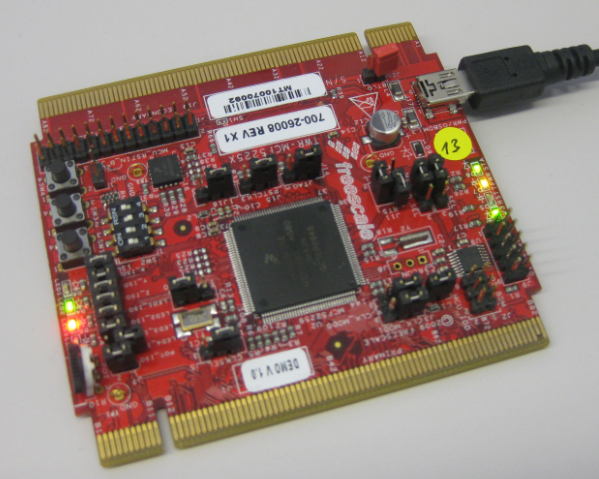
MCF52259 Tower Board with OSBDM Firmware

MCF52259 Tower Board with OSBDM Firmware

Continue reading

Replicating an Eclipse Update Site for Offline Usage

In my post “Constructing a Classroom IDE with Eclipse for ARM” I outlined how to build a DIY Eclipse distribution. That way I can build an archive/zip and distribute to my students: it saves them a lot of time, and they do not need to download things from the internet themselves, as I can give them the thing on a memory stick. But what if I want them to give them the update site files for offline usage too? For example CodeWarrior has an online update site:

Online Update Site

Online Update Site

How can I make a local copy of it to use in my classroom?

Continue reading

Slow 32 kHz Oscillator Startup

In an IoT (Internet of Things, see “IoT: FreeRTOS Down to the Micro Amps“) project I’m using the Freescale KL15Z microcontroller. The nodes are moving around, and the board is using a special inductive charging ‘on the fly’ when nearby the charging station. The energy is stored in capacitors, so no batteries are needed. That worked very well, but some system failed: they need to quickly check sensor signals after power-up. Tracking down the problem, it was obvious that most of the systems failed because it took them too long to boot from the power-on reset. So I instrumented the application to toggle an LED so I can monitor what happens: It was over 400 ms after power-on! Yikes!

413 ms for startup

413 ms for startup

Continue reading

Finding Settings in Processor Expert Components

Processor Expert components are making things very easy to configure: go a component, use the component inspector and change a setting. However, with the devices getting more and more complex, the list of settings or properties get longer and longer. To the point that it is hard to find a setting.

For example, where are the settings for the PLL in the CPU component?

Component with Settings

Component with Settings

Continue reading

FILLing unused Memory with the GNU Linker

In many of my applications I use a CRC/checksum to verify that the code/flash on the target is not modified. For this, not only the code/data in flash counts, but as well all the unused gaps in the memory map. Instead to leave it up to the flasher/debugger (which usually erases it to 0xFF), I want to fill it with my pattern. The GNU linker is using the pattern 0x00 for unused bytes inside sections. So this post is about to use the GNU linker to ‘fill’ the uninitalized FLASH memory with a pattern.

FLASH with DeadBeef Pattern

FLASH with DeadBeef Pattern

Continue reading

Preventing Reverse Engineering: Enabling Flash Security

Now I have invested a lot of time into my application, ready to be flashed on the devices and shipped. But wait: I don’t want that someone can read out the code from my device and have it reverse engineered. For this, I can ‘secure’ the device.

Flash Security Settings

Flash Security Settings

Continue reading

Tutorial: DIY Kinetis SDK Project with Eclipse – Board Configuration

In “Tutorial: DIY Kinetis SDK Project with Eclipse – Startup” I showed how to create a Kinetis SDK project from scratch. In this post it is about adding the board initialization files. With the board initialization the peripheral clocks and pin muxing is configured.

MK64FN1M0VLL12 on FRDM-K64F

MK64FN1M0VLL12 on FRDM-K64F

Continue reading

Switching between ‘tabs’ and ‘no-tabs’ UI in Processor Expert

Newer releases of Processor Expert (e.g. in Kinetis Design Studio (KDS)) come with a ‘graphical’ (or ‘tabbed’) view of the Component Inspector. The UI elements are different and ‘tabs’ are using:

Component Inspector in Tabbed View

Component Inspector in Tabbed View

I like much more the earlier ‘no-tabs’ view. Luckily, there is a setting to switch the view back.

Continue reading

Tutorial: DIY Kinetis SDK Project with Eclipse – Startup

This is the start of a multi-post tutorial about the Freescale Kinetis SDK, released back in April as beta version. The SDK a set of peripheral drivers, and will become the standard software foundation and drivers provided by Freescale for their ARM Cortex based devices. Similar what other vendors already do. While this is a good step, it is the same time very disruptive for my university projects with new Freescale Cortex-M devices. And with everything new (and beta), it needs time to learn. So this post is about creating a Do-It-Yourself Kinetis SDK project from scratch for Eclipse. This part is about the startup code: about everything to get the application started.

FRDM-K64F with SD, nRF24L01+ and HC-06 Bluetooth

FRDM-K64F with SD, nRF24L01+ and HC-06 Bluetooth

Continue reading