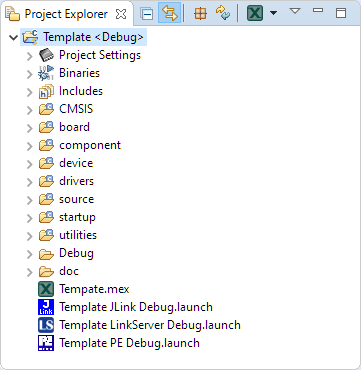
Especially in a lab or classroom environment it is convenient to start with a template project, and then explore different ways to shape the project for different needs. As for any IDE of this world, this requires an understanding of the inner workings to get it right. So in this article I show how to copy, clone or rename properly an Eclipse ‘template’ project in the MCUXpresso IDE.
Tag Archives: ARM
Visualizing Data with Eclipse, gdb and gnuplot
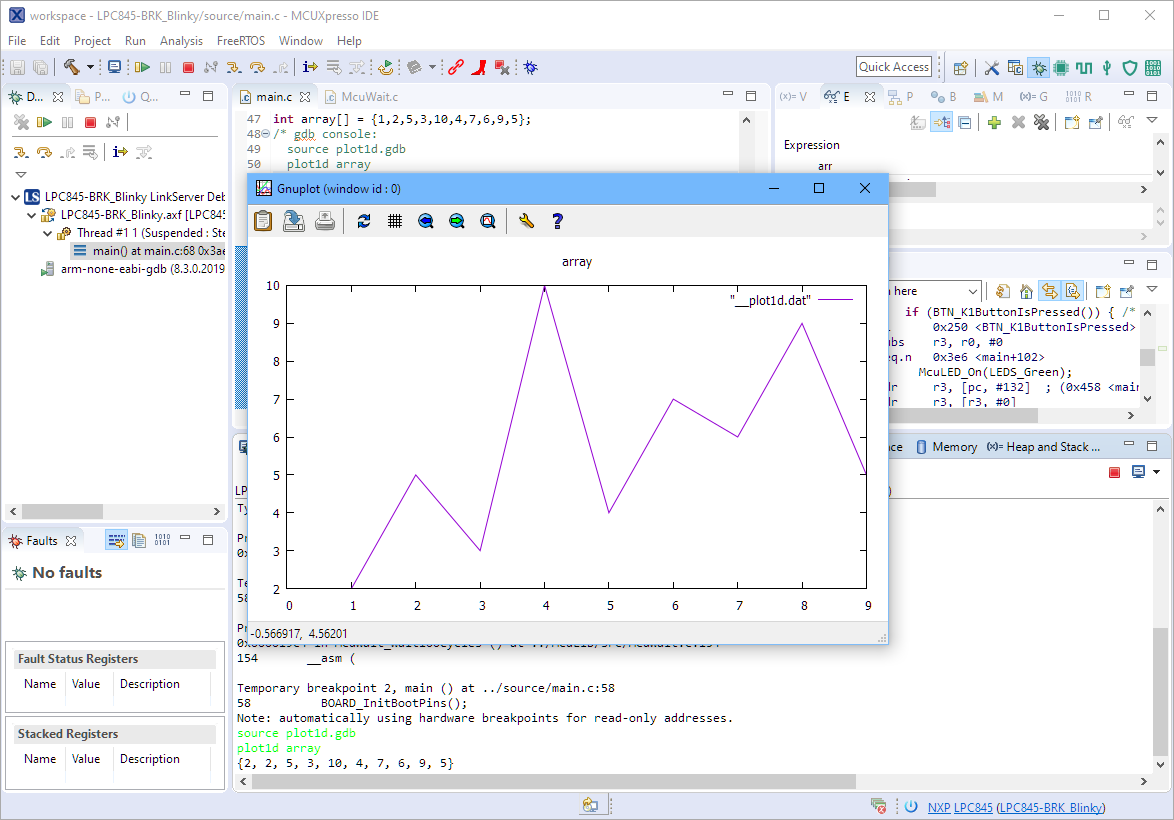
The gnuplot is a versatile and powerful tool to plot and visualize all kind of data. I wish there would be a plugin for it in Eclipse. But as this is not (yet?) the case, here is how I’m using it with gdb and Eclipse, using the MCUXpresso IDE as example.
MCUXpresso IDE V11.1.0
Right before Christmas 2019, NXP has released a new version of the MCUXpresso IDE, the version 11.1.0. This gave me time to explore it over the Christmas/New-Year break and evaluate it for the next university semester. There are several new features which will make my labs using it easier, so I plan to get the course material updated for it.
After the break you will find the highlights …
Implementing FreeRTOS Performance Counters on ARM Cortex-M
When using an RTOS like FreeRTOS, sooner or later you have to ask the question: how much time is spent in each task? The Eclipse based MCUXpresso IDE has a nice view showing exactly this kind of information:
For FreeRTOS (or that Task List view) to show that very useful information, the developer has to provide a helping hand so the RTOS can collect this information. This article shows how this can be done on an ARM Cortex-M.
DIY ‘Meta Clock’ with 24 Analog Clocks
Human since 1982 claims
“Human since 1982 have the copyright to works displaying digital time using a grid arrangement of analog clocks…”
I’m not a lawyer, but without obligations (imho) I have removed the content.
You can read more of the details here: Copyright Law for Makers and Educators
Thanks for understanding,
Erich
OpenPnP Solder Paste Dispensing Video
OpenPnP (see “Building a DIY SMT Pick&Place Machine with OpenPnP and Smoothieboard (NXP LPC1769)“) is a cool open source framework to run Pick&Place machines. I have mentored and supported Tobias Mailänder who extended the PnP machine with the ability to dispense solder past on PCBs. Below a video (courtesy of Tobias Mailänder) which shows the machine in action:
It is still a prototype, but things are working very well.
Linking Bootloader Applications with Eclipse and FreeMarker Scripts
Bootloaders are a fine thing: With this I can load any applications I like. Power comes with some complexity, and a bootloader alone is a complex thing already. But this applies to the application part too: I need to link the application to a certain offset in the memory space so it can be loaded by the bootloader, plus the application typically needs to add some extra information to be used by the bootloader. This article describes how to build a bootloader application with Eclipse (MCUXpresso IDE) using the MCUXpresso SDK.
Stack Canaries with GCC: Checking for Stack Overflow at Runtime
Stack overflows are probably the number 1 enemy of embedded applications: a call to a a printf() monster likely will use too much stack space, resulting in overwritten memory and crashing applications. But stack memory is limited and expensive on these devices, so you don’t want to spend too much space for it. But for sure not to little too. Or bad things will happen.
The Eclipse based MCUXpresso IDE has a ‘Heap and Stack Usage’ view which can be used to monitor the stack usage and shows that a stack overflow happened:
But this is using the help of the debugger: how to catch stack overflows at runtime without the need of a debugger? There is an option in the GNU gcc compiler to help with this kind of situation, even if it was not originally intended for something different. Continue reading
Eclipse JTAG Debugging the ESP32 with a SEGGER J-Link
When Espressif released in 2014 their first WiFi ESP8266 transceiver, they took over at least the hobby market with their inexpensive wireless devices. Yet again, the successor ESP32 device is used in many projects. Rightfully there are many other industrial Wi-Fi solutions, but Espressif opened up the door for Wi-Fi in many low cost projects. Many projects use the ESP devices in an Arduino environment which basically means decent debugging except using printf() style which is … hmmm … better than nothing.
What is maybe not known to many ESP32 users: there *is* actually a way to use JTAG with the ESP32 devices :-). It requires some extra tools and setup, but with I have a decent Eclipse based way to debug the code. And this is what this article is about: how to use a SEGGER J-Link with Eclipse and OpenOCD for JTAG debugging the ESP32.
Programming the ESP32 with an ARM Cortex-M USB CDC Gateway
The Espressif ESP32 devices are getting everywhere: they are inexpensive, readily available and Espressif IDF environment and build system actually is pretty good and working well for me including Eclipse (see “Building and Flashing ESP32 Applications with Eclipse“). The default way to program an ESP32 is to a) enter UART bootloader by pressing some push buttons and b) flash the application with ESP-IDF using a USB cable.
That works fine if the ESP32 is directly connected to the host PC. But in my case it is is behind an NXP Kinetis K22FX512 ARM Cortex-M4F microcontroller and not directly accessible by the host PC. So I had to find a way how to allow boot loading the ESP32 through the ARM Cortex-M which is the topic of this article.