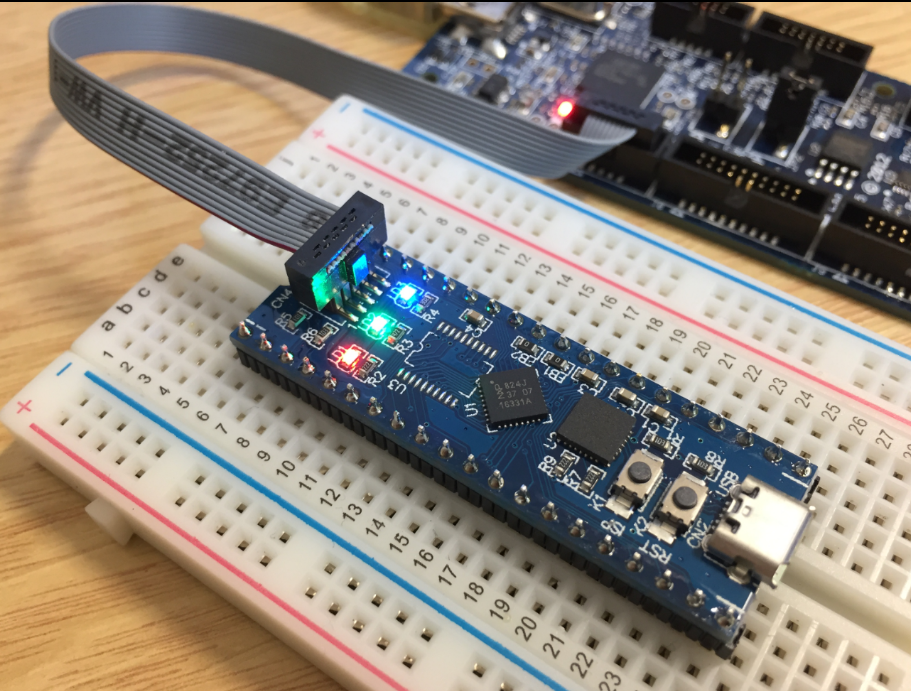
During Embedded World 2017 in Nürnberg I was lucky to get a handful LPC800-DIP boards. To get all students who were lucky to get one, here is a tutorial to make that very exciting ‘blinky’ application on that board:
Category Archives: Tutorial
Using the LPCXpresso V2/V3 Boards to Debug an external Board
The MCUXpresso IDE (see “MCUXpresso IDE: Unified Eclipse IDE for NXPs ARM Cortex-M Microcontrollers“) has one great feature: it includes debug support for the popular LPC-Link2 debug probes. That way I have yet another powerful debug probe with extra features for ARM based boards. That LPC-Link2 circuit is present on many LPCXpresso boards from NXP. So why not using it to debug it my custom hardware?
Tuturial: mbedTLS SSL Certificate Verification with Mosquitto, lwip and MQTT
In “Tutorial: Secure TLS Communication with MQTT using mbedTLS on top of lwip” I already used TLS for a secure communication, but I had not enabled server certificate verification. This article is about closing that gap.
Tutorial: Secure TLS Communication with MQTT using mbedTLS on top of lwip
One of the most important aspects of the ‘IoT’ world is having a secure communication. Running MQTT on lwip (see “MQTT with lwip and NXP FRDM-K64F Board“) is no exception. Despite of the popularity of MQTT and lwip, I have not been able to find an example using a secure TLS connection over raw/native lwip TCP :-(. Could it be that such an example exists, and I have not found it? Or that someone implemented it, but has not published it? Only what I have found on the internet are many others asking for the same kind of thing “running MQTT on lwip with TLS”, but there was no answer? So I have to answer my question, which seems to be a good thing anyway: I can learn new things the hard way :-).
Enable Secure Communication with TLS and the Mosquitto Broker
MQTT is a lightweight and broadly used internet protocol (see “MQTT with lwip and NXP FRDM-K64F Board“). And probably the majority of IoT applications today are using Mosquitto as server (or ‘broker’ in MQTT language). By default, Mosquitto is using a protocol without encryption. In “Introduction to Security and TLS (Transport Layer Security)” I have covered the basics and needs for encryption. This article is about how to enable Mosquitto and clients to use the TLS protocol.
Introduction to Security and TLS (Transport Layer Security)
IoT (Internet of Things) is all about connecting to the internet. And even more it is about security. Without security and without encrypted communication, everyone possibly can see what I send or receive. And this is especially bad if passwords or user names are sent in an unencrypted way. So encryption and secure communication is key. The solution to that is to use a connection which uses the TLS (Transport Layer Security) protocol.
I want to use TLS for my MQTT communication (see “MQTT with lwip and NXP FRDM-K64F Board“). I’m still learning MQTT, and I’m even more learning about the fundamentals of security and security protocols. So this article is about what I have learned recently, and what I can use to make my data communication secure: Network stack architecture, symmetric and asymmetric encryption and certificates.
MQTT with lwip and NXP FRDM-K64F Board
In the area of IoT (Internet of Things), one obvious need is to have a way to send and receive data with an internet protocol. MQTT (or Message Queue Telemetry Transport) is exactly like that: a light-weight Machine-to-Machine communication protocol. With the MQTT protocol a microcontroller (or ‘client’) can send data and/or subscribe to data. For example to the Adafruit.IO:
MCUXpresso IDE: Installing Processor Expert into Eclipse Neon
In “MCUXpresso IDE: Importing Kinetis Design Studio Projects” I explained how Kinetis Design Studio projects can be imported and used inside the MCUXpresso IDE. Processor Expert projects can be used, but no new components added, modified or new Processor Expert projects created. To fully use Processor Expert, two plugins need to installed, and this is what this article is about.
Tutorial: Using Eclipse with NXP MCUXpresso SDK v2 and Processor Expert
To me, software and tools are by far more important than the microcontroller. Because the silicon is a ‘one time kind of thing’, where the software has to be maintained and working over a longer time. And at least my software usually needs to be ported to a new device, so portability and available software and tools are critical to me.
The combination of MCUXpresso SDK (formerly Kinetis SDK) and Processor Expert is unfortunately not supported by NXP. But I have found a way to get them work together in a nice way, and this article is about making that combination possible :-).
Zephyr: Thoughts and First Steps on the ARM Cortex-M4F with gcc, gdb and Eclipse
The concept of Linux (Open Source, broad developer base and broad usage) is a success story. While there is a lot of diversity (and freedom) in the Linux world, Linux is Linux and again Linux :-). And the world has (mostly) standardized on Linux and its variants on the high embedded system side.
On the other side, the ‘middle and lower end’ Embedded world is fragmented and in many aspects proprietary. So it was no surprise to me when the Linux Foundation announced the ‘Zephyr’ project back in February 2016:
“The Linux Foundation Announces Project to Build Real-Time Operating System for Internet of Things Devices. Open source Zephyr™ Project aims to deliver an RTOS; opens call for developers to help advance project for the smallest footprint IoT devices.“
Ζεφυρος (Zephyros) is the Greek good of spring and the west wind. Obviously this inspired the logo for the Zephyr project: