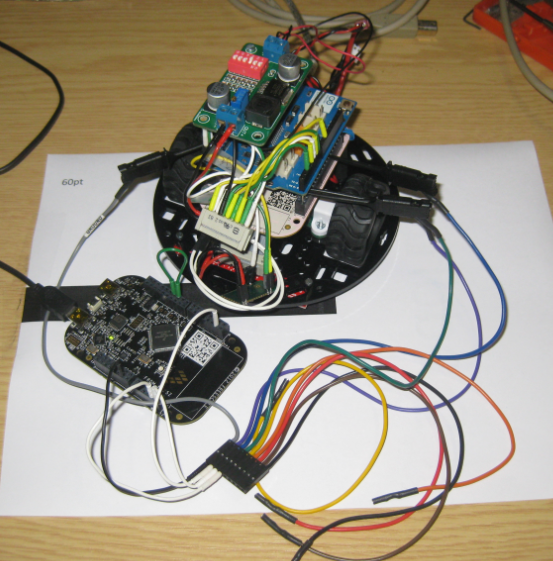
I love the Freescale Freedom boards because they are low-cost, and I do not need a special debug device, as they have the on-board OpenSDA. It is using a small Kinetis-K20 which acts as JTAG SWD debugging probe. Why not using the Freedom board to program another board?
Category Archives: Kinetis
Red Suite 5: Eclipse Juno, Processor Expert and unlimited FRDM-KL25Z
❗ UPDATE: Code Red Technologies have been acquired May 1st 2013 by NXP, see this press release. According to this, they will not continue to support non-NXP architectures after May 2014. 😦
You probably know this already: I’m a fan of Eclipse, Processor Expert and the Freedom board. As for tool chains I use CodeWarrior for MCU10.x (Eclipse based, 64 KByte free limit) and IAR (32 KByte limit) with the Processor Expert Driver Suite.
And I have added a new Eclipse based solution: Red Suite 5 from Code Red Technologies. They released a new Red Suite 5 (v5.2.2 build 2108) which caught my attention when reading the release notes:
- Eclipse Juno SR2: New Eclipse Look & Feel 🙂
- Added integration for Processor Expert 🙂 🙂
- Non-expiring 128k (!!!) limit when used with the Freescale FRDM boards 🙂 🙂 🙂
printf() with the FRDM-KL25Z Board and without Processor Expert
In this tutorial I explored how to use printf(), and this tutorial is so generic that it works for any processor/microcontroller. That flexibility is because I’m using Processor Expert. In case Processor Expert shall not be used, then some tweaks are needed. Here I show what is needed to have printf() working with the FRDM-KL25Z board. I use the UART0 connected to OpenSDA USB CDC for this.
A new Freedom Board: FRDM-K20D50M with ARM Cortex M4
Freescale/Farnell/Element14 announced last week a new Freedom Board: the FRDM-K20D50M :-). As you can expect, I was not able to resist, and ordered one from my local Farnell store right away. So I did my first steps with it on this sunny and wonderful weekend (yes! we skipped Spring Time and entered Summer Time right away!).
I do not need to compare the board with the previous Freedom boards, as I have found an article here. I a nutshell: I get pretty much the same as with the FRDM-KL25Z, but instead of an ARM Cortex-M0+, it has an ARM Cortex-M4!
text, data and bss: Code and Data Size Explained
In “Code Size Information with gcc for ARM/Kinetis” I use an option in the ARM gcc tool chain for Eclipse to show me the code size:
text data bss dec hex filename 0x1408 0x18 0x81c 7228 1c3c size.elf
I have been asked by a reader of this blog what these item numbers really mean. Especially: what the heck is ‘bss’???? 🙂
Extended Driver for the MMA8451Q Accelerometer
In “Tutorial: Accelerating the KL25Z Freedom Board” I used the MMA8451Q accelerometer on the FRDM-KL25Z board in a very primitive way: I’m reading directly some low-level registers from the device through an I2C low-level component. No calibrating, no special device feature setting, only raw values. Since then, things have been evolved: In “Tutorial: Creating a Processor Expert Component for an Accelerometer” I started to create a driver for this accelerometer, and since then a lot more functionality has been added.
Tutorial: Creating a Processor Expert Component for an Accelerometer
If you are a frequent reader of this blog, then you know: I’m a big fan of Processor Expert components. While there are many Processor Expert components delivered with CodeWarrior, it lacks many components and device drivers beside of the normal on-chip peripherals. But value gets added to an embedded project with all the external devices, sensors and actuators. That’s why I have created many more components which are available on my GitHub site. Readers of this blog have asked several times to create a tutorial on how to create a Processor Expert component. So why not working on that on a long Easter weekend full of cold rain and snow?
So here we go: a tutorial how to create a Processor Expert component for the MMA8451Q accelerometer found on the FRDM-KL25Z board:
Maze solving FRDM-KL25Z Robot goes backward for Dead-Ends
The maze solving robot based on the Freedom FRDM-KL25Z and Pololu Zumo shield has new features:
- For dead-end paths, instead turning around, the robot is driving backward
- Higher speed for going forward/backward/turns
- In the finish area, the robot turns around
- It reverts the solution path, so the robot can directly run from the finish area to the start
Freedom Logic Analyzer with DMA
The FRDM-KL25Z Open Source Logic Analyzer based on SUMP presented here was already very useful with the added trigger support. But it was not capable to do a sampling rate above a few hundred kHz. That’s ok for slower probing, but not for anything with a higher speed. Using DMA (Direct Memory Access) instead of timer based sampling can remove that limitation :-).
Compiling C Files with GNU ARM G++
If I want a C++ project for my KL25Z Freedom board, I select C++ during the project creation:
This creates a gcc C++ project with all the needed settings.
This worked fine until I added a *.c file to my project which had code in it which was not accepted by the C++ compiler. Wait! Should the *.c not be compiled in C mode, as I was used to with other compilers? It turned out that things are different with gcc (or g++) :-(: the *.c files in my project are compiled in C++ mode. So the question is: how to compile in C mode with the ARM g++ compiler?