XFormat, a Lightweight printf() and sprintf() Alternative

Frequent readers of this blog know that I do not like printf (see “Why I don’t like printf()“), because the standard printf() adds a lot of overhead and only causes troubles. But like small kids, engineers somehow get attracted by troubles ;-). Yes, printf() and especially sprintf() are handy for quick and dirty coding. The good news is that I have added a lightweight printf() and sprintf() implementation to my set of components: the XFormat component. And best of all: it supports floating point formatting :-).

XFormat Component

XFormat Component

Continue reading

Link to Files and Folders in Eclipse

Eclipse projects have the nice features that they can link to files and folders: so instead of having the physical file, it is just a pointer to a file. This is very cool as that way I can point to shared files, or keep files in a common place referenced from projects, and so on.

Linked Folder and File in Eclipse

Linked Folder and File in Eclipse

As with most things in Eclipse, there is not a single way how to do things. So I’m showing in this post several ways how to link to files and folders.

Continue reading

Overwriting Symbols in the GNU Linker File

I start liking the GNU linker (ld) more and more. Yes, that linker command file syntax needs some time to learn, but it is very powerful. I stumbled over an interesting way how to define linker symbols:

/* Linker file for GNU C Compiler */

/* Entry Point */
ENTRY(Reset_Handler)

HEAP_SIZE  = DEFINED(__heap_size__)  ? __heap_size__  : 0x00000400;
STACK_SIZE = DEFINED(__stack_size__) ? __stack_size__ : 0x00000400;

The interesting part is how the HEAP_SIZE and STACK_SIZE symbols are defined.

It checks if e.g. __heap_size__ is DEFINED, and if so, it uses that symbol, otherwise it is using 0x400. Very similar to the C/C++ ‘?’ operator. So I can overwrite the default of 0x400 with my value or symbol. The questions is: from where does the symbol come from?

Continue reading

Converting S19 Files into Binary Files with GNU objcopy

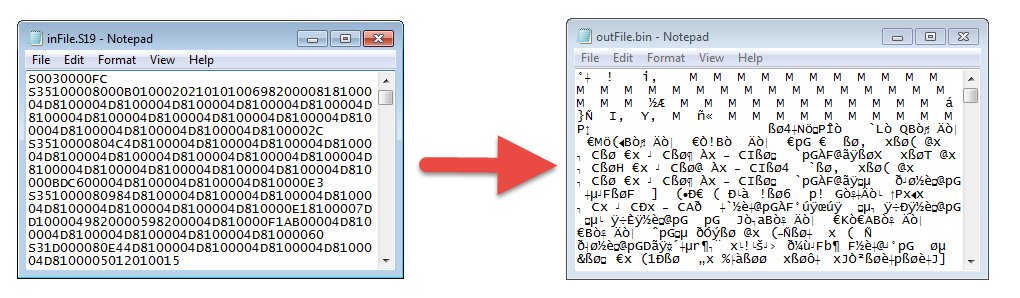
Typically I can create with my build the file I usually need (like an S19). See “S-Record Generation with gcc for ARM/Kinetis” how to do this in CodeWarrior, or “Binary Files for the mbed Bootloader with Eclipse and GNU ARM Eclipse Plugins” how this works in Kinetis Design Studio. The basis of all this is the GNU objcopy utility (see “S-Record Manipulation with GNU objcopy and Burner Utility”). So what if I just have an S19 (S-Record) file and need it in a different format, e.g. as .bin (binary) file for the mbed bootloader which only accepts .bin (raw binary) files?

Converting S19 to BIN

Converting S19 to BIN

Continue reading

LED Clock with Kitchen Hot Pan Protector

When I showed my 60 NeoPixel LED clock prototype to my daughter and her girlfriend, and they both wanted to have one right away :-). Well, that clock was just a proof of concept, with lots of temporary wiring. So I decided this week-end to beautify it and to make it look nice and clean(er). There is nothing like a week-end project with adding a few more LEDs and features :-).

Adafruit Neopixel Clock with 60+24+12 LEDs

Adafruit Neopixel Clock with 60+24+12 LEDs

Continue reading

Exclude Source Files from Build in Eclipse

Sometimes I have source files in my project which I do not want to get compiled (or excluded from build). Because as I’m using the ‘managed make’, all source files matching certain extensions (like *.c) are automatically included into the build.

To exclude a file from build, I right-click on it to get to the properties. There I can select a check box to have it excluded from the build:

File Excluded from Build

File Excluded from Build

Continue reading

Listing Code and Data Size for each Source File with GNU and Eclipse

I have used the ‘classic’ CodeWarrior IDE for years, before I moved over to Eclipse some years ago. And as with any IDE or tool switch, things are different in the ‘new world’. In summary, I don’t want to go back anyway, and Eclipse is my development tool of choice now. But from time to time I get challenged about something like “hey, this was possible in the previous tool, so how can I do the same in Eclipse?”. As a fan of Eclipse, this then gets my attention as I feel that Eclipse can do it, and it can do it better. 😉

So what about this one: In CodeWarrior the project view lists code and data size for each source file:

Code And Data Size in CodeWarrior

Code And Data Size in CodeWarrior

Continue reading

UART printf() for the FRDM-K64F Board and Kinetis Design Studio

I had great plans for this Saturday: to work on really cool project. But as so many times, things turned out to be different. Maybe you have read my recent posts about printf()? A colleague wanted to use that article to the same thing with the Kinetis Design Studio on the FRDM-K64F board. I used the FRDM-KL25Z board, so I expected this to work out of the box for him too. Well, turned out that I was wrong about this, and my Saturday was used for debugging and googling about a printf() problem 😦

While things work as expected for the FRDM-KL25Z (ARM Cortex-M0+) and using the standard GNU GCC ARM Embedded from the launchpad, the application traps on the K64F (ARM Cortex-M4F) in initialise_monitor_handles() with KDS:

Trap in initialize_monitor_handles()

Trap in initialize_monitor_handles()

Continue reading

Switching ARM GNU Tool Chain and Libraries in Kinetis Design Studio

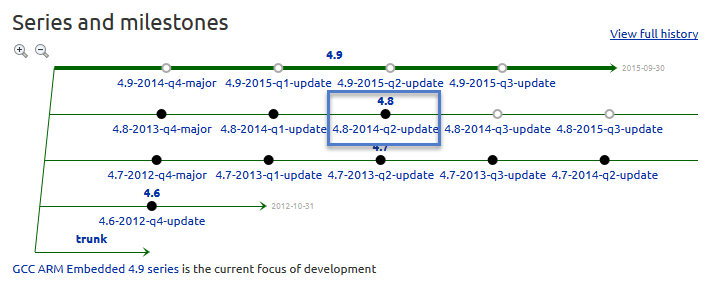
The Freescale Kinetis Design Studio (KDS) V1.0.1 beta is using a different GNU ARM toolchain than the ARM Inc. supported one on launchpad (GCC ARM Embedded). Additionally, KDS is using newlib 1.19 and newlib-nano 1.0, while there just has been a new release of the GCC ARM Embedded a month ago with the 4.8.4 update 2 release in June this year. So how to upgrade KDS to the latest and greatest GCC ARM Embedded?

Continue reading

printf() and scanf() with GNU ARM Libraries

In “Semihosting with Kinetis Design Studio” I’m using the debugger with semihosting to output text with printf(). But how to use a physical serial connection instead?

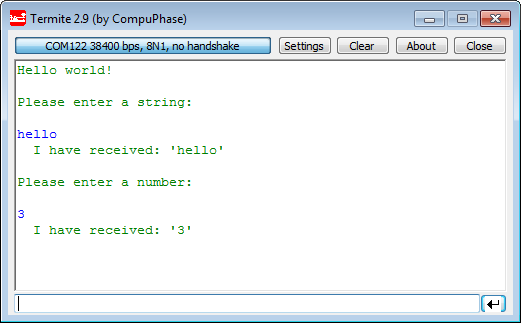
printf() and scanf() in action

printf() and scanf() in action

This post is about how to enable and use printf() and scanf() with GNU ARM libraries. I show it both for the Freescale Kinetis Design Studio (KDS) and for stock Eclipse Kepler with the GNU GCC ARM Embedded (launchpad) toolchain and libraries. The principles are the same, just the details are different ;-).

Continue reading