Linking Bootloader Applications with Eclipse and FreeMarker Scripts

Bootloaders are a fine thing: With this I can load any applications I like. Power comes with some complexity, and a bootloader alone is a complex thing already. But this applies to the application part too: I need to link the application to a certain offset in the memory space so it can be loaded by the bootloader, plus the application typically needs to add some extra information to be used by the bootloader. This article describes how to build a bootloader application with Eclipse (MCUXpresso IDE) using the MCUXpresso SDK.

Build Configuration for Bootloader Application

Continue reading

Stack Canaries with GCC: Checking for Stack Overflow at Runtime

Stack overflows are probably the number 1 enemy of embedded applications: a call to a a printf() monster likely will use too much stack space, resulting in overwritten memory and crashing applications. But stack memory is limited and expensive on these devices, so you don’t want to spend too much space for it. But for sure not to little too. Or bad things will happen.

The Eclipse based MCUXpresso IDE has a ‘Heap and Stack Usage’ view which can be used to monitor the stack usage and shows that a stack overflow happened:

Heap and Stack Usage

Heap and Stack Usage

But this is using the help of the debugger: how to catch stack overflows at runtime without the need of a debugger? There is an option in the GNU gcc compiler to help with this kind of situation, even if it was not originally intended for something different. Continue reading

Programming the ESP32 with an ARM Cortex-M USB CDC Gateway

The Espressif ESP32 devices are getting everywhere: they are inexpensive, readily available and Espressif IDF environment and build system actually is pretty good and working well for me including Eclipse (see “Building and Flashing ESP32 Applications with Eclipse“). The default way to program an ESP32 is to a) enter UART bootloader by pressing some push buttons and b) flash the application with ESP-IDF using a USB cable.

That works fine if the ESP32 is directly connected to the host PC. But in my case it is is behind an NXP Kinetis K22FX512 ARM Cortex-M4F microcontroller and not directly accessible by the host PC. So I had to find a way how to allow boot loading the ESP32 through the ARM Cortex-M which is the topic of this article.

TTGO ESP32 MICRO-D4 Module

TTGO ESP32 MICRO-D4 Module

Continue reading

Building and Flashing ESP32 Applications with Eclipse

The new semester is approaching in a very fast way, and so is the new lecture and lab module ‘Advanced Distributed Systems’ at the Lucerne University. For that module we are going to build a new ‘Sumo’ style robot with WLAN capabilities using the ESP32 chip. It will be a new robot PCB, and below is the current robot (based on NXP K22FX512) with the WLAN module connected to it:

Zumo connected to TTGO ESP32 module

Zumo connected to TTGO ESP32 module

Continue reading

Tutorial: How to Optimize Code and RAM Size

It is great if vendors provide a starting point for my own projects. A working ‘blinky’ is always a great starter. Convenience always has a price, and with a ‘blinky’ it is that the code size for just ‘toggling a GPIO pin’ is exaggerated. For a device with a tiny amount of RAM and FLASH this can be concerning: will my application ever fit to that device if a ‘blinky’ takes that much? Don’t worry: a blinky (or any other project) can be easily trimmed down.

Binky on NXP LPC845-BRK Board

Binky on NXP LPC845-BRK Board

I use a ‘blinky’ project here just as an example: the trimming tips can apply to any other kind of projects too.

Continue reading

Restoring Default Firmware on Seeed Arch Mix NXP i.MX RT1052 Board

In my previous article “Debug and Execute Code from FLASH on the Seeed Arch Mix NXP i.MX RT1052 Board” I explained how to take complete control over the board and flash and debug a firmware. Of course this overwrites the one which comes by default shipped on the board. This article is about how to restore or update the original firmware.

Restored Seeed Firmware

Restored Seeed Firmware

Continue reading

SWO with NXP i.MX RT1064-EVK Board

With the cost of an single pin, many ARM Cortex-M boards including the NXP i.MX RT1064 can produde SWO data: think about a pin able to stream data out of the chip in realtime. For example interrupt activity which otherwise might be hard to capture:

SWO Interrupt Trace

SWO Interrupt Trace

Continue reading

MCUXpresso Eclipse IDE Mouse Tips & Tricks

In a modern development workflow both command-line and a graphical user interface has its place. On the GUI side, Eclipse is famous that it offers many different ways to accomplish something which is great. But sometimes I continue to use an old habit or way because I have missed that there is a newer and better way, and the MCUXpresso Eclipse IDE is no exception to that. In this article I show a few ways how to use the mouse even more productive.

Project Settings

Project Settings

Continue reading

Tutorial: MCUXpresso SDK with Linux, Part 3: RAM and XiP Code on i.MX RT1064

In my previous articles I have used the command line on Linux to build and debug NXP MCUXpresso SDK applications. In this article I’m running code on NXP i.MX RT1064 in RAM or FLASH.

i.MXRT1064 board with LPC845-BRK as debug probe

i.MXRT1064 board with LPC845-BRK as debug probe

Continue reading

Internal and External Debug Options for the NXP LPC55S69-EVK Board

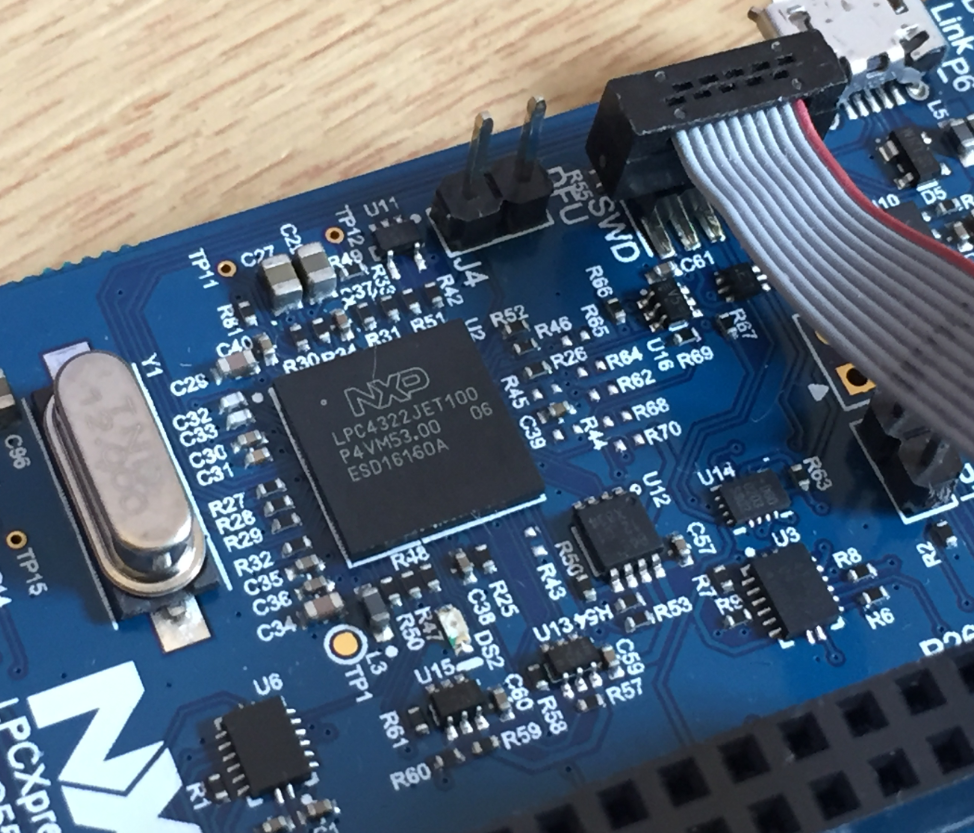
The LPC55S69-EVK board comes on-board debug probe. The board includes the LPC4322JET100 device which acts like NXP LPC-Link2 debug probe:

LPC4322JET100 on LPC55S69-EVK

LPC4322JET100 on LPC55S69-EVK

But it is easily possible to use the board with an external debug probe or re-program the onboard one as a SEGGER J-Link debug probe.

Continue reading