I’m pleased to announce that a new release of the McuOnEclipse components is available on SourceForge. This release includes several smaller bug fixes and initial component support for the NXP S32 Design Studio and SDK.

SourceForge

I’m pleased to announce that a new release of the McuOnEclipse components is available on SourceForge. This release includes several smaller bug fixes and initial component support for the NXP S32 Design Studio and SDK.
SourceForge
I apologize: I have not been blogging much in the past weeks :-(. One reason is that I’m working on a DIY SMT/SMD Pick&Place machine which keeps me busy most of my spare time :-). I admit that this project is not finished yet, but now is the time I can give a sneak preview: a SMD/SMT pick and place machine:

Pick&Place Machine
It’s April Fool’s Day, but be assured this is not a joke ;-): I’m pleased to announce that a new release of the McuOnEclipse components is available in SourceForge. This release includes several smaller bug fixes and components have been upgraded for FreeRTOS V10.0.1.
SourceForge
One of the great things with the FreeRTOS operating system is that it comes with free performance analysis: It shows me how much time is spent in each task. Best of all: it shows it in a graphical way inside Eclipse too:

FreeRTOS Runtime Information in Eclipse
I’m pleased to announce that a new release of the McuOnEclipse components is available in SourceForge., which is supposed to be the last release for 2017 :-). This release features several smaller bug fixes, the new FreeRTOS V10.0.0 and extended device support.
SourceForge
Doing Mini Sumo robot competition is really fun, and there is yet another one coming to end the current university semester. For several years we have used our own sumo robot, and this is the one used in the course this year too. But for future and extended events we are exploring a new robot. I proudly present the concept of the next generation sumo robot for the year 2018:

Sumo Robot with Bluetooth module
“Amazon FreeRTOS – IoT operating system for microcontrollers”: The announcement of FreeRTOS V10.0.0 was one of the biggest news last week for me. Not only is there now a Version 10, the bigger news is that FreeRTOS is now part of Amazon. Wow! Now this explains why Richard Barry (the founder behind FreeRTOS) was kind of hiding away for about a year: he joined Amazon as a principal engineer about a year ago. I think we all have to wait and see what it means for FreeRTOS.

Amazon FreeRTOS (Source: Amazon Web Site)
The NXP Freedom boards are very popular. Many of them are inexpensive (less than $20), include a debug interface and can be easily extended with extra shields or boards. Especially the FRDM-KL25Z is very popular: I’m getting told because of Processor Expert and tutorials available on web sites like this one ;-).
Unfortunately there are no small or breadboard friendly Kinetis boards available. There is the NXP LPC800-DIP but with no onboard debugger and without Processor Expert support. We have the tinyK20, but projects tend to use more CPU power, FLASH and RAM space than what the tinyK20 board (50 MHz, 128 KByte FLASH, 16 KByte RAM) can provide. So we ended up designing the big brother of the first tinyK20: the tinyK22 with 120 MHz, 512 KByte of FLASH and 128 KByte of RAM.
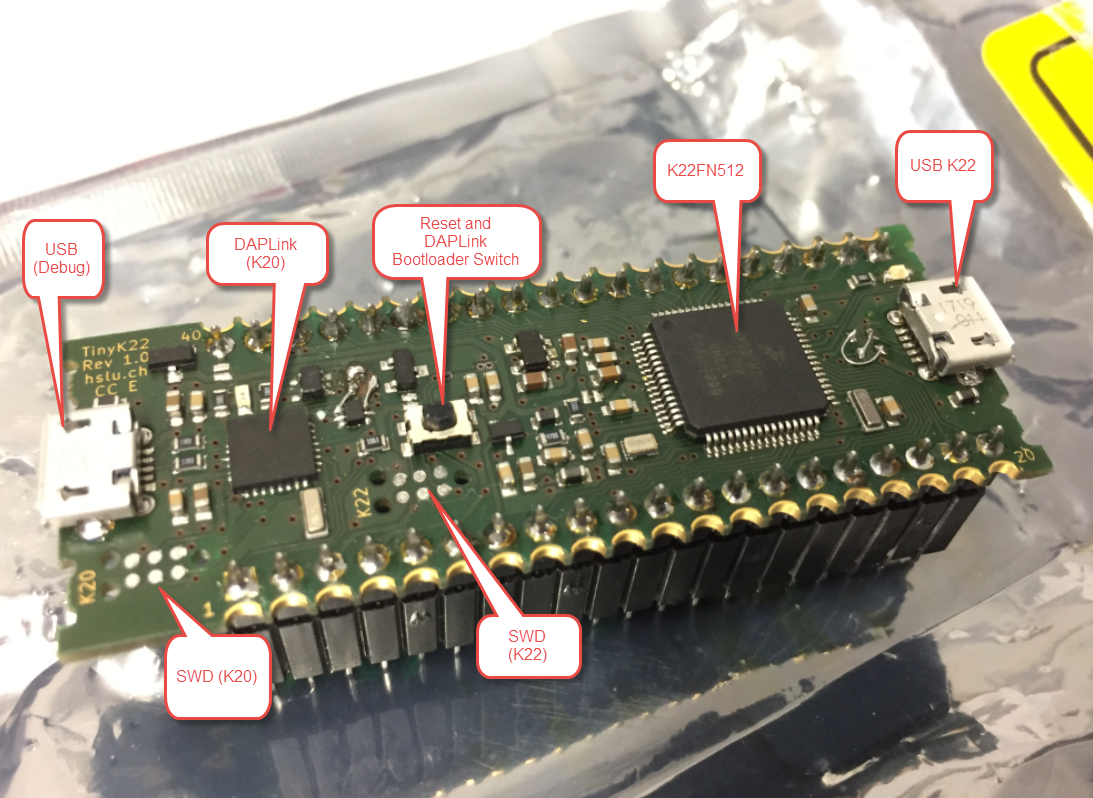
tinyK22 Overview
Back in March 2017, NXP had rolled the MCUXpresso IDE starting with Version 10.0.0. With the intent to unify the SDK, LPCXpresso, CodeWarrior, Kinetis Design Studio and Processor Expert into one unified and integrated set of tools. V10.0.0 was a good start. The MCUXpresso IDE V10.0.2 in July was more of a smaller update, and the Pin and Clock configuration tools were not integrated, no added tool for peripheral configuration.
A week ago the MCUXpresso V10.1.0 has been released which shows where the journey is going: an free-of-charge and code size unlimited Eclipse based integrated set of tools to configure, build and debug Cortex-M (Kinetis, LPC and i.MX RT) microcontroller/processor based applications.
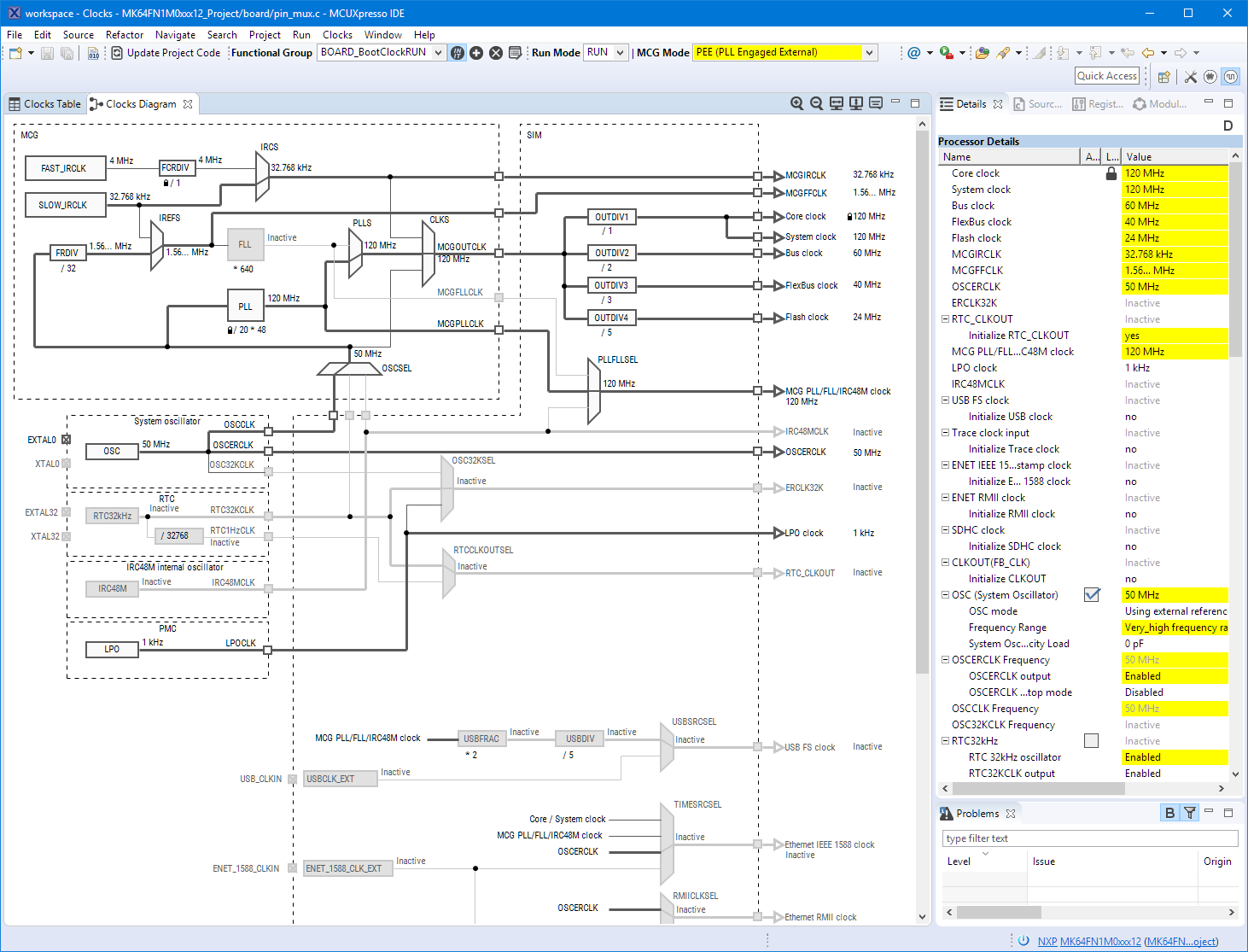
Clock Tool inside MCUXpresso IDE
I have used it for a week, and although many things are still new, I thought I’m able to give an overview about what is new.
It can happen to everyone using Eclipse: launching Eclipse with workspace, and then it is stuck loading it. As a last resort, create a new workspace and go on? Possible, but painful, right? For some time I have a strange issue nagging me: from time to time, I’m not able to switch to a workspace which worked before. The IDE starts loading, but then is stuck:

Eclipse Oxygen Stuck Loading Workspace
 MCU on Eclipse