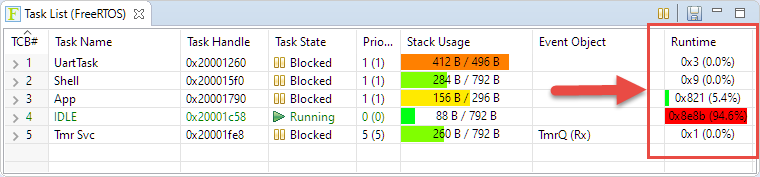
FreeRTOS has many cool features, and one is that it can report the CPU percentage spent in each task. The downside is that to get this kind of information some extra work is needed. In this article I show how to do this for the NXP i.MX1064.
Category Archives: FreeRTOS
Enable Default FreeRTOS Debugging for LinkServer Debug Connections
Most of my projects are using FreeRTOS, and I’m using different Debug Probes (SEGGER, P&E and LinkServer) to debug NXP devices.
The NXP LinkServer debug connection is able to show the RTOS threads in Eclipse/MCUXpresso IDE which is incredibly helpful:
However, by default this is turned off. In this article I show how to turn this on by default.
Implementing FreeRTOS Performance Counters on ARM Cortex-M
When using an RTOS like FreeRTOS, sooner or later you have to ask the question: how much time is spent in each task? The Eclipse based MCUXpresso IDE has a nice view showing exactly this kind of information:
For FreeRTOS (or that Task List view) to show that very useful information, the developer has to provide a helping hand so the RTOS can collect this information. This article shows how this can be done on an ARM Cortex-M.
DIY ‘Meta Clock’ with 24 Analog Clocks
Human since 1982 claims
“Human since 1982 have the copyright to works displaying digital time using a grid arrangement of analog clocks…”
I’m not a lawyer, but without obligations (imho) I have removed the content.
You can read more of the details here: Copyright Law for Makers and Educators
Thanks for understanding,
Erich
Programming the ESP32 with an ARM Cortex-M USB CDC Gateway
The Espressif ESP32 devices are getting everywhere: they are inexpensive, readily available and Espressif IDF environment and build system actually is pretty good and working well for me including Eclipse (see “Building and Flashing ESP32 Applications with Eclipse“). The default way to program an ESP32 is to a) enter UART bootloader by pressing some push buttons and b) flash the application with ESP-IDF using a USB cable.
That works fine if the ESP32 is directly connected to the host PC. But in my case it is is behind an NXP Kinetis K22FX512 ARM Cortex-M4F microcontroller and not directly accessible by the host PC. So I had to find a way how to allow boot loading the ESP32 through the ARM Cortex-M which is the topic of this article.
Building a Raspberry Pi UPS and Serial Login Console with tinyK22 (NXP K22FN512)
There are different ways to ruin a Linux system. For the Raspberry Pi which uses a micro SD card as the storage device by default, it comes with two challenges:
- Excessive writes to the SD card can wear it out
- Sudden power failure during a SD card write can corrupt the file system
For problem one I do I have a mitigation strategy (see “Log2Ram: Extending SD Card Lifetime for Raspberry Pi LoRaWAN Gateway“). Problem two can occur by user error (“you shall not turn it off without a sudo poweroff!”) or with the event of a power outage or black out. So for that problem I wanted to build a UPS for the Raspberry Pi.
Be aware: Floating Point Operations on ARM Cortex-M4F
My mantra is *not* to use any floating point data types in embedded applications, or at least to avoid them whenever possible: for most applications they are not necessary and can be replaced by fixed point operations. Not only floating point operations have numerical problems, they can lead to performance problems as in the following (simplified) example:
#define NOF 64Continue reading
static uint32_t samples[NOF];
static float Fsamples[NOF];
float fZeroCurrent = 8.0;
static void ProcessSamples(void) {
int i;
for (i=0; i < NOF; i++) {
Fsamples[i] = samples[i]*3.3/4096.0 - fZeroCurrent;
}
}
FreeRTOS: how to End and Restart the Scheduler
Most host or desktop systems (say Linux, Mac or Windows) have a normal use case where you start the operating system say in the morning and shut it down in the evening, and then you leave the machine. Embedded Systems are different: they are not attended, and they are supposed to run ‘forever’. Not every embedded system needs to run an OS (or in that world: Real-Time Operating System or RTOS), but the same applies here: after the RTOS is started, it is not intended that it will shutdown and restart. To the extend that you won’t they support the ‘shutdown’ and ‘restart’ functionality at all. In case of gathering coverage information this would be really useful:
In the case of FreeRTOS: what if I really need to shutdown the RTOS and restart it again, as by default this is not supported. This is what this article is about …
GDB All-Stop and Non-Stop Mode with LinkServer
GDB supports a mode which allows the GDB debug client to read memory while the target is running. This allows features like ‘live variables’: that way I can see the variables refreshed and changing over time without halting the target. Another functionality which comes with that feature is to check stopped threads or to see all threads in the system.
McuOnEclipse Components: 30-Sept-2018 Release
I’m pleased to announce a new release of the McuOnEclipse components, available on SourceForge. This release includes several bug fixes, extra support for the NXP S32 Design Studio and SDK and includes FreeRTOS V10.1.1.