NXP has released an updated of their Eclipse based IDE for ARM Cortex-M (Kinetis and LPC) microcontroller: the version v10.0.2 build 411:

MCUXpresso v10.0.2 build 411

NXP has released an updated of their Eclipse based IDE for ARM Cortex-M (Kinetis and LPC) microcontroller: the version v10.0.2 build 411:
MCUXpresso v10.0.2 build 411
If you are like me – someone who always wants to know what the compiler generates for a piece of source code – then have a look at the Compiler Explorer: A web-based compiler code comparison tool:

Compiler Comparison
Thanks to Matt Godbolt, I can select different compilers and compare their output for a given source code. Very useful to see the impact of a compiler optimization or to compare different GCC compiler versions.
Happy Comparing 🙂
For a next-gen course I’m evaluating different platforms, and one of it are modules based on the NXP i.MX ARM architectures. In this article I have a look a the Variscite DART-6UL development kit which includes the NXP i.MX6Ultralite ARM Cortex-A7 plus a 7″ capacitive touch LCD:

Variscite VAR-DVK-6UL_LO Kit
For a research project, we are going to send a satellite with an embedded ARM Cortex microcontroller into space early next year. Naturally, it has to work the first time. As part of all the ESA paperwork, we have to prove that we tested the hardware and software thoroughly. One piece of the that is to collect and give test coverage evidence. And there is no need for expensive tools: Free-of-charge Eclipse and GNU tools can do the job for a space mission 🙂

Eclipse with Coverage Views
In “Cycle Counting on ARM Cortex-M with DWT” I have used the ARM DWT register to count the executed cycles. With the MCUXpresso IDE comes with a very useful feature: it can capture the ARM SWO (Single Wire Output) trace data. One special kind of trace data is the ‘cycle counter’ information which is sent through SWO.

SWO Counters
I’m pleased to announce that a new release of the McuOnEclipse components is available in SourceForge, with the following changes and updates:

SourceForge
I believe in ‘life-long-learning’. With this I continue to learn and discover new things every day. I’m writing tutorials to give something back to the community from which I have learned so much.
On top of this, I receive emails on a nearly daily basis, asking for help. Many articles have the origin in such requests or questions. I prefer questions or comments in a public forum, because that way I feel all others can benefit from it. Last week Alessandro contacted me with this:
“Hi Erich,
I hope this find you well! I’m starting to using ARM processors, but I find them quite complicated on the configuration side. I started in the past with PIC micro (PIC16) with asm, and I found them quite straightforward to be configured (clock, IO, peripherals, …). Then I moved myself on C language, and on PIC18 without any big issues.
Now I would really like join the ARM community, I see that these processors are what I’ve always looking for, on energy, calc power, peripherals, and FINALLY on IDE (editor, toolchain and utilities)… AMAZING!!!”
The topic is about how to start learning developing for ARM. Alessandro agreed to make this public, so I thought this might be a good topic for an article?
Firmware
Looking for a small, inexpensive ($25-30) ARM development board (say 120-180 MHz ARM Cortex-M4 with FPU, 512kB-1MB of FLASH and 256 KByte of RAM? Then have a look at the Teensy 3.5 and Teensy 3.6 by PJRC/Paul Stoffregen:
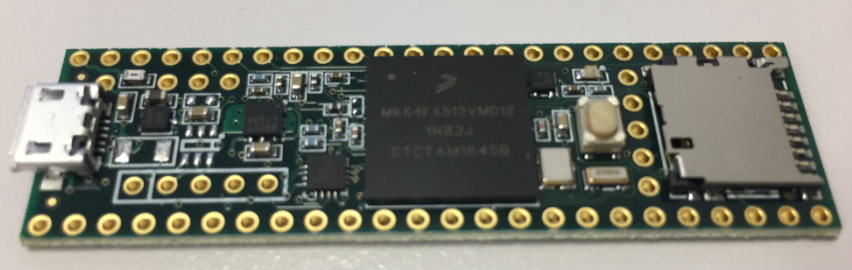
Teensy 3.5 with NXP K64F ARM Cortex-M4F
The only problem? it is not possible to debug it :-(. At least not in the traditional sense. This article is about how to change the board to use it with any normal SWD debugging tool e.g. Eclipse and the Segger J-Link :-).
In “Tutorial: Secure TLS Communication with MQTT using mbedTLS on top of lwip” I already used TLS for a secure communication, but I had not enabled server certificate verification. This article is about closing that gap.

Secure MQTT running on NXP FRDM-K64F with lwip and mbed TLS
One of the most important aspects of the ‘IoT’ world is having a secure communication. Running MQTT on lwip (see “MQTT with lwip and NXP FRDM-K64F Board“) is no exception. Despite of the popularity of MQTT and lwip, I have not been able to find an example using a secure TLS connection over raw/native lwip TCP :-(. Could it be that such an example exists, and I have not found it? Or that someone implemented it, but has not published it? Only what I have found on the internet are many others asking for the same kind of thing “running MQTT on lwip with TLS”, but there was no answer? So I have to answer my question, which seems to be a good thing anyway: I can learn new things the hard way :-).

Block diagram MQTT Application with TLS using lwip
 MCU on Eclipse