This year I managed to attend the Embedded World in Nürnberg/Germany after missing the 2016 show. And 2017 has been a blast! With more than 1000 exhibitors and >30’000 visitors it was huge! There were too many exciting things, so I just pick a few: NXP demonstrated the new MCUXpresso Software and Tools with a new Eclipse Neon based IDE, lots of IoT and Hexiwear, the tiny LPC800-DIP board, and I have met Alan Hawse in person!
Tag Archives: gnu gcc
McuOnEclipse Components: 12-Mar-2017 Release
I’m pleased to announce that a new release of the McuOnEclipse components is available in SourceForge, with the following main features and changes:
- Wait: Busy-Waiting using ARM DWT cycle counter
- Percepio FreeRTOS+Trace: Updated to version 3.1.1, simplified usage of streaming and snapshot mode
- GenericSWI2C: MCUXpresso SDK can be used with the bit-banging I2C driver support
- FreeRTOS: includes updates of the 9.0.1 release, ‘optimized task selection, enabled MPU support (experimental)
- Graphical GUI drivers for screens, windows, icons, headers, text widgets and more
- SSD1351: display driver for Solomon Systech SSD1351 display
- More components are now supported by the McuLibConfig settings
- Many other smaller bug fixes and enhancements
Percepio FreeRTOS Tracealyzer Plugin for Eclipse
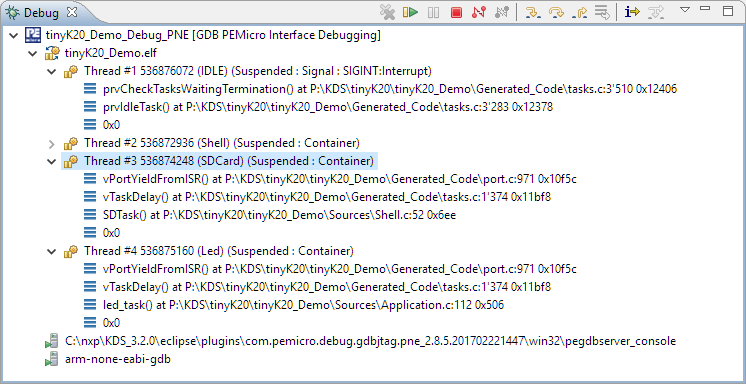
P&E ARM Cortex-M Debugging with FreeRTOS Thread Awareness and Real Time Expressions for GDB and Eclipse
P&E has a new version of their GDB/Eclipse debug plugins available on their Eclipse update site, and it comes with to great features: Real Time Expressions (show variables while target is running) and FreeRTOS thread awareness 🙂
Tips for Making Copy of Eclipse CDT Projects Easier
Instead creating a new project from scratch, often it is simpler to copy an existing Eclipse CDT project, then change it and go on. To copy-past the a project in Eclipse:
- Select the project in the Project Explorer View (CTRL-C on Windows)
- Then paste it in the Project Explorer View (CTRL-V on Windows), and I can specify the new name:
However, to make that process simpler, a few things have to be done right in the ‘source’ project first.
Remote Board Debugging: J-Link Remote Server with Eclipse
For a CubeSat project we only have a single board available. But multiple universities and developers need to have access to that board for developing and debugging the firmware. We cannot easily ship around the board: that takes a lot of time and during shipment nobody can use the board.
There is a nice feature in the Segger J-Link software which allows to share the debug connection over the network: the J-Link Remote Server. It even works nicely between different networks without complicated firewall setup:
“No source available”, or how to Debug Multiple Binaries with GDB and Eclipse
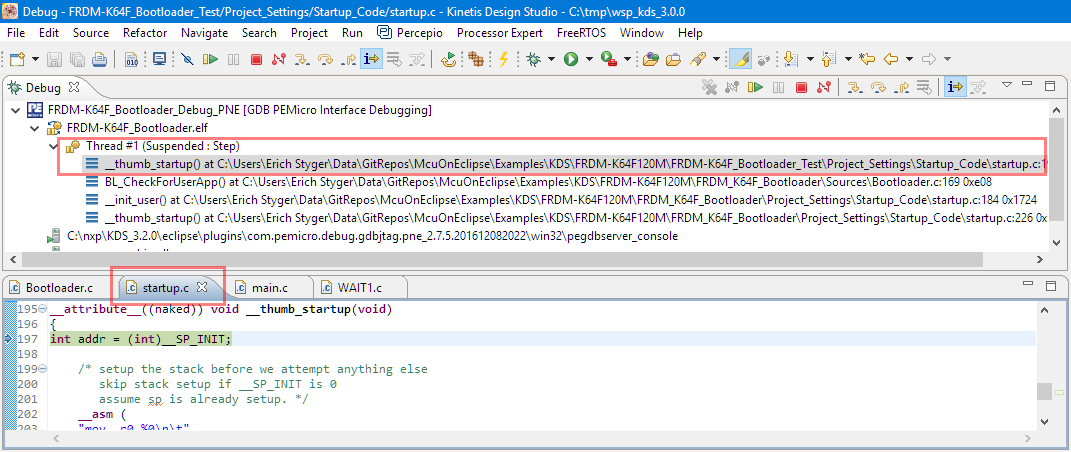
When working and debugging a bootloader, debugging can be a challenge: During debugging the bootloader, a new binary gets loaded into the microcontroller address space which is unknown to the debugger. As soon as I step into the newly loaded binary, I only see assembly code, with that ugly “No source available” in Eclipse:
But wait: GDB is able to do pretty much everything you can imagine, so here is how to debug multiple binaries with GDB and Eclipse, and to turn the above into something which is easy to debug:
Debugging ARM Cortex-M0+ HardFaults
To me, one of the most frustrating things working with ARM Cortex-M cores are the hard fault exceptions. I have lost several hours this week debugging and tracking an instance of a hard fault on an ARM Cortex-M0+ device.

Upgrading to Sharp 128×128 Pixel Memory Display
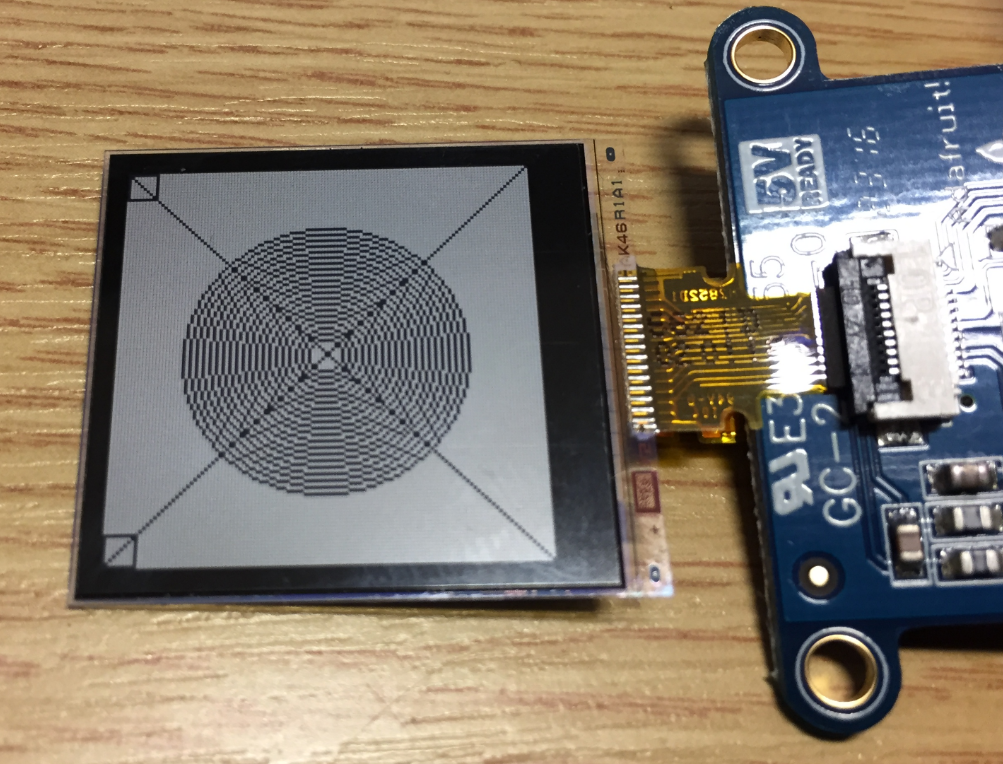
In “Low Power LCD: Adafruit Breakout Board with Sharp Memory Display” I used a 96×96 Sharp Display (LS013B4DN04) with the Adafruit breakout board, but because that one seems to be EOL (End Of Life), I searched for a replacement. I have found the 128×128 pixel version (Sharp LS013B7DH03), and best of all, it is pin compatible :-). With a small tweak of the driver, it works :-):
McuOnEclipse Components: 12-Dec-2016 Release
Time is passing by so fast, and the year end is approache fast! I’m pleased to announce that a new release of the McuOnEclipse components is available in SourceForge:
- Percepio Trace V3.1 for FreeRTOS which includes both Segger RTT continuous streaming and snapshot tracing in a single API
- Generation of sources and drivers so they can be used without Processor Expert using McuLibConfig, removal of dependency to NXP Kinetis SDK: components use a generic API approach to have them working with other SDKs.
- New contributed ExceptionsHandler component
- Callback Setter and Getter in USB CDC stack for simpler option handling
- GenericTimeDate with flexible RTC support and added Unix Timestamp functions
- LongKey events in Key component
- FreeRTOS with optimized task selection on Cortex-M4/M7
- Many smaller bug fixes and enhancements