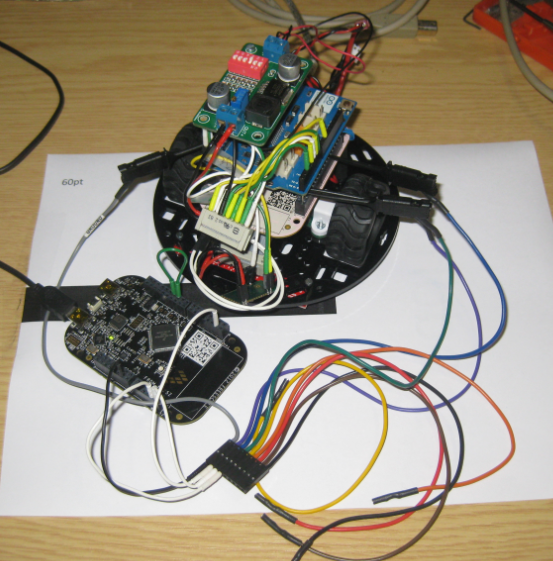
The first FRDM-KL25Z Freedom Logic Analyzer firmware was missing one important feature: Triggers! But this weekend the firmware has evolved a bit :-).
Tag Archives: Debugging
Skipping Breakpoints
The challenge with small microcontroller like the ARM-Cortex-M0+ is that they have very limited debugging resources. As such, the number of hardware break points is very limited (see this post). For example for the KL25Z on the Freedom board, I only have 2 break points available if I want to do stepping:
Turning the Freedom Board into a Logic Analyzer
I think the most important tool for a firmware engineer is a Logic Analyzer. I always have one on my desk. Working in different locations, sometimes I forget to carry it with me. And for sure I would need it. To buy another one to compensate my laziness? Or maybe there is another solution? And here I stumbled over an article about the Logic Sniffer project recently: it is about an open source logic analyzer hardware and firmware project. What a cool idea! Why not using my FRDM-KL25Z Freedom board as a Logic Analyzer? Heck, that would be awesome 🙂
Live View for Variables and Memory
Debugging is usually a ‘stop-inspect-continue’ process. That does not work very well for watching a system which continuously changes its state. For this usually I toggle an LED, or write things to the console to watch with a human eye what is going on. But there is something very powerful in the CodeWarrior debugger too: to display variables and memory content while the target is running.
Debugging ARM Cortex-M0+ Hard Fault with MTB Trace
And here it is again: a Hard Fault exception raised by the ARM Cortex-M0+ on my Freedom board:
A reason for hard faults are for example dereferencing a NULL pointer. The issue with the ARM Cortex hard fault exception stack is: it is not easy to find out where in the code the problem is.I have created a Processor Expert component to help me to find the location of such an exception. With the Eclipse based CodeWarrior for MCU10.3 there is another way: Trace with the MTB (Micro Trace Buffer)!
A Processor Expert Component to Help with Hard Faults
Ahrg! Again my ARM application crashed somewhere and I ended up in a HardFault exception :-(. In my earlier post I used a handler to get information from the processor what happened. But it is painful to add this handler again and again. So I decided to make things easier for me: with a special HardFault Processor Expert component :-).
After adding this HardFault component to my project, it automatically adds an entry to the vector table. So no manual steps are needed: having the component in the project and enabled will do the needed steps.
Adding Symbols to the CodeWarrior Debugger
On the TWR-LCD, I’m using a USB MSD bootloader. In Programming part of flash I showed how to download and debug the application on top of the bootloader. But how to debug both the bootloader and the application? At the same time with CodeWarrior for MCU? The magic key is tell CodeWarrior to use ‘Other Executables’.
KL25Z and I2C: Missing Repeated Start Condition
I really hate this kind of stuff: I know it should work, but it does not. I’m loosing a lot of time (hours, days, even weeks) to track it down to the root cause. Yes, I create my own bugs. Yes, there are bugs in tools, sources, libraries and components. But what many might not believe: there are bugs in silicon too :-(. If you do not believe, here is one: there is a hardware I2C problem on the KL25Z used on the Freedom board. It worked in one project, but not in another.
❗ The silicon bug described here is present on many Kinetis devices, not only the KL25Z!
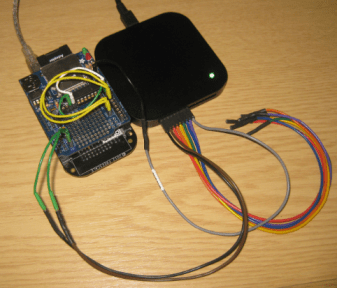
So if you are facing a problem where you read 0xFF or wrong values from the I2C bus with the KL25Z, here is probably why (and how to workaround it). The problem showed up with a modified version of the Freedom Accelerometer tutorial….
Debugging Hard Faults on ARM Cortex-M
It is as bad as this: my application stopped in an unhandled interrupt service routine:

That does not tell much. I’m using Processor Expert generated code, and with this all my ‘unhandled’ vectors are pointing the same handler:
Continue readingSWD Debugging with the FRDM-KL25Z Board
The OpenSDA on the FRDM-KL25Z board is a cool feature: I do not need any external debugging device to program and debug my board :-). But my KL25Z custom board will not have that OpenSDA on it: first because it would add additional costs, and I do not see a way how I could use it for my board. I better start using a SWD/JTAG debugger for my Freedom board to have everything in place.
What I need to add to the black Freedom board is the SWD header: