Investigating ARM Cortex® M33 core with TrustZone® – Trusted Execution Environment tutorial

When we are learning about TrustZone® it does not take long to recognise that it is the security attributes for memory that define memory regions to be Secure, Non-Secure or Non-Secure Callable. This week’s video shows how the Cortex® M33 core with TrustZone® extension can test the security attributes for every read, write and execute from memory (without impacting performance). And how the security attributes are set with the Trusted Execution Environment configuration tool inside MCUXpresso IDE.

Trusted Execution Environment configuration tool in MCUXpresso IDE
Continue reading

Investigating ARM Cortex® M33 core with TrustZone® – running TrustZone® example projects in MCUXpresso IDE

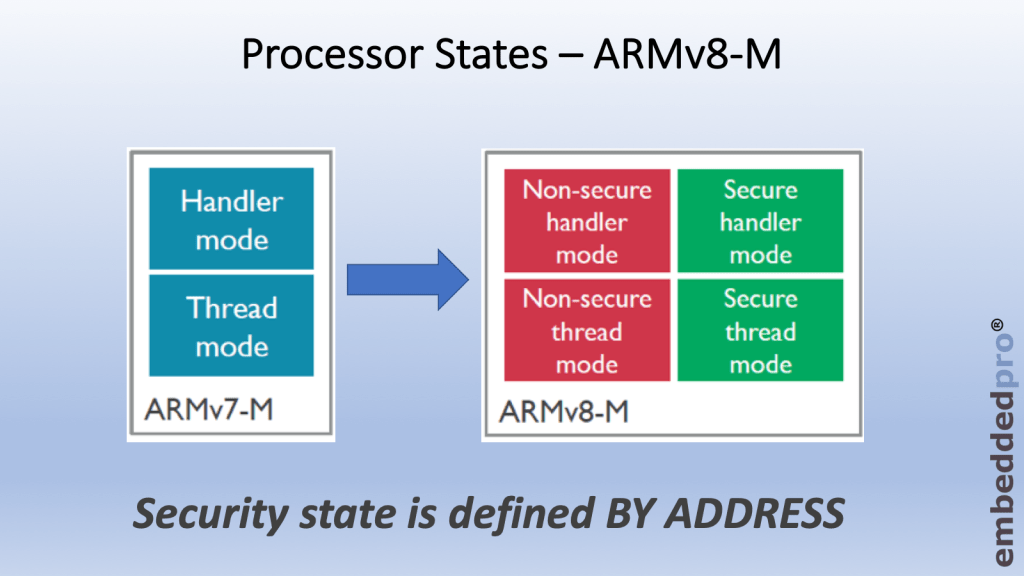
Last week I wrote about why we need the TrustZone® security extension for ARMv8-M. There are software use-cases where it can be very helpful to partition the software into 2 separate worlds, secure and non-secure. TrustZone® acts as the gatekeeper between these two worlds and manages how the core transitions between the worlds. The ARMv8-M architecture introduces two new States for the core – secure and non-secure. Cortex® M33 core (and M23 core also) is implemented to ARMv8-M standard and of course supports the two new states.

ARMv8-M architecture introduces 2 states for the core – secure and Non-secure
Continue reading

Investigating ARM Cortex® M33 Core with TrustZone® – What is TrustZone® anyway?

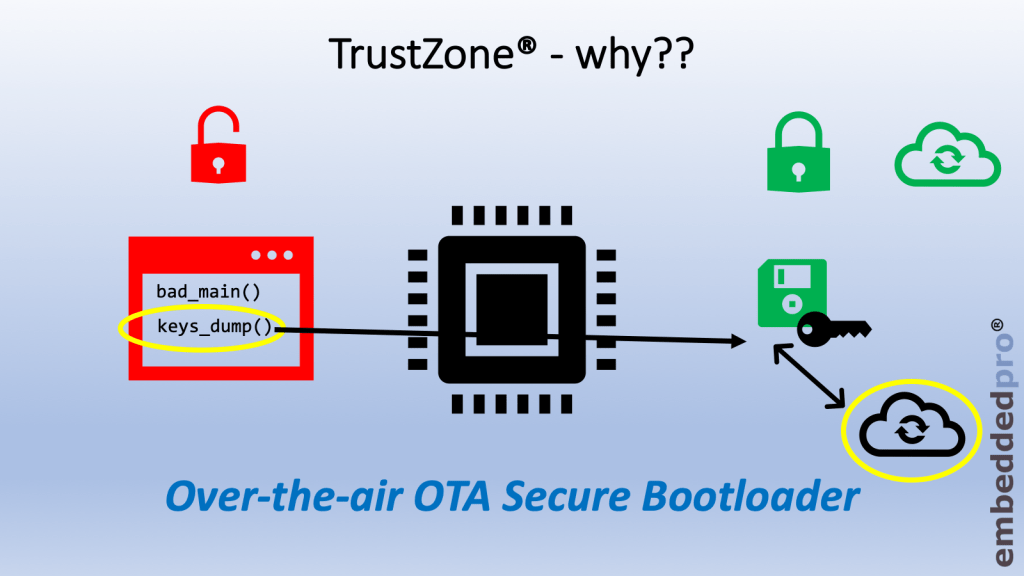
After the Getting Started material from the previous weeks, today we are ready to investigate TrustZone®. We all remember TrustZone® – it is that magic piece of embedded IP that miraculously solves all of our IOT security problems – right? It’s true that TrustZone® is an embedded component related to security, but not in the way that you think.

Non-trusted software can dump out our keys to a cloud server hosted by malign third-party

Before we get stuck into all the fancy technical details, let us at first stop and think about some of the challenges that we face with embedded systems, and what can be done about them. This week I simply address the topic: What is TrustZone® and Why do we need it??

Continue reading

Stack Canaries with GCC: Checking for Stack Overflow at Runtime

Stack overflows are probably the number 1 enemy of embedded applications: a call to a a printf() monster likely will use too much stack space, resulting in overwritten memory and crashing applications. But stack memory is limited and expensive on these devices, so you don’t want to spend too much space for it. But for sure not to little too. Or bad things will happen.

The Eclipse based MCUXpresso IDE has a ‘Heap and Stack Usage’ view which can be used to monitor the stack usage and shows that a stack overflow happened:

Heap and Stack Usage

Heap and Stack Usage

But this is using the help of the debugger: how to catch stack overflows at runtime without the need of a debugger? There is an option in the GNU gcc compiler to help with this kind of situation, even if it was not originally intended for something different. Continue reading

NXP MCUXpresso IDE 11.0.1 available

NXP has released an update of the Eclipse based V11 IDE. This is right on time for the new semester starting mid of September where this IDE will be used in several labs.

MCUXpresso IDE V11.0.1

MCUXpresso IDE V11.0.1

Continue reading

DIY Stepper Motor Clock with NXP LPC845-BRK

This project is about building a stepper motor clock around the NXP LPC845-BRK board. The design is using a combination of 3D printed and laser cut parts and costs below $15.

Stepper Clock Acrylic Face White Hands

Stepper Clock Acrylic Face White Hands

Continue reading

Tutorial: How to Optimize Code and RAM Size

It is great if vendors provide a starting point for my own projects. A working ‘blinky’ is always a great starter. Convenience always has a price, and with a ‘blinky’ it is that the code size for just ‘toggling a GPIO pin’ is exaggerated. For a device with a tiny amount of RAM and FLASH this can be concerning: will my application ever fit to that device if a ‘blinky’ takes that much? Don’t worry: a blinky (or any other project) can be easily trimmed down.

Binky on NXP LPC845-BRK Board

Binky on NXP LPC845-BRK Board

I use a ‘blinky’ project here just as an example: the trimming tips can apply to any other kind of projects too.

Continue reading

Visualizing Global Variables while Target is Running with Eclipse and MCUXpresso IDE

By default, Eclipse provides ‘stop-mode-debugging’: in order to inspect the target code and data, I have to stop the target. But with the right extensions as present in the Eclipse based MCUXpresso IDE, it is possible to inspect the target even while it is running.

Graphing Variables

Graphing Variables

Continue reading

Black Magic Open Source Debug Probe for ARM with Eclipse and GDB

The ‘Black Magic Probe’ (or in short: BMP) is a very small and open source JTAG/SWD debug probe with a build-in GDB Server. I saw that probe referenced in different places, so I thought I try it out with a few of my NXP LPC and Kinetis boards:

BMP with LPC and Kinetis Boards

BMP with LPC and Kinetis Boards

Continue reading