Character LCD with 4 Lines

Character LCD’s (like 2 lines with 16 characters each) as in this post are easy to use. Much easier to use compared to full graphical LCDs.

The ones I’m using have either 1 or 2 lines, but I saw that there are 4 line displays too. So far my LCD component only supports one or two lines.

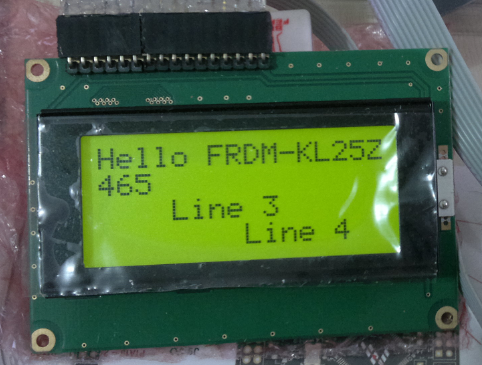
4 Line LCD

4 Line LCD (Source: Ezequiel Bazotti)

Continue reading →

CMSIS-DAP with IAR and the KL25Z Freedom Board

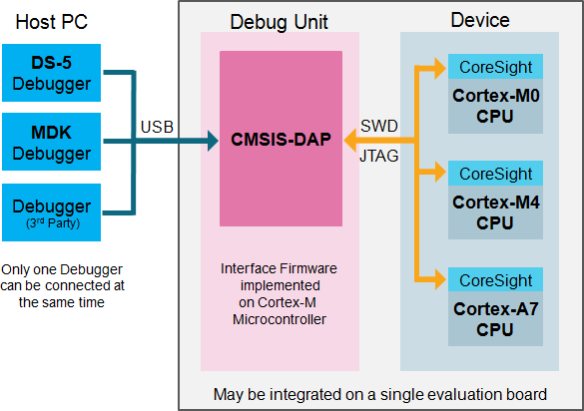
Beside of USBDM, there is another Open Source implementation of a debug interface for the Freedom Board OpenSDA: CMSIS-DAP.

CMSIS-DAP stands for ‘Cortex Microcontroller Software Interface Standard – Debug Access Port’) has been published by ARM Inc. With this, there is an open source alternative to proprietary implementation (e.g. P&E OpenSDA or Segger OpenSDA).
Beside of the ARM MDK IDE, CMSIS-DAP is supported by Coocox and IAR. And IAR is what I’m using in this post.

Continue reading →

Freedom Board with Segger OpenSDA Debug Firmware

Looks like there is some movement on the ‘OpenSDA Front’: After CodeRed has released their RedProbe OpenSDA firmware, now Segger has released an OpenSDA firmware.

With this, I get a low-cost debugging solution similar to the well-known J-Link run control devices. The OpenSDA Segger Firmware is something like a J-Link-lite.

FRDM-KL25Z with Segger OpenSDA Debug Firmware

FRDM-KL25Z with Segger OpenSDA Debug Firmware

Continue reading →

Freedom Track Robot with IEEE802.15.4/SMAC

My other robots based on the FRDM-KL25Z use Bluetooth as connectivity. This one is using a Freescale IEEE802.15.4/ZigBee/SMAC module:

Robot with SRB MC13213 Board

Robot with SRB MC13213 Board as Remote Controller

Continue reading →

Fix for 3.3V Voltage Drop on FRDM-KL25Z Board

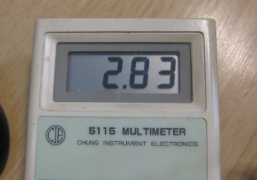
With my Pololu line following robot I had strange problems with the sensor array: the sensor values were very unreliable. Until I have found the problem: Instead of the expected 3.3V, my FRDM-KL25Z RevD board provided 2.8V instead 3.3V on the P3V3 Arduino header pin:

Measured 2.8V on P3V3

Measured 2.8V on P3V3

And that voltage even was lower the more current I needed :-(. Luckily there is an easy hardware fix for this.

Continue reading →

Low-Level Coding with PDD (Physical Device Driver)

As with any software drivers: they are never perfect. The same applies to the Processor Expert components delivered in CodeWarrior for MCU10 or the DriverSuite too. That’s why I have created many more components which are available on GitHub here. All these components are using other components to reach the hardware. But what if a functionality is not exposed through the low-level component? Or what if I want direct access to the hardware? Up to now I had to choose either the Processor Expert way, or to do it in the ‘traditional’ way using an SDK like CMSIS or vendor supplied header files.

With MCU10.4, I noticed that there is another way: PDD (Physical Device Driver).
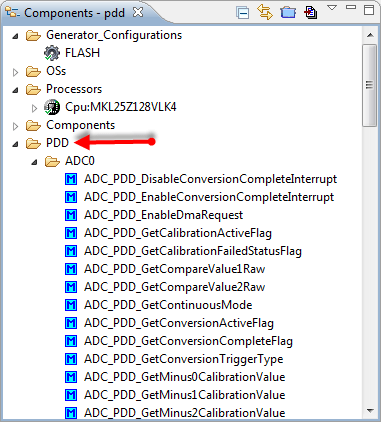
PDD in the Components View

PDD in the Components View

Continue reading →
USBDM 4.10.5 supports now MCU10.4

Wow, that was fast! The SourceForge USBDM project has added support for MCU10.4 (see as well this post) in release 4.10.5 available here, announced in the Freescale Forum.

USBDM 4.10.5 Installer

USBDM 4.10.5 Installer

Continue reading →

Adding USBDM to CodeWarrior for MCU10.4

If you are following my recent posts, then you know I started using USBDM on OpenSDA as an alternative run control solution. Now with the advent of MCU10.4, the question is: how to use USBDM with it, because the USBDM installer obviously only knows the version up to MCU10.3?

USBDM 4.10.4a Installer

USBDM 4.10.4a Installer

Continue reading →

Can MCU10.4 recover a bricked OpenSDA Freedom Board?

Ok, this one might not work for everyone. And maybe I’m seeing a ghost. But a nice and real one, at least for me :-). It seems that with the new CodeWarrior for MCU10.4 installation I was able to recover a bricked OpenSDA FRDM-KL25Z board 😯

Recovered OpenSDA Board

Recovered OpenSDA Board

Continue reading →