Compiling C Files with GNU ARM G++

If I want a C++ project for my KL25Z Freedom board, I select C++ during the project creation:

C++ Project Creation for GCC

C++ Project Creation for GCC

This creates a gcc C++ project with all the needed settings.

This worked fine until I added a *.c file to my project which had code in it which was not accepted by the C++ compiler. Wait! Should the *.c not be compiled in C mode, as I was used to with other compilers? It turned out that things are different with gcc (or g++) :-(: the *.c files in my project are compiled in C++ mode. So the question is: how to compile in C mode with the ARM g++ compiler?

Continue reading

Tutorial: PWM with Processor Expert

For many of my applications I’m using a PWM (Pulse Width Modulated) signal. One example is the motor driver used in this project where I use one PWM signal for each motor. Another usage of PWM is to control the brightness of an LED. Processor Expert makes usage of the PWM hardware easier. Still, for some settings it is good to have the resulting signals in mind. So in this post I’m showing how the settings impact the PWM signal generated.

Continue reading

The Quotation Problem

Maybe this article gets the attention of a local optometrist or eye shop: I have a business opportunity for you! ;-).

I ran into a weird problem: I received an ARM GNU gcc project which failed during the generation of the S19 file in strange way:

'Executing target #80 Freedom_Zumo.siz'
'Invoking: ARM Ltd Windows GNU Create Flash Image'
“C:/Freescale/CW MCU v10.3\eclipse\../Cross_Tools/arm-none-eabi-gcc-4_7_3/bin/arm-none-eabi-objcopy”  -O srec Freedom_Zumo.elf "Freedom_Zumo.hex"
' '
Der Befehl "“C:" ist entweder falsch geschrieben oder
konnte nicht gefunden werden.
mingw32-make: *** [Freedom_Zumo.hex] Error 1

Continue reading

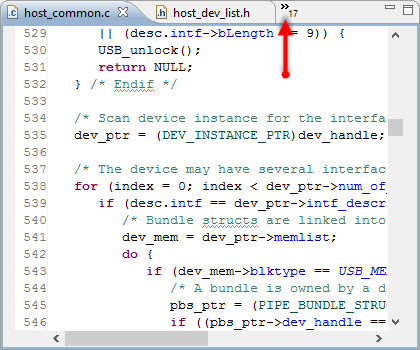
Quick Switch Editor in Eclipse

Probably I need to add 3rd monitor to my laptop system, or maybe I’m not organized enough. But as a matter of fact: I want to have as many source files as possible open in Eclipse. But there is simply not enough screen real estate to show them all:

Many source files open

Many source files open

With that many source files open, I need an effective way to switch between the files.

Continue reading

Editor Templates in Eclipse

Eclipse is a good IDE. At a first glance, it does the job. Good enough. At least for myself, I was not that much excited when I used it the first time. I came from the Microsoft Visual Studio world, and have used many other proprietary IDE’s. So Eclipse was just ‘yet another one’. But what Eclipse makes really great is the incredible wealth of functionality which is not visible right away. Yes, this is the same for any other software tool: it takes time to explore, and once you know things well, you do not want to switch or even consider something different. Same for me.

The other thing is: after some time, I get used to things, and I do not appreciate it that much any more. Only until someone reminds me that maybe things are not that well-known? This is what happened to me two days ago: I did some editing in Eclipse, while a colleague was watching me doing this. Then he said something like this

“Hey, what did you do? What was that?!? How did you do that?”

I do not remember his exact words, as I was surprised as well. I did not do anything special? Kinda standard Eclipse thing. Well, maybe not.

Continue reading

Search in Processor Expert Component Properties

Sometimes I’m looking for a functionality, and I cannot find it. But this does not mean that it does not exist ;-).

The Eclipse preference pages have a great filter text field: If I want to change a setting which has something to do with ‘color’, I can enter that text and it will show me all setting pages having something to do with ‘color’:

Eclipse Preference Filter

Eclipse Preference Filter

Continue reading

Switching Processor Package in Processor Expert

When I create a new project for the KL05Z with Processor Expert, then it shows up as 48 pin LQFP package in the project:

48pin LQFP Package in Components View

48pin LQFP Package in Components View

However, when I look at my board, it has a KL05Z32 in a LQFP package with 32 pins:

FRDM-KL05Z Board

FRDM-KL05Z Board

Continue reading

Skipping Breakpoints

The challenge with small microcontroller like the ARM-Cortex-M0+ is that they have very limited debugging resources. As such, the number of hardware break points is very limited (see this post). For example for the KL25Z on the Freedom board, I only have 2 break points available if I want to do stepping:

No more hardware breakpoints available

No more hardware break points available

Continue reading

Be Aware of the Baud Problem

I’m using serial communication in different flavors for my project: with the shell, with OpenSDA USB CDC, to use printf(), and with the Bluetooth module. Processor Expert is a big helper, but as for any software, it is not bug free. And there is a problem with Processor Expert in CodeWarrior for MCU10.3 in respect with Baud settings for a serial interface.

Probing the Bluetooth Module Serial Connection

Probing the Bluetooth Module Serial Connection

Continue reading

Processor Expert Configuration Registers View

In “Using the Reset Button on the Freedom Board as User Button”, I had the problem to find out why a setting did not make it into my generated code. There is the fundamental question: “How does a setting impact my microcontroller register settings?”. There is an answer to that question: The Configuration Registers view:

Configuration Registers View

Configuration Registers View

Continue reading