Board Take-Over: Using Segger J-Link to Debug NXP

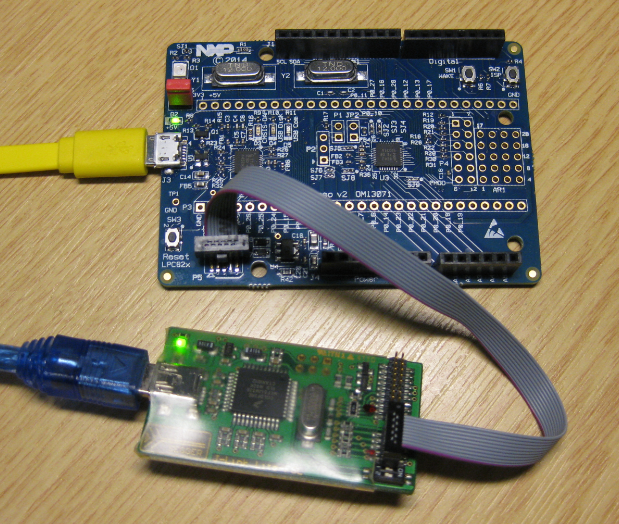
So NXP has announced that they want to take over Freescale (see this press release). In an earlier post I experimented how Freescale tools could be used in NXP tools, see “Merging NXP LPCXpresso IDE with Freescale Kinetis Design Studio, Processor Expert and Kinetis SDK“. Just for fun, I want to do the acquisition the other way round: Using Freescale (now NXP) software and tools to build and debug the LPC824 from NXP :-).

Debugging the NXP LPC824 with Freescale J-Link Lite

Debugging the NXP LPC824 with Freescale based J-Link Lite

Continue reading

Translating for the world …

English is not my first language, but I use it in this blog because that way I can reach a broader audience. If I would use Swiss German, only a few would be able to understand what I write about: “WΓ€nn I wΓΌrd schwiizerdΓΌtsch bruuche, dΓ€nn chΓΆnt wohl chuum ΓΆpper das hie lΓ€se” ;-).

Google Translate is not prefect, but still it does a fair job of translating web pages. I have added now a Google translate button to this blog side bar. Click on it and have the web page translated to the language of your choice. Try it out:

GoogleTranslate

πŸ’‘ If you are speaking Portuguese and want to learn about the Freescale FRDM-KL25Z board, then check out https://hardwarizando.wordpress.com/2015/08/11/introducao-a-kl25z-codewarrior-processor-expert-e-interrupcoes-periodicas/

Happy Translating πŸ™‚

PS: some of the translations by Google are sooooo funny πŸ™‚

Revert an Eclipse Update Installation

I’ve been running into an issue with an Eclipse plugin update: I updated a plugin, and then broke a critical functionality. What I usually do is to uninstall the plugin (see “Uninstalling Eclipse Plugins“), and then install it again. However, in this case the uninstall ended with an error too :-(.

Uninstall failed

Uninstall failed

What now? How can I revert that plugin installation/update?

Continue reading

Tutorial: Adafruit WS2812B NeoPixels with the Freescale FRDM-K64F Board – Part 5: DMA

This is Part 5 of a Mini Series. In Part 4, I described how to set up the FTM (Kinetis Flex Timer Module) to generate the required waveforms used for DMA operations (see “Tutorial: Adafruit WS2812B NeoPixels with the Freescale FRDM-K64F Board – Part 4: Timer“). In this post I describe how to use to trigger DMA (Direct To Memory) events. The goal is to drive Adafruit’s NeoPixel (WS2812B) with the Freescale FRDM-K64F board:

FRDM-K64F with Adafruit NeoPixel

FRDM-K64F with Adafruit NeoPixel

Continue reading

Tutorial: Adafruit WS2812B NeoPixels with the Freescale FRDM-K64F Board – Part 4: Timer

This is Part 4 of a Mini Series. In Part 3, I described the software concepts (see “Tutorial: Adafruit WS2812B NeoPixels with the Freescale FRDM-K64F Board – Part 3: Concepts“). In this post I describe how to set-up the timer to trigger later DMA operations. The goal is to drive Adafruit’s NeoPixel (WS2812B) with the Freescale FRDM-K64F board:

NeoPixels with FRDM-K64F

NeoPixels with FRDM-K64F

Continue reading

Tutorial: Adafruit WS2812B NeoPixels with the Freescale FRDM-K64F Board – Part 3: Concepts

This is Part 3 of a Mini Series. In Part 2, I described how to set up the development tools and to debug the first project (see “Tutorial: Adafruit WS2812B NeoPixels with the Freescale FRDM-K64F Board – Part 2: Software Tools“). Now it is time to look into the software concepts. The goal is to drive Adafruit’s NeoPixel (WS2812B) with the Freescale FRDM-K64F board:

Adafruit 8x8 NeoPixel Shield with Freescale FRDM-K64F Board

Adafruit 8×8 NeoPixel Shield with Freescale FRDM-K64F Board

Continue reading