Sometimes it happens that arm-none-eabi-gdb complains about “no source file named” in the GDB console view in Eclipse when I debug a project with GDB:

No Source File Named in GDB Console

Sometimes it happens that arm-none-eabi-gdb complains about “no source file named” in the GDB console view in Eclipse when I debug a project with GDB:
No Source File Named in GDB Console
FreeRTOS seems to get more and more popular, and I think as well because more and more debugger and Eclipse IDE vendors add dedicated debugging support for it.

FreeRTOS Threads in Eclipse
By default, the GNU Linker expects a very special naming scheme for the libraries: the library name has to be surrounded by “lib” and the “.a” extension:
lib<NAME>.a
But what if the library I want to use does not conform to that naming standard?

Non-conforming Library Naming
The benefit of an IDE like Eclipse is: it makes working with projects very easy, as generates make files and it takes and automatically manages the make file(s). But sometimes this might not be what I want because I need greater flexibility and control, or I want to use the same make files for my continues integration and automated testing system. In that case a hand crafted make file is the way to go.
One thing does not exclude the other: This article explains how to use make files with Eclipse with similar comfort as the managed build system in Eclipse, but with the unlimited power of make files:

Makefile Project with Eclipse
A bootloader on a microcontroller is a very useful thing. It allows me to update the firmware in the field if necessary. There are many ways to use and make a bootloader (see “Serial Bootloader for the Freedom Board with Processor Expert“). But such a bootloader needs some space in FLASH, plus it needs to be programmed first on a blank device, so a JTAG programmer is needed. That’s why vendors have started including a ROM bootloader into their devices: the microcontroller comes out of the factory with a bootloader in FLASH. So instead writing my bootloader, I can use the one in the ROM.

FRDM-KL03Z with ROM Bootloader
And as with everything, there are pros and cons of that approach.
If you are like me – someone who always wants to know what the compiler generates for a piece of source code – then have a look at the Compiler Explorer: A web-based compiler code comparison tool:

Compiler Comparison
Thanks to Matt Godbolt, I can select different compilers and compare their output for a given source code. Very useful to see the impact of a compiler optimization or to compare different GCC compiler versions.
Happy Comparing 🙂
For reliable applications, I avoid using functions of the standard libraries. They are banned for most safety related applications anyway. I do not use or avoid malloc(), printf() and all the other variants, for many reasons including the ones listed in “Why I don’t like printf()“. Instead, I’m using smaller variants (see “XFormat“). Or I’m using only the thread-safe FreeRTOS heap memory allocation which exist for many good reasons.
Things get problematic if malloc() still is pulled in, either because it is used by a middleware (e.g. TCP/IP stack) or if using C++. Dave Nadler posted a detailed article (http://www.nadler.com/embedded/newlibAndFreeRTOS.html) about how to use newlib and newlib-nano with FreeRTOS.

FreeRTOS Newlib Memory Allocation Scheme
Some silicon vendors provide their Eclipse example and SDK projects using linked files and folders. For example a bootloader demo application is provided in the context of an SDK or library. That’s fine until the time I want to transform such an example into a real project or if I want to have it without the hundreds of files for all the other devices I don’t need or use. I cannot take the project and put it into a version control system as the linked files won’t be in my VCS. I cannot move the project to another place as the links are pointing to many places. What I need is a ‘standalone’ project: a project which has all the needed files in it and is self-containing.

Eclipse Project with Linked Files and virtual groups
In many sources I have ‘inactive’ code: source code which is disabled by some macros or defines. Eclipse is great to ‘gray’ out the inactive parts using its Indexer, but they still need screen real estate:

inactive Code in Eclipse Source View
Don’t get me wrong. I love a good slow-smoked and true BBQ pulled pork shoulder just as probably everyone else out there. And I love the babysitting (aka beer drinking 🙂 ) while the shoulder gets that incredible taste inside the smoker. But my workload for this weekend is insane high with all the university exam and grading work. My family loves that pulled pork too, and I knew upfront that I would not have the time to check and handle the smoking process for 12-18 hours (see “Easter Weekend Apple Juice Brined Pulled Pork Smoked on Beech Wood“). So I decided to prepare pulled pork the ‘easy’ way: Using a Sous Vide cooker and then use a normal oven to finish it. So it was an experiment, and the result is interesting:
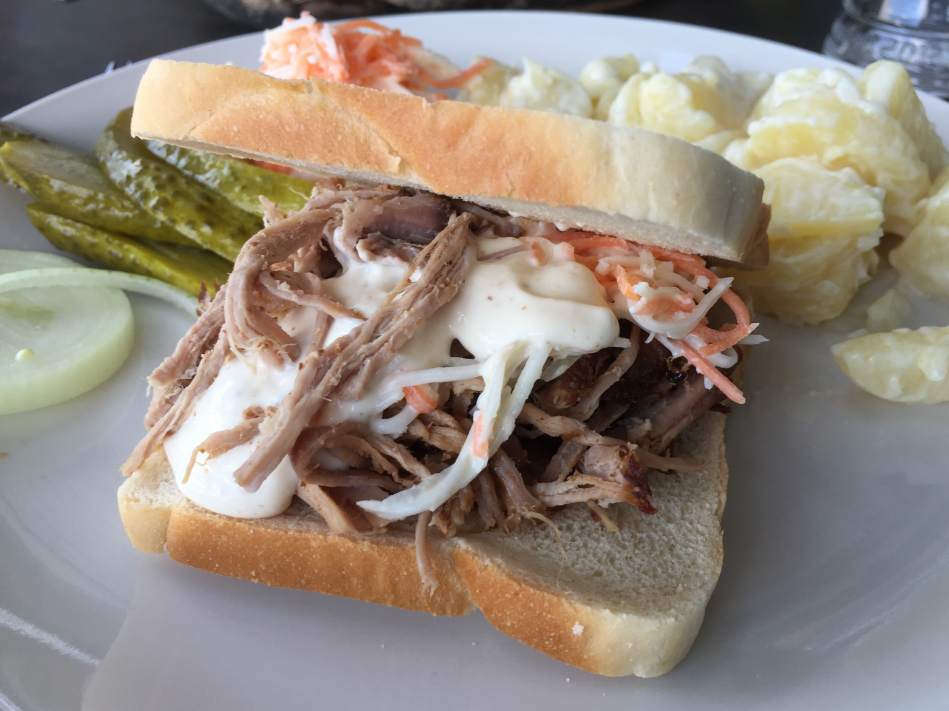
Pulled Pork on Toast
 MCU on Eclipse