As promised I’m going to share more details about the “60 Billion Lights” project. It is about a project to build a piece of electronics behind a 100×50 cm canvas to show animations or to display information like temperature, humidity, weather, time or just any arbitrary text.
Tag Archives: LPC
Tutorial: Adding FreeRTOS to where there is no FreeRTOS
FreeRTOS is pretty much everywhere because it is so simple and universal, and it runs from the smallest to the biggest systems. But it still might be that for the microcontroller device you have selected there is no example or SDK support for it from your vendor of choice. In that case: no problem: I show how you could easily add FreeRTOS plus many more goodies to it.
“60 Billion Lights”: 2400 RGB LEDs and 120 Stepper Motors hiding behind Canvas Art
It is one thing to create something ‘cool’ or technically interesting. But it is a completely different story to convince your girlfriend, partner, wife, family (or whatever you can name it) to hang something on a wall in our house or office. Then it is not about technology: it is more about design and art. So here is my attempt to solve that challenge:
LPC55S16-EVK: how fast does it go? How much current does it take?
I will always take the same approach when I receive a new embedded board: firstly I want to see how quickly I can get it up-and-running, then I want to see what it does “out-of-the-box” and finally I want to find out if the board is “useful”. Does it have some features that will inspire me for new projects??
The NXP LPC55S16-EVK has some great features – CAN-FD, dual USB and a high performance Cortex M33 microcontroller, running at 150 MHz. I have an idea to use the LPC55xx series as the basis for a Weather Station. But this is only feasible if the chip has a low power consumption and can run for weeks on a small battery.
Time to run some test code and get my digital multimeter out…
Continue readingNXP LPC55S16-EVK: unboxing and first impressions
Hi, this is Mark from embeddedpro in the United Kingdom and I’m back with more videos and blogs. In the next few weeks there are two new Cortex M33 development boards becoming available. I’ll blog about my first impressions of the boards, and what I’ve been doing with them. I want my blogs give you some tips, hints and ideas about things that you can do: let me know in the Comments below.

Implementing FreeRTOS Performance Counters on ARM Cortex-M
When using an RTOS like FreeRTOS, sooner or later you have to ask the question: how much time is spent in each task? The Eclipse based MCUXpresso IDE has a nice view showing exactly this kind of information:
For FreeRTOS (or that Task List view) to show that very useful information, the developer has to provide a helping hand so the RTOS can collect this information. This article shows how this can be done on an ARM Cortex-M.
DIY ‘Meta Clock’ with 24 Analog Clocks
Human since 1982 claims
“Human since 1982 have the copyright to works displaying digital time using a grid arrangement of analog clocks…”
I’m not a lawyer, but without obligations (imho) I have removed the content.
You can read more of the details here: Copyright Law for Makers and Educators
Thanks for understanding,
Erich
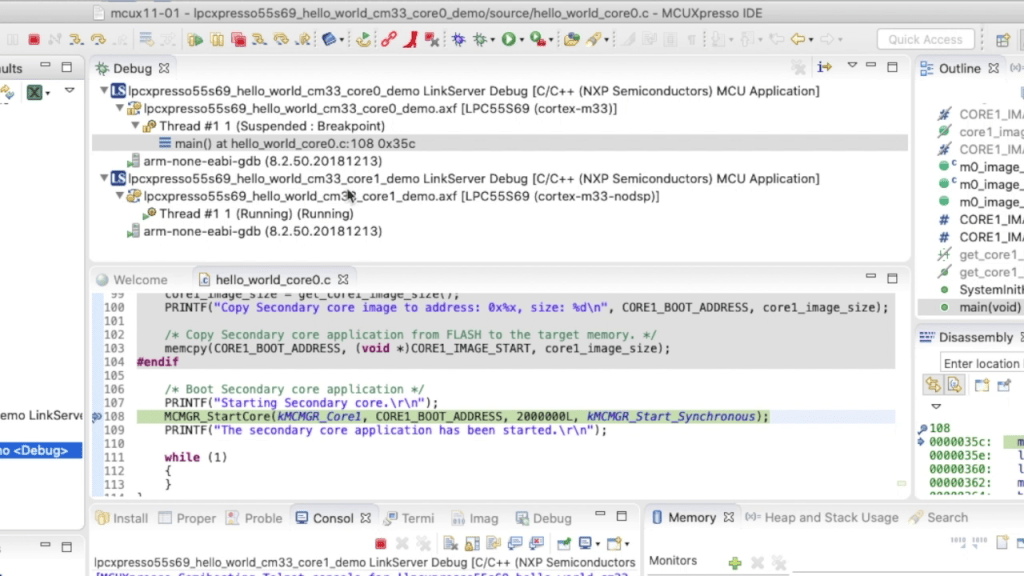
Investigating ARM Cortex® M33 core – Dual Core debug tutorial
In last week’s blog I explained that the LPC55S69 microcontroller from NXP has two Cortex® M33 cores, named core0 and core1. There was a lot of theory, and so this week I put it all into practice and show you how to debug 2 cores with MCUXpresso IDE.

Investigating ARM Cortex® M33 core – NXP LPC55S69 has *two* M33 cores.
Throughout this series I’ve been using the LPC55S69 microcontroller from NXP as a platform to investigate the ARM Cortex® M33 core. NXP designed the LPC55S69 with two Cortex M33 cores and so this week I’m investigating these in more detail.
You’ll remember that when ARM launch a processor core it will have a number of optional features. This is shown very clearly on the LPC55S69. The 150 MHz primary core – cpu0 – is a full implementation of Cortex® M33 and includes the optional components FPU, MPU, DSP, ITM and the TrustZone® features.

Investigating ARM Cortex® M33 core – DSP Acceleration 3 (PowerQuad FFT Tutorial)
I’ve always felt that the Fourier Transform (and in particular the embedded implementation Fast Fourier Transform) is the GOAT* of the DSP algorithms. The ability to convert a time-domain signal into a frequency-domain signal is invaluable in applications as diverse as audio processing, medical electrocardiographs (ECGs) and speech recognition.
So this week I’ll show you how to use the Transform engine in the PowerQuad on LPC55S69 to calculate a 512-point FFT. All of the difficult steps are very easily managed and the PowerQuad does all of the very heavy lifting.