In my previous articles I have used the command line on Linux to build and debug NXP MCUXpresso SDK applications. In this article I’m running code on NXP i.MX RT1064 in RAM or FLASH.

i.MXRT1064 board with LPC845-BRK as debug probe

In my previous articles I have used the command line on Linux to build and debug NXP MCUXpresso SDK applications. In this article I’m running code on NXP i.MX RT1064 in RAM or FLASH.
i.MXRT1064 board with LPC845-BRK as debug probe
The LPC55S69-EVK board comes on-board debug probe. The board includes the LPC4322JET100 device which acts like NXP LPC-Link2 debug probe:
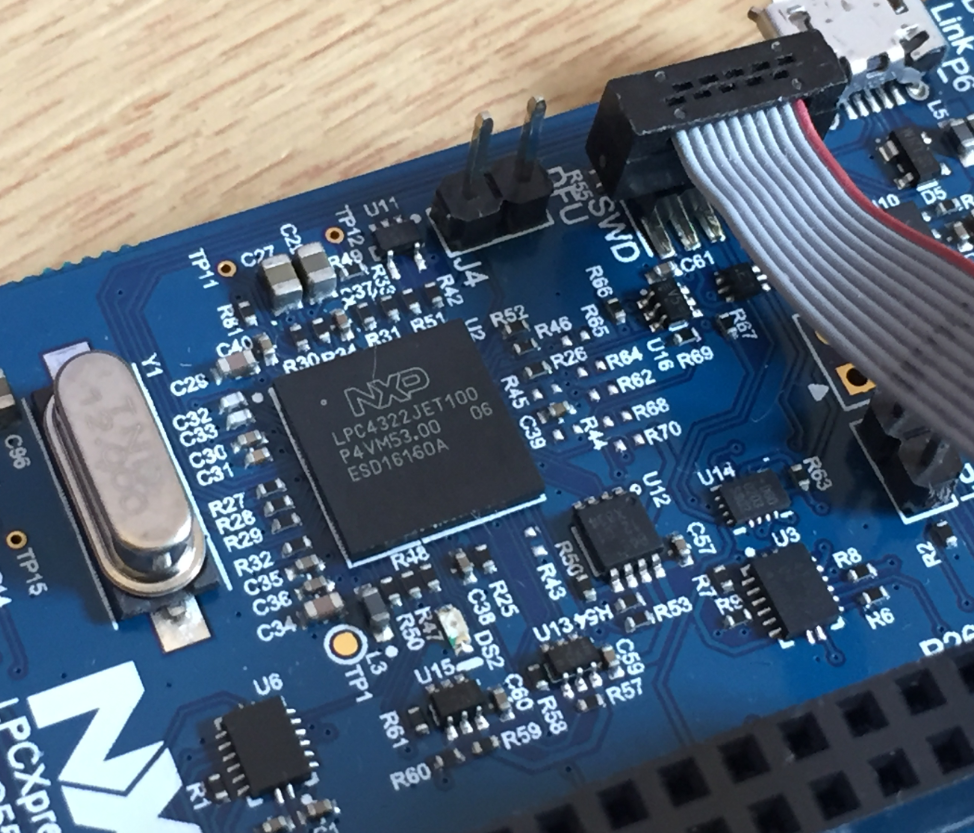
LPC4322JET100 on LPC55S69-EVK
But it is easily possible to use the board with an external debug probe or re-program the onboard one as a SEGGER J-Link debug probe.
There are different ways to ruin a Linux system. For the Raspberry Pi which uses a micro SD card as the storage device by default, it comes with two challenges:
For problem one I do I have a mitigation strategy (see “Log2Ram: Extending SD Card Lifetime for Raspberry Pi LoRaWAN Gateway“). Problem two can occur by user error (“you shall not turn it off without a sudo poweroff!”) or with the event of a power outage or black out. So for that problem I wanted to build a UPS for the Raspberry Pi.

Raspberry Pi with UPS System and tinyK22
The ARM TrustZone is an optional security feature for Cortex-M33 which shall improve the security for embedded applications running on microcontroller as the NXP LPC55S69 (dual-core M33) on the LPC55S69-EVK.

NXP LPC55S69-EVK Board
For the long Easter weekend I have organized a new toy: the NXP LPC55S69-EVK board: a dual ARM Cortex-M33 running at 100 MHz with ARM TrustZone:

LPC55S69 Microcontroller
The long Easter Weekend has its benefits, beside of preparing lecture material and writing up geeky technology articles :-). I love that view with meadows sprinkled with all the Dandelion, and the snow-covered mountains in the back. Back on the left the peaks of the Mythen.

Talkessel Schwyz (click to enlarge)
In “Tutorial: MCUXpresso SDK with Linux, Part 1: Installation and Build with Maked” I used cmake and make to build the SDK application. In this part I’m going to use the command line gdb to debug the application on the board.

Cross-Debugging with GDB
Spring time definitely arrived in the lower areas of Switzerland, with the snow melting away in the higher areas.

Blooming Pear Tree
I admit: my work laptop machine is running a Windows 10 OS by default. But this does not prevent me running Linux in a Virtual Machine (VM). Each host platform has its benefits, and I don’t feel biased to one or the other, but I have started using Ubuntu more and more, simply because I have worked more on Embedded Linux projects. While I have used mostly Windows with Eclipse for NXP LPC, Kinetis and i.MX platforms in the past, I started using Ubuntu too from last year with the NXP MCUXpresso SDK. I did not find much documentation about this on the web, so I thought it might be a good idea to write a tutorial about it. So here we go…

Building NXP MCUXpresso SDK on Linux Ubuntu

 MCU on Eclipse