The bad news: my ESC (see “Kinetis Drone: Graupner ESC S3055 Failure“) for my Kinetis drone is still not repaired :-(. Anyway, I have plenty of other things to make for my drone project. One is to work on the remote controller:
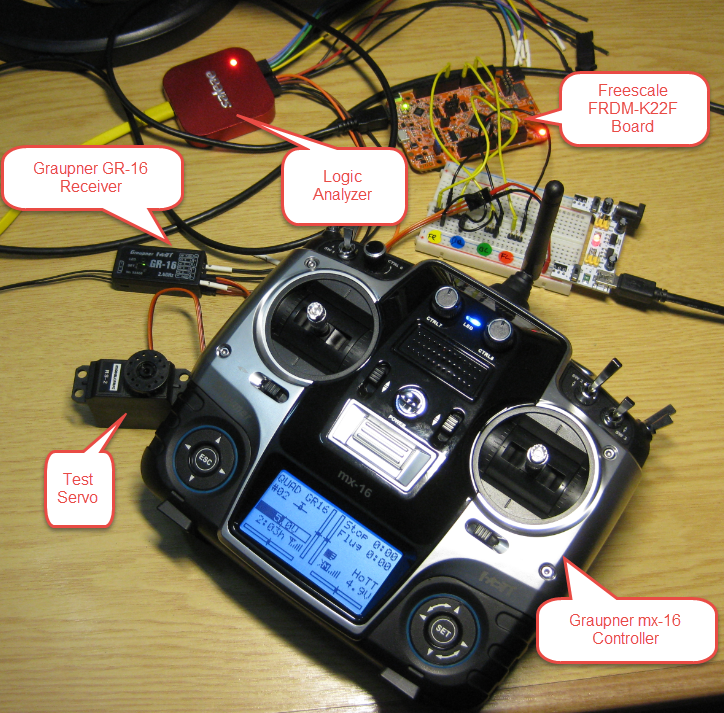
Test Setup
The bad news: my ESC (see “Kinetis Drone: Graupner ESC S3055 Failure“) for my Kinetis drone is still not repaired :-(. Anyway, I have plenty of other things to make for my drone project. One is to work on the remote controller:
Test Setup
This tutorial is about how to create a lwIP project with FreeRTOS using the Kinetis SDK V1.3.0 with Kinetis Design Studio on the Freescale FRDM-K64F board.

FRDM-K64F Board with lwIP running
Mastering interrupts is critical to make an embedded application reentrant. The challenge with reentrancy is that things might be implemented in a wrong way and the issue might just show up sporadically (see “EnterCritical() and ExitCritical(): Why Things are Failing Badly“). The ARM Cortex interrupt controller is named NVIC (Nested Vectored Interrupt Controller).

ARM Cortex NVIC Registers
Probably for cost reasons, the Freescale FRDM-K22F does not come with the micro SD card socket populated on the the board:
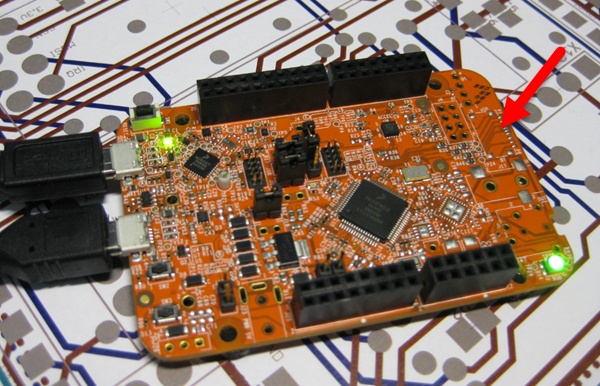
Freescale FRDM-K22F Board with no SD card socket
With a little soldering skills it is possible to populate the socket so the board can be used with a file system on it :-):
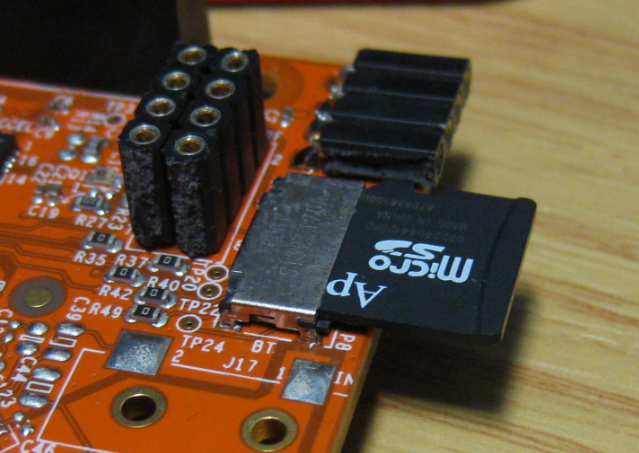
Using SD card with FRDM-K22F Board
It is possible to use the Freescale FRDM-KL43Z to debug another board (see “Using the Freescale Freedom (FRDM-KL43Z) to Debug other Boards“). The FRDM-KL43Z has an on-board debug probe integrated, the OpenSDA. But it is easily possible to debug the board directly with a SWD debug probe like the P&E Universal Multilink or the Segger J-Link.

Debugging the FRDM-KL43Z with SWD
I don’t own a Mac computer, and I try to keep my tutorials as multi-host-platform as possible. So it is always cool to see if someone else posts a nice tutorial on a different host machine: For all Mac (and as well non Mac) users, have a look at this tutorial Nash Reilly has posted: “An Introduction to Freescale’s Kinetis Design Studio.”

It nicely explains downloading and installing KDS with the Kinetis SDK and then run a ‘hello world’ program on the hardware.
And very worthwhile to check out Nash’s other articles here too: http://www.allaboutcircuits.com/author/nash-reilly
Happy Nashing 🙂
In “Kinetis Drone: Frame Construction with Graupner Race Copter Alpha 250 Q” I have assembled the frame for my Kinetis Drone. In this post I’m going to drive the ESC’s (Electronic Speed Controllers) with the Freescale FRDM-K22F board:
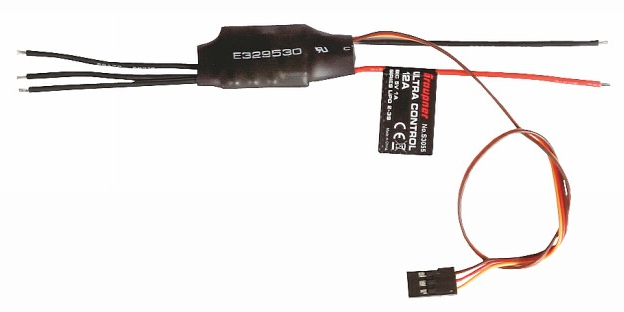
Graupner S3055 ESC (Source: Graupner)
FreeRTOS is probably the most popular RTOS used and I love it: it is efficient, has a lot of features, simple and easy to use. But despite its popularity, debugging it with open source tools as with Eclipse and GDB is really not that user-friendly: debugging threads/tasks is a pain compared to commercial solutions. For my university classes this semester I was looking for something easy to use by my students. Finally I managed to use a GDB helper which makes things easier now: I can switch task threads in Eclipse with GDB now 🙂

Switched to Shell Task
Every day, there is something new to learn. And having problems is always a good learning opportunity :-). Yesterday we were able to find a strange problem with our tinyK20 prototypes, just before we were about to send the design for manufacturing.

Kinetis K20 on tinyK20 Board
Sometimes I need to link an object file (e.g. bootloader.o) to my application, and I do not want to build it, or I do not have the sources to build it. There is a simple way with the GNU ARM Eclipse plugins to link extra object files:

Other Objects for GNU Linker

