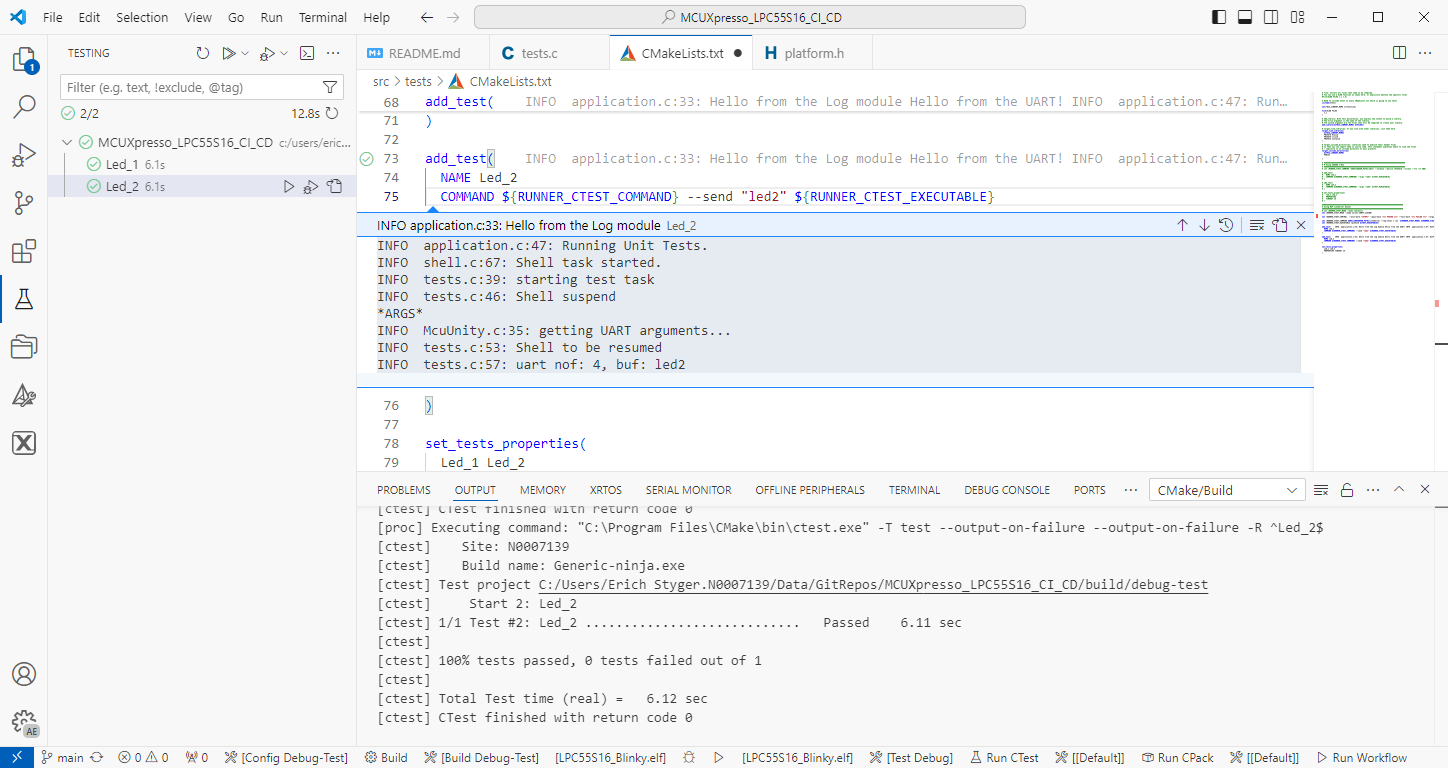
The release 24.9.75 of LinkServer software and tools includes interesting feature: the ability to use the debug probe for automated on-target testing. It includes a ‘runner’ which can program, launch and run the application on the target through a debug probe. While the target is running, it uses semihosting or UART for communication. This makes it a perfect tool for automated testing, especially in a CI/CD environment. One such environment is running automated tests with CMake and CTest in VS Code.
Automated on-target testing with VS Code and LinkServerContinue reading →
SEGGER has released a new version of their J-Link tools suite. That suite includes the J-Run utility which loads, executes and monitors the output of the target. Output can be with RTT (Real-Time Transfer) or semihosting. This makes it useful for automated tests with CMake and CTest:
CTest with J-Run
What has been added from the V7.98g release is the ability to send arguments to the running application using the --args command, for example with CMake/CTest:
set (RUNNER_CTEST_COMMAND "$ENV{SEGGER_PATH}/JRun" --verbose --device LPC55S16 --silent --rtt -if SWD)

add_test(
  NAME Led_1
  COMMAND ${RUNNER_CTEST_COMMAND} --args "Led_1" ${TEST_EXECUTABLE}
)
Like applications running on the host, I can now pass arguments to the running application. This is useful to set up the target, or to tell which kind of tests to run.
Europe is currently facing an ‘Energy Crisis,’ and ‘Sustainability’ is a popular topic among companies. However, embedded engineers go beyond talking—they take action and make tangible changes in the world. With the increasing use of electronic devices, minimizing their energy and power consumption is crucial. Optimizing systems for deep low power or deep low energy is a challenging task. Nonetheless, as I will demonstrate in this article, it is possible to reduce energy consumption by a factor of 100 or more. This article provides a brief overview of the foundational concepts and then applies them step-by-step to an ARM Cortex microcontroller.
The MCU-Link debug probes are versatile and very useful debug probes from NXP. This article describes how to update the firmware on it, both the ‘traditional’ way with using the ISP jumper, and the new way using a command line script without the need to use a jumper.
Need to debug your robot or drone? In a HSLU university research project I’m using a Pixhawk and PX4 based drone hardware. Pixhawk and PX4 is an open standard for drone hardware and firmware and runs with NuttX RTOS. It is mainly used for drones, but is very capable for any other kind of mobile robots.
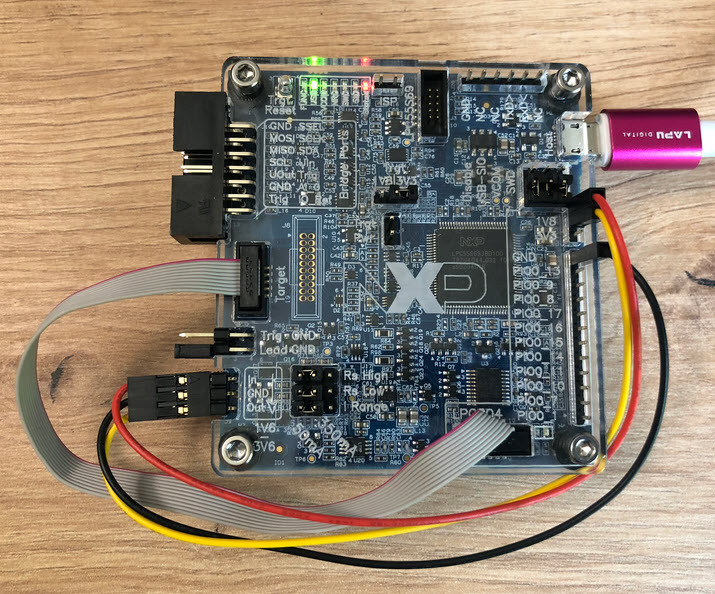
With the Pixhawk 6x-RT there is a powerful flight controller, using the NXP i.MX RT1176 dual-core processor. While this and other controller hardware do offer a hardware debug probe, it is not a simple task as there are different pin-outs and connectors, making debugging a mess with different cables and adapters. To simplify this, I have now a unified debug CMSIS-DAP debug probe using the NXP LPC55S69 as processor, with all the different headers and UART adapters included: the MCU-Link-MR (Mobule Robots) debug probe.
Many cost-sensitive ARM Cortex-M devices like the M0+ do not have a hardware floating point unit, and some like the M4 only has an optional single-precision floating point unit (FPU). As outlined in “Be aware: Floating Point Operations on ARM Cortex-M4F“, using floating point operations without a hardware unit can be costly.
Looking at the disassembly for sure will tell you if the hardware is handling the float or double operation or not:
Disassembly showing runtime routines
But who wants check the all the disassembly? With the GNU tools there is an easier way: readelf.
The new year 2024 is coming, so time to close the current year with a new release: I’m pleased to announce a new release of the Processor Expert components, available on SourceForge and GitHub.
Upgrading to a newer GNU toolchain always has its risks. That’s why I always recommend to stay on a given toolchain for production code.
But sometimes one needs to upgrade, or gets a code or project that works in one environment, but not in another. Today I have run into a problem with code read-out projection:
Disabled Automatic Placement of Code Read Protection
Well, the code read-out protection is not the root of the problem, but a good example why problems could occur.
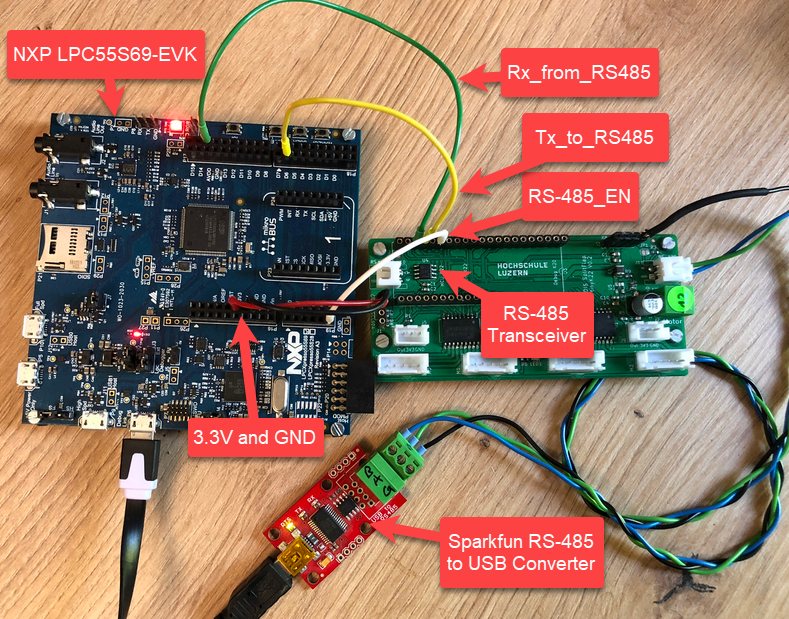
I’m using the RS-485 field bus in many of my projects: it is very reliable and robust, and easy to implement. And with ModBus there is standardized protocol used in building automation or industrial control applications. For example I’m using the protocol to communicate between battery systems and an EV Charger.
NXP LPC55S69-EVK with RS-485
In this article I show you with an example, how the NXP LPC55S69 can be used with RS-485.




 MCU on Eclipse