Eclipse as IDE takes care about compiling and building all my source files. But in an automated build system I would like to build it from the command line too. While using make files (see “Tutorial: Makefile Projects with Eclipse“) is an option, there is another easy way to build Eclipse projects from the command line:
Category Archives: LPC
Breathing with Oxygen: DIY ARM Cortex-M C/C++ IDE and Toolchain with Eclipse Oxygen
Last month (June 2017), the latest version of Eclipse “Oxygen” has been released, and I have successfully used it in several embedded projects. Time to write a tutorial how to use it to build a custom Do-It-Yourself IDE for ARM Cortex-M development: simple, easy, unlimited and free of charge. While the DIY approach takes a few minutes more to install, it has the advantage that I have full control and I actually know what I have.
Custom 3D Printed Enclosure for NXP LPC-Link2 Debug Probes
I love 3D printing as it enables me to create custom enclosures for all kind of projects. The NXP LPC-Link2 probe is great, but it lacks a protective enclosure. So I decided to create a custom enclosure. And as 3D filaments are available in different colors, I experimented with red and black and custom painting:
EmbSysRegView 0.2.6 for Eclipse Neon and Oxygen
Good news! There is an updated version of the EmbSysRegView v0.2.6 available which works now for Eclipse Neon and Oxygen :-).
How to use Custom Library Names with GNU Linker and Eclipse
By default, the GNU Linker expects a very special naming scheme for the libraries: the library name has to be surrounded by “lib” and the “.a” extension:
lib<NAME>.a
But what if the library I want to use does not conform to that naming standard?
Tutorial: Makefile Projects with Eclipse
The benefit of an IDE like Eclipse is: it makes working with projects very easy, as generates make files and it takes and automatically manages the make file(s). But sometimes this might not be what I want because I need greater flexibility and control, or I want to use the same make files for my continues integration and automated testing system. In that case a hand crafted make file is the way to go.
One thing does not exclude the other: This article explains how to use make files with Eclipse with similar comfort as the managed build system in Eclipse, but with the unlimited power of make files:
MCUXpresso IDE v10.0.2 – Updated Eclipse based IDE for LPC and Kinetis
NXP has released an updated of their Eclipse based IDE for ARM Cortex-M (Kinetis and LPC) microcontroller: the version v10.0.2 build 411:
Using FreeRTOS with newlib and newlib-nano
For reliable applications, I avoid using functions of the standard libraries. They are banned for most safety related applications anyway. I do not use or avoid malloc(), printf() and all the other variants, for many reasons including the ones listed in “Why I don’t like printf()“. Instead, I’m using smaller variants (see “XFormat“). Or I’m using only the thread-safe FreeRTOS heap memory allocation which exist for many good reasons.
Things get problematic if malloc() still is pulled in, either because it is used by a middleware (e.g. TCP/IP stack) or if using C++. Dave Nadler posted a detailed article (http://www.nadler.com/embedded/newlibAndFreeRTOS.html) about how to use newlib and newlib-nano with FreeRTOS.
MCUXpresso IDE: Blinky the NXP LPC800-DIP Board
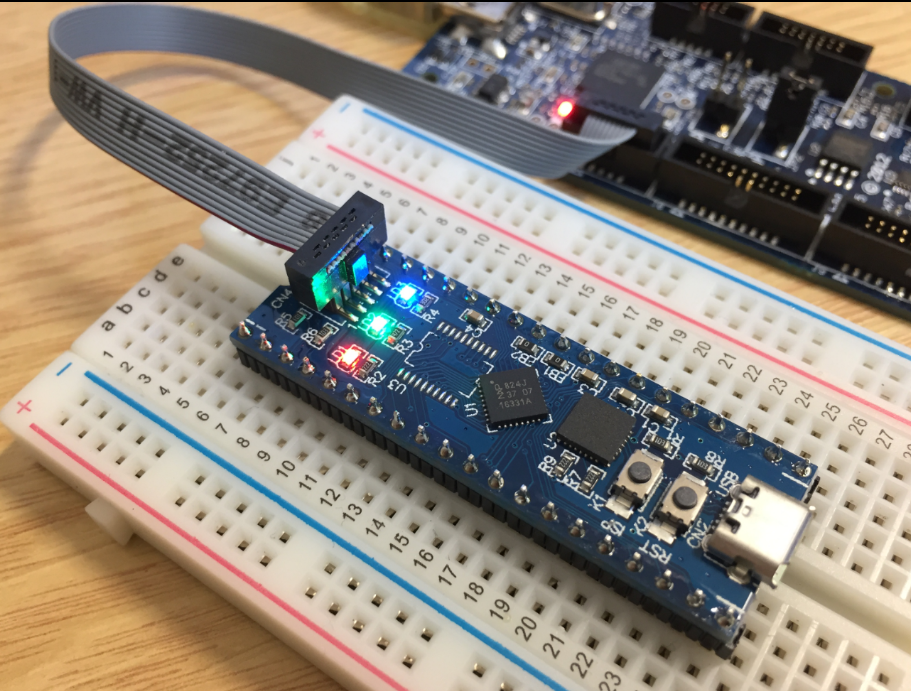
During Embedded World 2017 in Nürnberg I was lucky to get a handful LPC800-DIP boards. To get all students who were lucky to get one, here is a tutorial to make that very exciting ‘blinky’ application on that board:
MCUXpresso IDE: Terminate and Disconnect a Debug Session
Eclipse for C/C++ (CDT) offers two different ways to get out of a debug session: Terminate and Disconnect:
The terminate and disconnect behaviour is not standardized, and varies between Eclipse distributions and debug connection. This article is about how things are handled in MCUXpresso IDE, and how I can influence the behaviour.