Using Legacy Devices with LinkServer

The Freescale K20DX128 MCU was one of the first ARM Cortex-M devices of that company (now NXP) back in 2012, and the FRDM-K20D50M board was the first ‘FRDM‘ board of a long and successful series of boards, starting back in 2013. I still have the K20 present in many of my designs. The challenge with ‘early’ or ‘legacy’ devices is that after a while, they are ‘not recommended’ any more, and it is hard to get support for them. So for example in newer tooling and software from NXP, there is no support for the K20.

MCU-Link (NXP, left) debugging FRDM-K20 (Freescale, right) board

So if you still have the K20 around, and need some newer tooling, then I have good news for you: It is possible to add that good-old-Kinetis to the list of supported LinkServer devices, so you are not stuck and can use newer debugging solutions for the K20.

Continue reading

LinkServer Scripting, and how to Recover MCUs with a Script

The MCU-Link is an inexpensive CMSIS-DAP debug probe from NXP. It can be used as a GDB server debug probe, and as such it includes scripting support. This scripting can be very useful in some cases where the MCU cannot be accessed by a normal debug session. This happens for example if students are not pay attention what binary they flash to which device, causing an MCU to potentially get ‘bricked’.

NXP MCU-Link debug probe connected to Sumo Robot
Continue reading

Catchpoints: Unlimited Number of FLASH Breakpoints with GDB

Embedded hardware comes with limitations, and one if it is the given number of hardware breakpoints. Depending on your MCU, 4 or only 2 hardware breakpoints are available, making debugging and stepping in read-only memory (FLASH) a challenge.

Debugging NXP LPC845 with unlimited FLASH Breakpoints using MCU-Link

Did you know that one can have ‘unlimited’ number of breakpoints in FLASH, with the help of GDB? This is very useful for extended debugging, or if you want to use breakpoints for testing?

Continue reading

Creating a GNU Assembly-Only Project

Sometimes it makes sense to write everything in assembly, even these days. For example if using a tiny microcontroller. Or just if one just don’t need all the productivity of the C/C++ tools. And it is a good educational experience: getting hands-on on the lower levels.

Debugging an Assembly-Only Project
Continue reading

LinkServer for Microcontrollers

GDB is the de-facto debugging engine and debug connection for micro-controllers these days: it is versatile and with its client-server architecture very flexible and powerful, and pretty much every debug probe and vendor (PEMICRO, SEGGER, OpenOCD, pyOCD, …) offers it. But a GDB server or command line implementation was not available for the NXP LinkServer family of debug probes (LPC-Link, MCU-Link, MCU-Link Pro). This has changed now: LinkServer is available as command line tool and can be used as GDB Server:

LinkServer as GDB Server with Eclipse

With the new LinkServer package I do not only get a gdb server implementation: I have now a command line tool I can use for automation and all kind of different things: programming boards, erasing flash, and so on.

Continue reading

Booting J-Link as CMSIS-DAP Debug Probe

Mostly unnoticed (at least for myself), SEGGER has enabled some of the J-Link debug probes to support the CMSIS-DAP debug protocol.

SEGGER J-Link as CMSIS-DAP Debug Probe

This greatly enhances the use of J-Link debug probes for CMSIS-DAP based tools.

Continue reading

Added Heap Memory Monitoring and Tracking to FreeRTOS V10.5

We all should know it: dynamic memory usage can be dangerous. There can be memory fragmentation, use-after-free, out-of-memory and memory leaks. While I do prefer static memory allocation for embedded systems, using a dynamic memory allocation in some applications is not avoidable or just makes sense.

In one of my lecture modules we develop a ‘Boulder’ game, where the player has to collect underground diamonds and avoid moving monsters:

LPC845-BRK with OLED using dynamic memory allocation

I’ll show you have FreeRTOS memory usage can be tracked and monitored.

Continue reading

Different Laser-Cut Enclosures for the MCU-Link

The MCU-Link debug probe comes without an enclosure. To protect the hardware against ESD issues, I had created a 3D printed enclosure for it. That one worked fine, but takes some time to print it. If you have to build many enclosures for a full classroom setup, then a laser cutter is much faster. And to create some variations, I have decided to cut it with different materials and colors. To be environment friendly, extra glue is needed, and with recycled PMMA, different colors are possible too.

Different laser-cut enclosure: wood, and red, transparent, blue and green PMMA
Continue reading

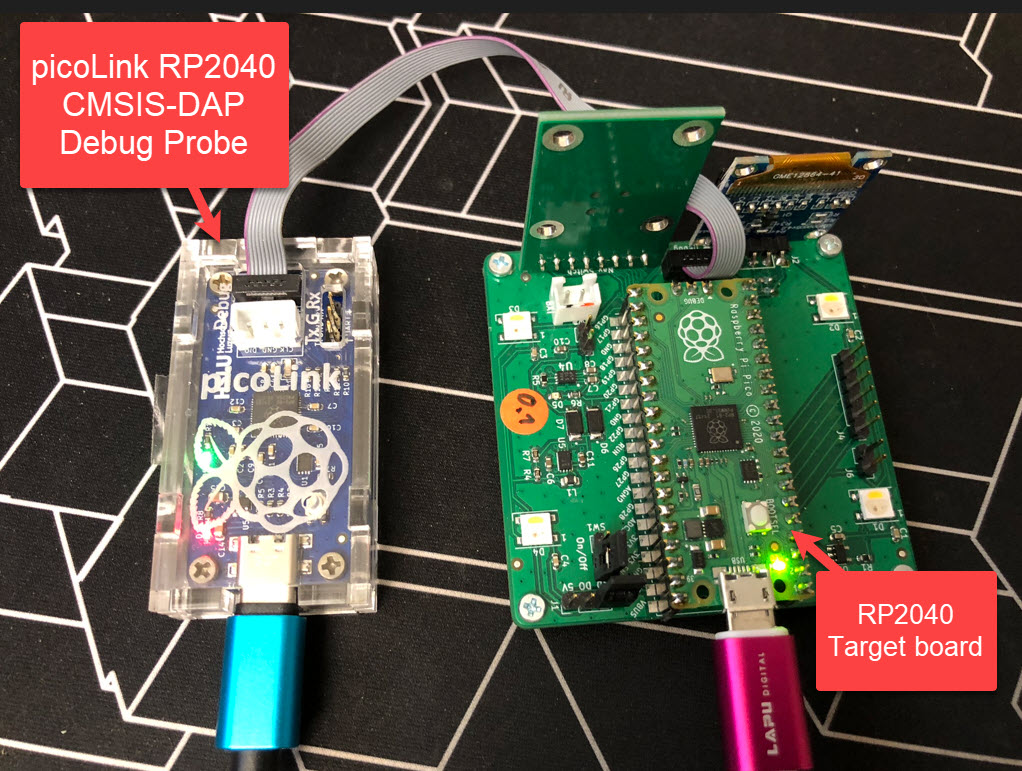
Open Source picoLink: Raspberry Pi RP2040 CMSIS-DAP Debug Probe

One essential part of embedded development is the ability to debug the target application. The good thing with the Raspberry Pi Pico RP2040 Eco-system is: One can use another RP2040 Pico board as a debug probe to debug other ARM Cortex-M devices.

But instead using a Raspberry Pi Pico board with some wires, why not building a dedicated board? The result is a small, versatile and open source debugging probe which virtually can debug any ARM Cortex-M device as a standard ARM CMSIS-DAP probe:

picoLink Debug Probe debugging a Raspberry Pi Pico Board
Continue reading

Changing the Startup: Custom initial PC and SP Register Setting with the Debugger

By default, the debugger cares about the initial register settings after connecting to the target. But for special cases like using a bootloader combined with a loaded application, this requires a bit more than the usually ‘standard procedure’. For example I need to set both a custom program counter (PC) and stack pointer (SP).

How to set custom PC and SP for startup of the application
Continue reading