Debugging FRDM-KL05Z with USBDM

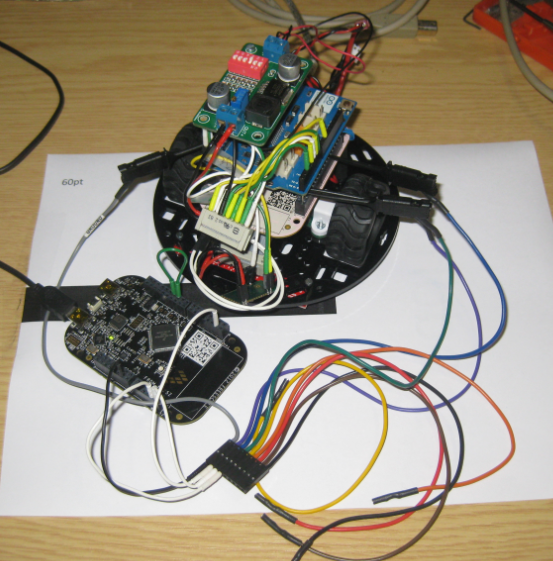
I mentioned in “Debug External Processors with USBDM and Freedom Board” post that I had a problem to debug the FRDM-KL05Z with USBDM. Well, after a long night with some sleep, with more thinking and searching, finally I have it resolved: I can debug my FRDM-KL05Z with USBDM 🙂

FRDM-KL05Z Debugging with USBDM

FRDM-KL05Z Debugging with USBDM

Continue reading

Debug External Processors with USBDM and Freedom Board

Teaching at a university means to work in a very special environment. What students love is ‘Open Source’: because it allows them to ‘see’ things and learn from the technology. The other thing is: students have a low budgets, so they appreciate if they can use inexpensive or low-cost hardware and software. The FRDM-KL25Z Freedom board for sure meets that low price, and no extra programming device needed.

Now they are building their own boards, and they wish to program and debug it. They can borrow the Segger J-Links and P&E Multilinks we have available at the university. But why not use the Freedom board as ‘hobby’ debug and programming solution? As explored in “Using the Freedom Board as SWD Programmer“, they can use the default factory installed OpenSDA to program another microcontroller of same type. But not to debug it.

While writing the “Using the Freedom Board as SWD Programmer” article, I was looking into USBDM. USBDM has added in January 2013 support for OpenSDA. But at that time, it was somehow not working for me, and I had not enough time to find out what the problem was. Time to get that fixed. Good news: With help and tips from the USBDM community, I have it finally working 🙂

USBDM Debugging another FRDM-KL25Z

USBDM Debugging another FRDM-KL25Z

Continue reading

Using the Freedom Board as SWD Programmer

I love the Freescale Freedom boards because they are low-cost, and I do not need a special debug device, as they have the on-board OpenSDA. It is using a small Kinetis-K20 which acts as JTAG SWD debugging probe. Why not using the Freedom board to program another board?

FRDM-KL25Z board programs another board

FRDM-KL25Z board programs another board

Continue reading

A new Freedom Board: FRDM-K20D50M with ARM Cortex M4

Freescale/Farnell/Element14 announced last week a new Freedom Board: the FRDM-K20D50M :-). As you can expect, I was not able to resist, and ordered one from my local Farnell store right away. So I did my first steps with it on this sunny and wonderful weekend (yes! we skipped Spring Time and entered Summer Time right away!).

I do not need to compare the board with the previous Freedom boards, as I have found an article here. I a nutshell: I get pretty much the same as with the FRDM-KL25Z, but instead of an ARM Cortex-M0+, it has an ARM Cortex-M4!

The new FRDM-K20D50M Board

The new FRDM-K20D50M Board

Continue reading

Show it again! (How to re-enable hidden Dialogs in Eclipse)

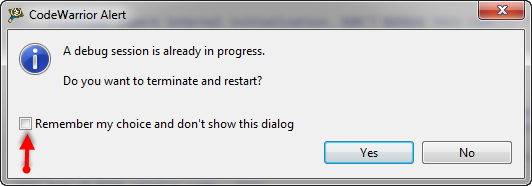
Eclipse has a nice feature to ‘shut up’ dialogs: In many dialogs I can select an option so that dialog does not show up again:

'Dont' show Again' in Dialog

‘Dont’ show Again’ in Dialog

But what if I change my mind later on and what to have this dialog to show up again?

Continue reading

Stepping Backwards while Debugging: Move To Line

It happens to me many times: I’m stepping with the debugger through my code, and ups! I made one step too far!

Debugging, and made one step over too far

Debugging, and made one step over too far

What now? Restart the whole debugging session?

Actually, there is a way to go ‘backwards’ 🙂
Continue reading

First Steps with the P&E Tracelink

“As an engineer, you should ask for the best tools available. Spending money for better tools can make the difference between finding a problem quickly, or wasting days or weeks, and ultimately failing a project.” (unknown)

I had to learn it the hard way: some ‘hard-to-find-problems’ sometimes only can be found with some amount of luck, or with using a good trace solution. CodeWarrior already supports trace, such as using the MTB on the Cortex-M0+. But with this I’m limited to the on-chip trace buffer or on-chip RAM, which is better than nothing. But to solve the real hard problems, a bit of more power and memory is needed. And here where the P&E Tracelink comes into play: with 128 MByte trace buffer it would allow me to record a lot more trace data :-).

Continue reading

Freedom Logic Analyzer with DMA

The FRDM-KL25Z Open Source Logic Analyzer based on SUMP presented here was already very useful with the added trigger support. But it was not capable to do a sampling rate above a few hundred kHz. That’s ok for slower probing, but not for anything with a higher speed. Using DMA (Direct Memory Access) instead of timer based sampling can remove that limitation :-).

FRDM-KL25Z used as Logic Analyzer on another FRDM-KL25Z board

FRDM-KL25Z used as Logic Analyzer on another FRDM-KL25Z board

Continue reading

Skipping Breakpoints

The challenge with small microcontroller like the ARM-Cortex-M0+ is that they have very limited debugging resources. As such, the number of hardware break points is very limited (see this post). For example for the KL25Z on the Freedom board, I only have 2 break points available if I want to do stepping:

No more hardware breakpoints available

No more hardware break points available

Continue reading

Turning the Freedom Board into a Logic Analyzer

I think the most important tool for a firmware engineer is a Logic Analyzer. I always have one on my desk. Working in different locations, sometimes I forget to carry it with me. And  for sure I would need it. To buy another one to compensate my laziness? Or maybe there is another solution? And here I stumbled over an article about the Logic Sniffer project recently: it is about an open source logic analyzer hardware and firmware project. What a cool idea! Why not using my FRDM-KL25Z Freedom board as a Logic Analyzer? Heck, that would be awesome 🙂

I2C Capture with Decoder

Logic Analyzer with the KL25Z Freedom Board

Continue reading