This tutorial goes through the steps how to create a blinking LED application, using Kinetis SDK and Processor Expert, using the TWR-KL43Z48M board from Freescale (now NXP):

twr-kl43z48m

This tutorial goes through the steps how to create a blinking LED application, using Kinetis SDK and Processor Expert, using the TWR-KL43Z48M board from Freescale (now NXP):
twr-kl43z48m
The first enclosure for the INTRO robot remote controller board (see “INTRO Robot Remote – First Production PCB“) is ready, and it is looking good:

Enclosure for the Remote Controller Board
After the first prototype (see “Prototype of Wireless Remote Controller with NXP Kinetis K20“), we have received the boards and populated a first PCB to verify everything is working properly.

INTRO Robot Remote
In “ARM Cortex-M, Interrupts and FreeRTOS: Part 1” I started with the ARM Cortex-M interrupt system. Because the ARM implementation cann be very confusing, I confused myself and had to fix and extend the description in Part 1 :-). Thank for all the feedback and comments!
Originally I wanted to cover FreeRTOS in Part 2. Based on the questions and discussions in Part 1 I thought it might be a good idea to provide visual examples.

NXP KV58F ARM Cortex-M7
The ARM Cortex-M microcontroller are very popular. And it has a very flexible and powerful nested vectored interrupt controller (NVIC) on it. But for many, including myself, the Cortex-M interrupt system can be leading to many bugs and lots of frustration :-(.
ARM Cortex-M7: NXP KV58
Understanding the NVIC and the ARM Cortex-M interrupt system is essential for every embedded application, but even for if using an realtime operating system: if you mess up with interrupts, very bad things will happen….
For next semester I plan to use the tinyK20 as a remote controller for the Zumo Robots. I already had an early prototype presented in “3D Printed Gameboy and Remote Controller with tinyK20 Board“, so here is the next iteration of, in a sneak preview:
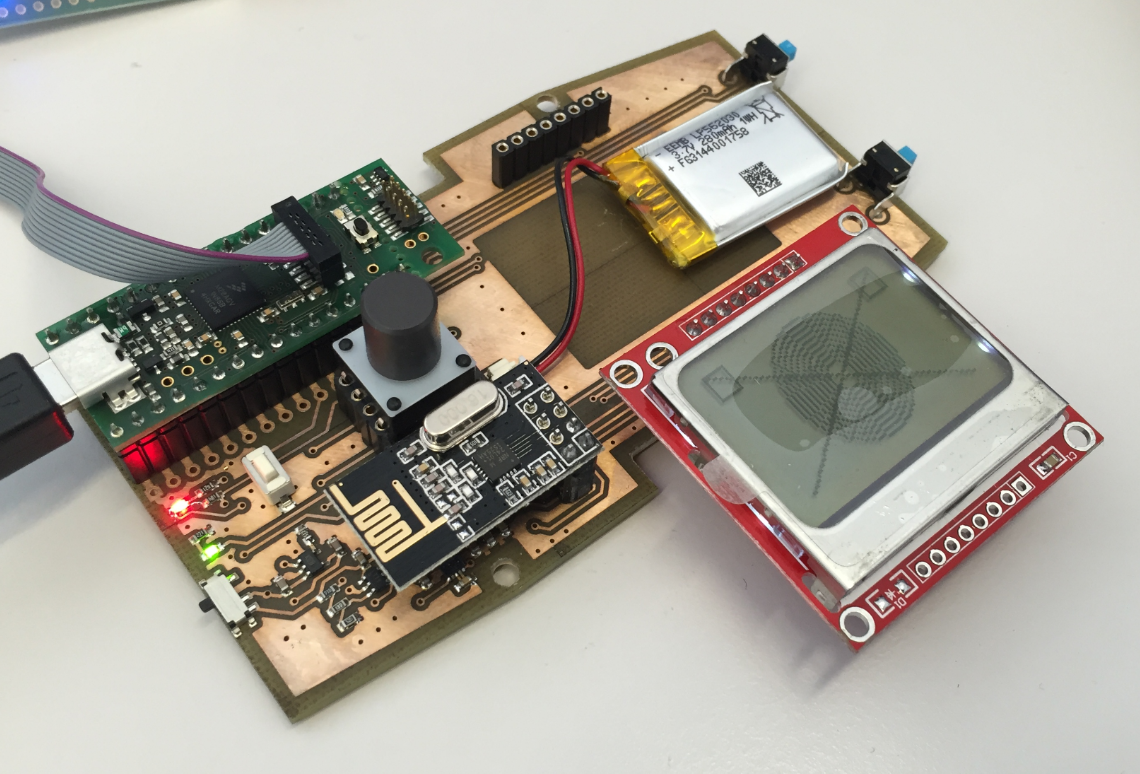
Remote Controller Prototype
To me this was new, and thanks to Liviu I know now how to inspect the command line passed to the GDB server (see “Semihosting (again!) with NXP Kinetis SDK V2.0“) 🙂

Process Properties
I kind of hoped that after “Why I don’t like printf()” and all my other articles about printf and semihosting, that topic would be 200% handled and I won’t have to deal with any more. Well, I was wrong and underestimated how the Kinetis SDK is interfering with semihosting. And I underestimated how many of my readers are still using semihosting (even as there are other and better alternatives), so I keep getting questions and requests for help. That’s ok, and I hope I can help :-).
So here is yet again another post about how to turn on semihosting with Eclipse, GNU ARM Embedded and the Kinetis SDK v2.0. This time with the FRDM-K64F board:

FRDM-K64F Board
Getting a board from a distributor like Farnell/Element14/Mouser (add your own distributor) means that chances are high that the default firmware on it is written years from now because the inventory has not been updated, or because boards are still produced with that original firmware (because of testing?). So what happens if I use board with a firmware developed pre-Windows 8/10 area?

Freshly Unboxed NXP FRDM-KL25Z Board
It might work, but chances are high that the bootloader and firmware is not ready for the ‘modern age’, and as a result the board might be bricked. If you still have a Windows 7 machine around (I do!), you are lucky. If not, then you need to read this article….
 MCU on Eclipse