Debug and Execute Code from FLASH on the Seeed Arch Mix NXP i.MX RT1052 Board

In my previous article “Seeed Studio Arch Mix NXP i.MX RT1052 Board” I described how I can use and debug the Seeed Arch Mix Board. But so far I only had things running in RAM. Ultimately I want to use the QSPI FLASH memory on the device with my firmware and running code on it. This article shows how to get from RAM execution to SPI FLASH in-place execution (XiP).

Seeed Arch Mix NXP i.MX RT1052 Board

Seeed Arch Mix NXP i.MX RT1052 Board

Continue reading

Seeed Studio Arch Mix NXP i.MX RT1052 Board

The Seeed Studio ‘Arch Mix’ board is a small and versatile development board with an NXP i.MX RT1052 on it, and it costs only $29.90. So I was not able to resist and just have ordered one so I can explore it.

Seeed Arch Mix Top Side

Seeed Arch Mix Top Side

Continue reading

Visualizing Global Variables while Target is Running with Eclipse and MCUXpresso IDE

By default, Eclipse provides ‘stop-mode-debugging’: in order to inspect the target code and data, I have to stop the target. But with the right extensions as present in the Eclipse based MCUXpresso IDE, it is possible to inspect the target even while it is running.

Graphing Variables

Graphing Variables

Continue reading

Generating Intel Hex Files with a given Length using srec_cat

The ‘standard’ binary files for many tools are S19, binary or Intel Hex files. Especially for S19 and Intel Hex it can be useful to control the amount of data per line. By default, the GNU objcopy creates files with a line length of 44 characters:

default objcopy binary file line length

default objcopy binary file line length

But it is possible to have Intel Hex files with an custom line length using the SRecord utility, and this is what this article is about.

Continue reading

Black Magic Open Source Debug Probe for ARM with Eclipse and GDB

The ‘Black Magic Probe’ (or in short: BMP) is a very small and open source JTAG/SWD debug probe with a build-in GDB Server. I saw that probe referenced in different places, so I thought I try it out with a few of my NXP LPC and Kinetis boards:

BMP with LPC and Kinetis Boards

BMP with LPC and Kinetis Boards

Continue reading

New NXP MCUXpresso Eclipse IDE v11.0

A few days ago NXP has released a new version of their Eclipse IDE flagship: the MCUXpresso IDE v11.0.

NXP MCUXpresso IDE V11.0.0

NXP MCUXpresso IDE V11.0.0

The previous v10.3.1 was released back in Feb 2019, and the 11.0 now in June this year matches up with the Fall university semester. I appreciate that the releases are about every 6 months, so this gives me time to use it in my university lecture material and lab work. I had the weekend for trying it out, and I’m very pleased.

Continue reading

SWO with NXP i.MX RT1064-EVK Board

With the cost of an single pin, many ARM Cortex-M boards including the NXP i.MX RT1064 can produde SWO data: think about a pin able to stream data out of the chip in realtime. For example interrupt activity which otherwise might be hard to capture:

SWO Interrupt Trace

SWO Interrupt Trace

Continue reading

Reverse Engineering of a Not-so-Secure IoT Device

The ‘Internet of Things’ is coming! It started as an overused marketing hype with no real use case (who needs internet connected fridges? Who wants the internet connected toilet paper?).

New ‘things’ start to pop up, useful or not: From smart bulbs (Philips Hue), thermostats (Nest), smart TV (Samsung and others) up to voice assistants (Alexa, Cortana, Google). You might even have installed one of these, right? What about temperature and humidity sensors? Probably there is nothing wrong with that?

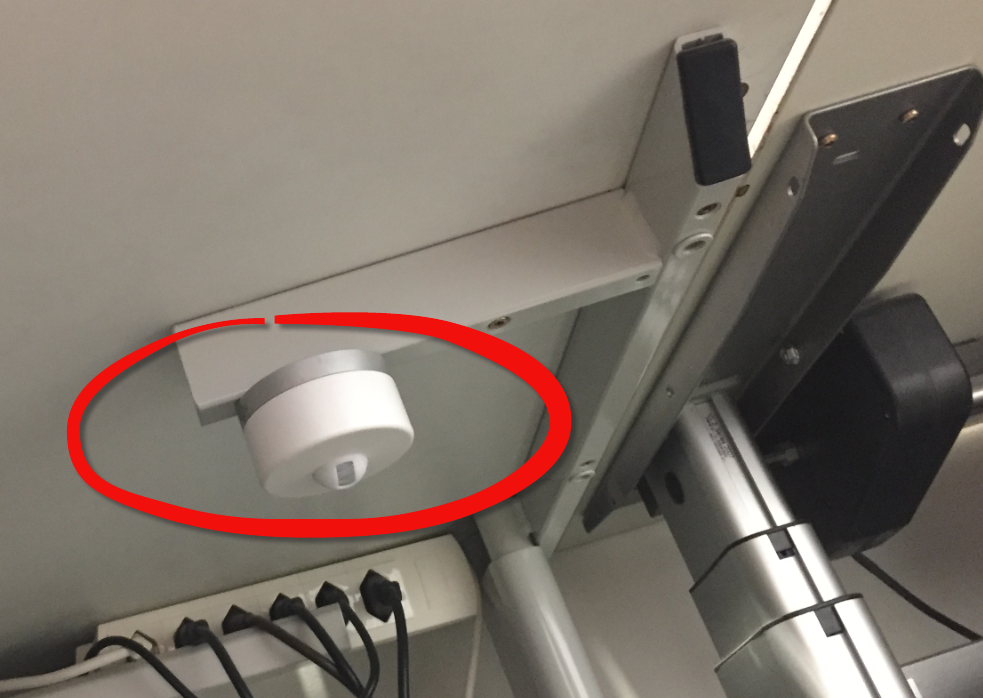
But what would you think if one morning you find a strange unknown device installed under your working desk, connected to the cloud and internet?

IoT Device attached under a working desk
Continue reading

MCUXpresso Eclipse IDE Mouse Tips & Tricks

In a modern development workflow both command-line and a graphical user interface has its place. On the GUI side, Eclipse is famous that it offers many different ways to accomplish something which is great. But sometimes I continue to use an old habit or way because I have missed that there is a newer and better way, and the MCUXpresso Eclipse IDE is no exception to that. In this article I show a few ways how to use the mouse even more productive.

Project Settings

Project Settings

Continue reading