Generating Static FreeRTOS Source Code

Using Processor Expert is an awesome tool: it generates source code for me, and I can can ‘dynamically’ tune my projects to my needs. Still, sometimes it is better or desirable to have a ‘normal’ or ‘static’ project. This is very well possible with Processor Expert (see “Sneaking from Processor Expert” or “Disable my Code Generation“): I can generate the code one time, and then use it without Processor Expert.

To make this even easier, I have added an option to the FreeRTOS Processor Expert component to generate ‘static’ code I can copy-paste to projects and tool chains which are either not supported by Processor Expert, or just for ‘static’ projects.
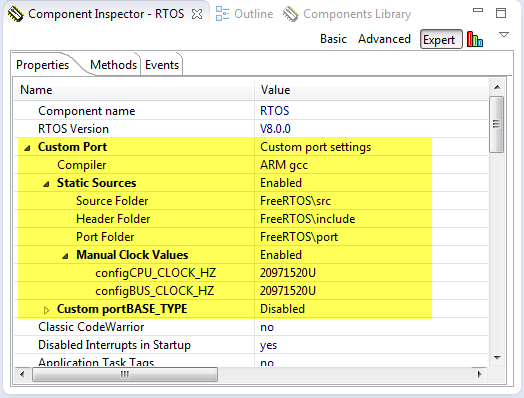
FreeRTOS Custom Port Settings

FreeRTOS Custom Port Settings

Continue reading

First Steps with the Freescale TWR-K64F120M

Naturally, I have several project ideas lingering around. No time to make them all (for now). One of it is interfacing the Raspberry Pi camera with a microcontroller. To store the images, I need plenty of RAM on the device, and so far the Kinetis microcontroller did not have that. Finally, Freescale announced the K64F120 a few months back, and my ordered TWR-K64F120M board arrived on my desk, waiting to be used: Finally I get an ARM Cortex-M4F with 1 MByte of FLASH and 256 KByte of RAM :-).

TWR-K64F120M Box

TWR-K64F120M Box

Continue reading

DIY Free Toolchain for Kinetis: Part 10 – Project Creation with GNU ARM Eclipse 2.1.1

As mentioned in Part 9: There is a new GNU ARM Eclipse plugin 2.1.1, and this one makes project creation for Freescale devices easier than ever πŸ™‚

  • Native Kinetis-L project templates for FRDM-KL25Z and FRDM-KL46Z boards
  • Easier than ever project creation for Processor Expert projects
GNU ARM Eclipse 2.1.1

GNU ARM Eclipse 2.1.1

Continue reading

EnterCritical() and ExitCritical(): Why Things are Failing Badly

I have carefully implemented my firmware. It works perfectly for hours, days, months, maybe for years. If there would not be this problem: the firmware crashes sporadically :-(. Yes, I’m using watchdogs to recover, but hey: it is a serious problem. And because it happens only under rare and special conditions, it is hard to track it down or to debug it.

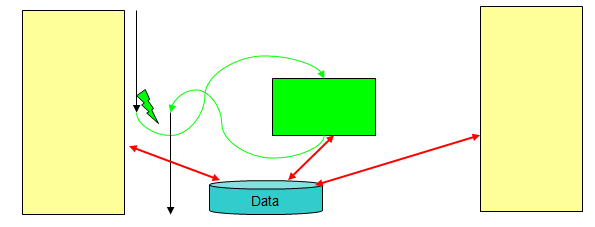
Accessing shared data

Accessing shared data from the main application and from an interrupt

The thing is: these nightmares exist, and they are real and nasty. I’m pushing my students hard on this topic: It is about how to protect critical sections. And what could go wrong. And here is just yet another example: how it can go badly wrong if you are not careful. And it took me a while too to realize where the problem is. It was not a fun ride….

Continue reading

DIY Free Toolchain for Kinetis: Part 7 – GNU ARM Eclipse Plugins

Tired by the tool chains provided by your silicon vendor? Do you want to use a free and open tool chain? Then you probably followed by “DIY Free Toolchain” series already. In “DIY Free Toolchain for Kinetis: Part 2 – Eclipse IDE” I used the standard GNU Eclipse plugins. As mentioned in above post, there is an even better and more powerful plugin available: the GNU ARM Eclipse plug-ins. There is a dedicated blog site which provides excellent documentation and direct access to new and frequent releases. And these days there is a true a Christmas gift for every Eclipse lover: the version 1.1.7 with the addition of J-Link debugger plugin :-).

GNU ARM Eclipse (http://gnuarmeclipse.livius.net)

GNU ARM Eclipse

Continue reading

Eclipse Build Variables

This post is not about variables in my application code (which I debug). It is about using Variables in Eclipse for building projects. Eclipse variables allow me to make my projects ‘position independent’ whenever I cannot use a path relative to my projects or workspace.

Eclipse Variables

Which variables are used where in Eclipse might be sometimes not very clear. Depending in which context variables are used, not everything might be available. This link for example gives a list of variables which can be used to invoke an external tool.

Build Variables

Eclipse comes with many built-in variables, especially for the build system. If I want to see what variables are already defined, I can show them in the project properties, under C/C++ Build > Build Variables with enabled option ‘Show system variables’:

System Build Variables

System Build Variables

Continue reading

Review: ThunderBench with the Freescale FRDM Board and Processor Expert

For the Eclipse and Processor Expert lovers of this world: there is another Eclipse based IDE you can use: ThunderBench made by Emprog:

ThunderBench for ARM Eclipse Startup Screen

ThunderBench for ARM Eclipse Startup Screen

They support a range of ARM based devices, including the Freescale ones I’m using. So I downloaded the v3.24 30 day trial from their download page last week. Finally I have found some time to try it out. Could this be an alternative to use my Freescale FRDM boards with Processor Expert?

Continue reading

S-Record Manipulation with GNU objcopy and Burner Utility

In my earlier post “S-Record Generation with gcc for ARM/Kinetis” I documented how to have the ARM GNU gcc toolchain to produce aΒ S19 (Motorola (or now Freescale) S-Record) file. Here are a few more tips on that subject:

  1. Changing length of S-Records
  2. Only using 32bit addresses
  3. Combining S19 files

Continue reading

Link Order: Using Multiple Definitions with ARM GNU Linker and Eclipse

Sometimes I have ‘multiple definitions’ in my projects: this means that I have functions defined in one source files, and I need to ‘overwrite’ one or more with a version in another source file.Β  For example I have a source file with utility functions (Utility.c), and I want to overwrite some of these functions with a different implementation in a different file (MyUtility.c). How can I do this?

Continue reading