Recovering OpenSDA Boards with Windows 10

Windows 8 and 10 have added a ‘feature’ to scan and index devices attached to the host machine. This means that bootloaders or MSD (Mass Storage Device) programming implementations on evaluation boards developed in the Windows 7 age might not be prepared for that. Up to the point that it can impact the bootloader as outlined in “Bricking and Recovering OpenSDA Boards in Windows 8 and 10“. So far one of the easiest way to get out that situation was to use a Windows 7 machine. But if you only have a Windows 10 machine available, this article describes the needed steps to update the bootloader with Windows 10 host machines.

OpenSDA LED

OpenSDA LED

Continue reading

Tutorial: CRC32 Checksum with the KBOOT Bootloader

In “Flash-Resident USB-HID Bootloader with the NXP Kinetis K22 Microcontroller” I presented how I’m using the tinyK22 (or FRDM-K22F) with a flash resident USB HID bootloader. To make sure that the loaded application is not corrupted somehow, it is important to verify it with a Cyclic redundancy Checksum (CRC). The NXP KBOOT Bootloader can verify such a CRC, but how to generate one and how to use it is not really obvious (at least to me), so this article explains how to generate that CRC.

CRC Values for KBOOT

CRC Values for KBOOT

Continue reading

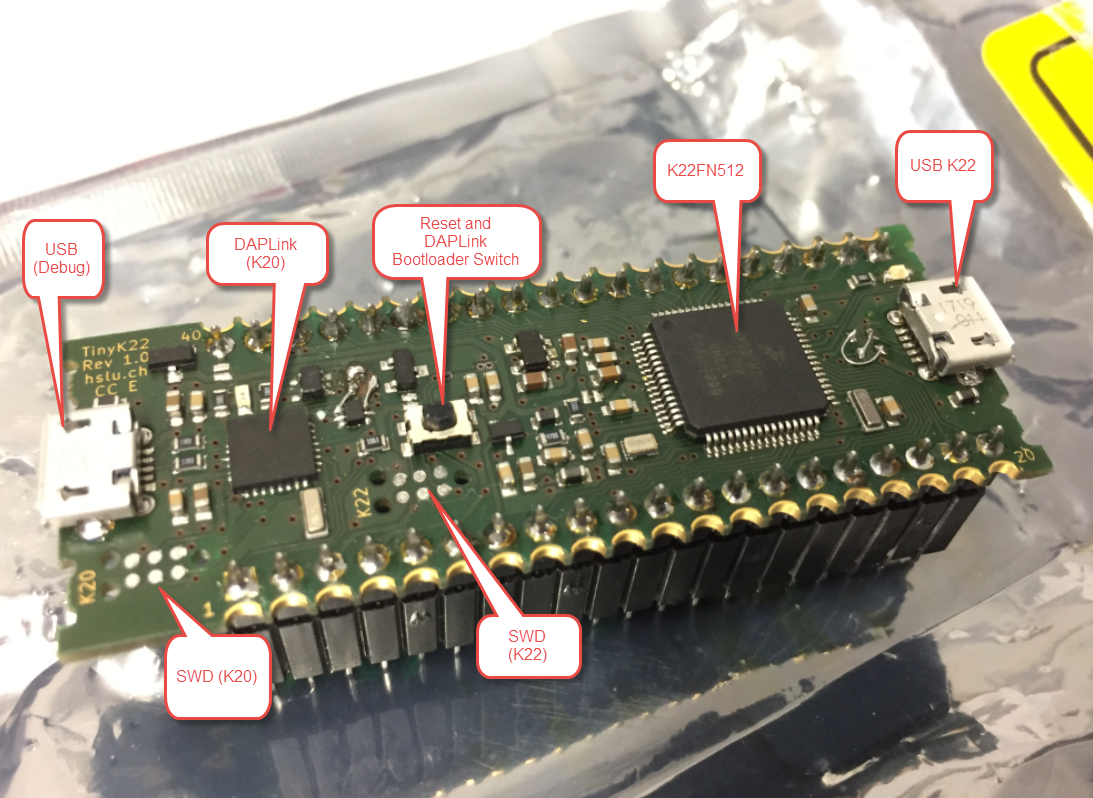
First tinyK22 Board with NXP K22FN512 ARM Cortex-M4F

The NXP Freedom boards are very popular. Many of them are inexpensive (less than $20), include a debug interface and can be easily extended with extra shields or boards. Especially the FRDM-KL25Z is very popular: I’m getting told because of Processor Expert and tutorials available on web sites like this one ;-).

Unfortunately there are no small or breadboard friendly Kinetis boards available. There is the NXP LPC800-DIP but with no onboard debugger and without Processor Expert support. We have the tinyK20, but projects tend to use more CPU power, FLASH and RAM space than what the tinyK20 board (50 MHz, 128 KByte FLASH, 16 KByte RAM) can provide. So we ended up designing the big brother of the first tinyK20: the tinyK22 with 120 MHz, 512 KByte of FLASH and 128 KByte of RAM.

tinyK22 Overview

tinyK22 Overview

Continue reading

Adding a Delay to the ARM DAPLink Bootloader

The ARM mbed USB MSD bootloader which is used on many silicon vendor boards has a big problem: it is vulnerable to operating systems like Windows 10 which can brick your board (see “Bricking and Recovering OpenSDA Boards in Windows 8 and 10“). To recover the board, typically a JTAG/SWD programmer has to be used. I have described in articles (see links section) how to recover from that situation, including using an inofficial new bootloader which (mostly) solves the problem. The good news is that ARM (mbed) has released an official and fixed bootloader. The bad news is that this bootloader does not work on every board because of a timing issue: the bootloader mostly enters bootloader mode instated executing the application.

DAPLink in Bootloader Mode

DAPLink in Bootloader Mode

Continue reading

Recovering and Updating the NXP OpenSDA Bootloader with P&E Multilink and MCUXpresso IDE

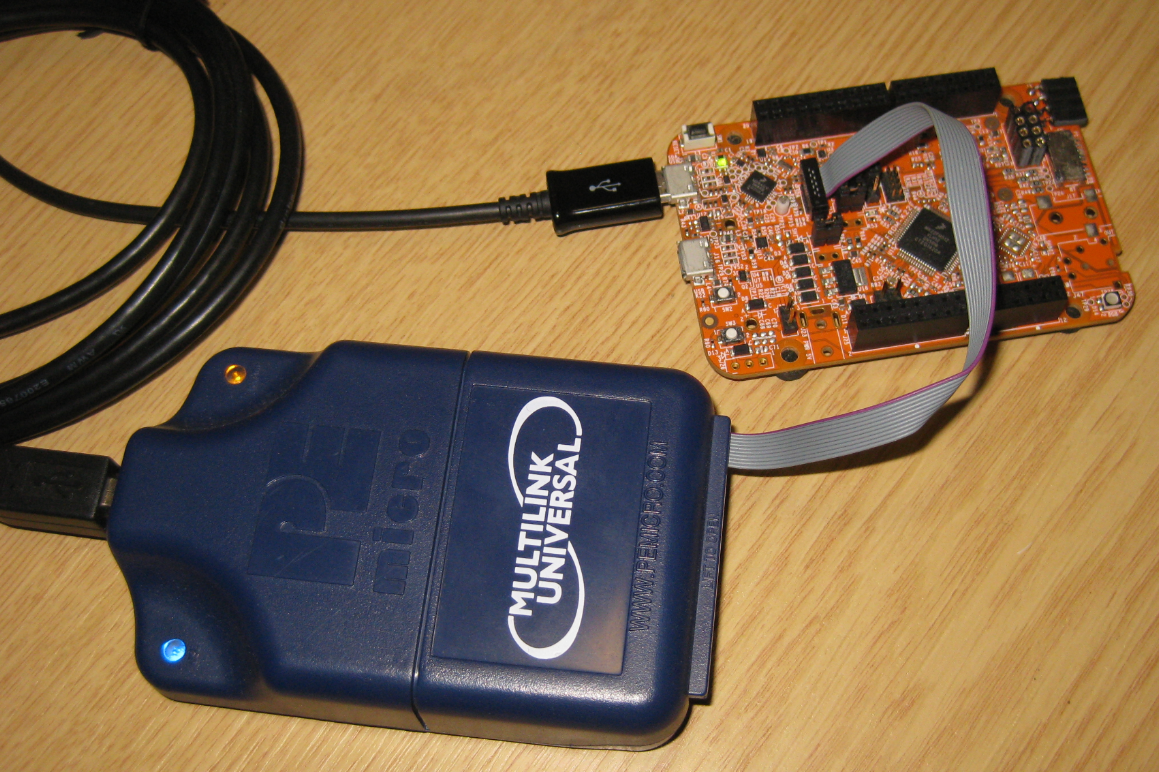
Many of the NXP OpenSDA boot loaders are vulnerable to Windows 8.x or Windows 10: write accesses of Windows can confuse the factory bootloader and make the debug firmware and bootloader useless. In this post I show how to recover the bootloader using MCUXpresso IDE and the P&E Universal Multilink.

Using P&E Multilink Universal to restore the OpenSDA Bootloader on NXP FRDM-K22F Board

Using P&E Multilink Universal to restore the OpenSDA Bootloader on NXP FRDM-K22F Board

Continue reading

Tutorial: Makefile Projects with Eclipse

The benefit of an IDE like Eclipse is: it makes working with projects very easy, as generates make files and it takes and automatically manages the make file(s). But sometimes this might not be what I want because I need greater flexibility and control, or I want to use the same make files for my continues integration and automated testing system. In that case a hand crafted make file is the way to go.

One thing does not exclude the other: This article explains how to use make files with Eclipse with similar comfort as the managed build system in Eclipse, but with the unlimited power of make files:

Makefile Project with Eclipse

Makefile Project with Eclipse

Continue reading

Getting Started: ROM Bootloader on the NXP FRDM-KL03Z Board

A bootloader on a microcontroller is a very useful thing. It allows me to update the firmware in the field if necessary. There are many ways to use and make a bootloader (see “Serial Bootloader for the Freedom Board with Processor Expert“). But such a bootloader needs some space in FLASH, plus it needs to be programmed first on a blank device, so a JTAG programmer is needed. That’s why vendors have started including a ROM bootloader into their devices: the microcontroller comes out of the factory with a bootloader in FLASH. So instead writing my bootloader, I can use the one in the ROM.

FRDM-KL03Z with ROM Bootloader

FRDM-KL03Z with ROM Bootloader

And as with everything, there are pros and cons of that approach.

Continue reading

GNU Code Coverage on Embedded Target with Eclipse Neon and ARM gcc 5

For a research project, we are going to send a satellite with an embedded ARM Cortex microcontroller into space early next year. Naturally, it has to work the first time. As part of all the ESA paperwork, we have to prove that we tested the hardware and software thoroughly. One piece of the that is to collect and give test coverage evidence. And there is no need for expensive tools: Free-of-charge Eclipse and GNU tools can do the job for a space mission 🙂

Eclipse with Coverage Views

Eclipse with Coverage Views

Continue reading

DIY USB HID Joystick Device and Game Controller

For many projects it would be cool to build a custom USB Joystick device, either as custom game controller for Windows or any USB host which can be used with a USB Joystick. Instead buying one, why not build my version? All what I need is a USB capable board, some kind of input (potentiometer, push buttons) and some software, and I have my USB Joystick:

DIY USB HID Joystick Device

DIY USB HID Joystick Device

Continue reading

Using the LPCXpresso V2/V3 Boards to Debug an external Board

The MCUXpresso IDE (see “MCUXpresso IDE: Unified Eclipse IDE for NXPs ARM Cortex-M Microcontrollers“) has one great feature: it includes debug support for the popular LPC-Link2 debug probes. That way I have yet another powerful debug probe with extra features for ARM based boards. That LPC-Link2 circuit is present on many LPCXpresso boards from NXP. So why not using it to debug it my custom hardware?

Debugging Custom Hardware with LPCXpresso Board

Debugging Custom Hardware with LPCXpresso Board

Continue reading