To me this was new, and thanks to Liviu I know now how to inspect the command line passed to the GDB server (see “Semihosting (again!) with NXP Kinetis SDK V2.0“) 🙂

Process Properties

To me this was new, and thanks to Liviu I know now how to inspect the command line passed to the GDB server (see “Semihosting (again!) with NXP Kinetis SDK V2.0“) 🙂
Process Properties
Getting a board from a distributor like Farnell/Element14/Mouser (add your own distributor) means that chances are high that the default firmware on it is written years from now because the inventory has not been updated, or because boards are still produced with that original firmware (because of testing?). So what happens if I use board with a firmware developed pre-Windows 8/10 area?

Freshly Unboxed NXP FRDM-KL25Z Board
It might work, but chances are high that the bootloader and firmware is not ready for the ‘modern age’, and as a result the board might be bricked. If you still have a Windows 7 machine around (I do!), you are lucky. If not, then you need to read this article….
More and more of my students are using Microsoft Windows 10 machines, and my computer has been upgraded to Windows 10 a couple of week ago too. From my work and experience, a new operating system causes always some challenges, and Windows 10 is no difference. And no, this is not about Microsoft vs. Apple vs. Linux, this post is about addressing a potential and painful problem which I have observed with Windows 10 machines, and to my understanding it could happen with any other operating system too. The problem is that somehow on several student machines the bootloader and OpenSDA application on their FRDM boards did not work any more.
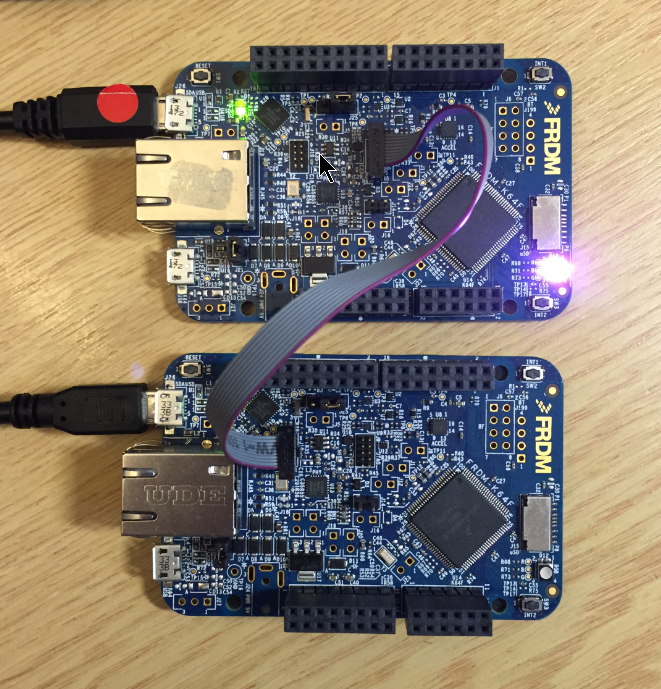
FRDM-K64F (top) programming the OpenSDA Bootloader (bottom)
Sometimes it is very convenient to load a new firmware to a board without the need for a hardware debugger. This is usually done with a bootloader. The NXP Freedom and Tower evaluation boards have on-board debug device/microcontroller (OpenSDA) which can load different firmware implementations like CMSIS-DAP/mbed, P&E Multilink or a Segger J-Link OpenSDA applications. Both mbed and P&E implemenations support to program the board with drag&drop: simply send a file to a virtual MSD (Mass Storage Device) to get it programmed. The latest Segger OpenSDA firmware has this ability added now too: Programming the board with a virtual MSD device:
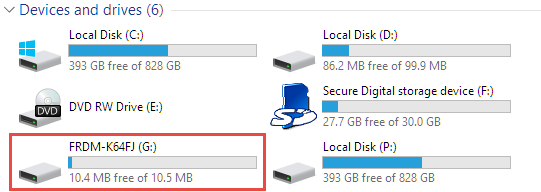
Virtual MSD Device
By default I’m programming the Elf/Dwarf (.elf) file present in the GNU ARM Eclipse debug configuration:

Elf File to be Downloaded
But how to program the board with something different from the .elf file?
Related to my earlier article about using OpenOCD, I want to share something I have learned (again) with OpenOCD v0.10.0:
I was running often into the following error:
Warn : Cannot communicate... target not halted.
Error: auto_probe failed
Error: Connect failed. Consider setting up a gdb-attach event for the target to prepare target for GDB connect, or use 'gdb_memory_map disable'.
Error: attempted 'gdb' connection rejected

OpenOCD cannot communicate
So here I have 50 new NXP Kinetis K22 Robot boards (see “Zumo Robot with Magnetic Encoders“), and they all need to be programmed with the first firmware on the bench:

Programming Robot Boards
The challenge is: how to do this in a fast an efficient way, without the need for an IDE or even host PC machine?
First off: The tinyK20 project is progressing fine and is now on Hackaday.io :-).
For a research project we would like to use the tinyK20 to log gyro sensor data. For this I have created a quick-n-dirty project to explore how feasible it is. The tinyK20 has all the pins on the outside of the board, so I’m able to put it on a bread board:

tinyK20 on Breadboard
It is possible to use the Freescale FRDM-KL43Z to debug another board (see “Using the Freescale Freedom (FRDM-KL43Z) to Debug other Boards“). The FRDM-KL43Z has an on-board debug probe integrated, the OpenSDA. But it is easily possible to debug the board directly with a SWD debug probe like the P&E Universal Multilink or the Segger J-Link.

Debugging the FRDM-KL43Z with SWD
Many tool chains and linker are able to produce S19 files, such as with the GNU tools it is the ‘objcopy‘ which does this job (see “Binary (and S19) Files for the mbed Bootloader with Eclipse and GNU ARM Eclipse Plugins“). But these tools usually cannot handle the special cases. For example on the Freescale Kinetis K64F my serial bootloader (see “Serial Bootloader for the Freedom Board with Processor Expert“) had a problem with these lines in the S19 file:
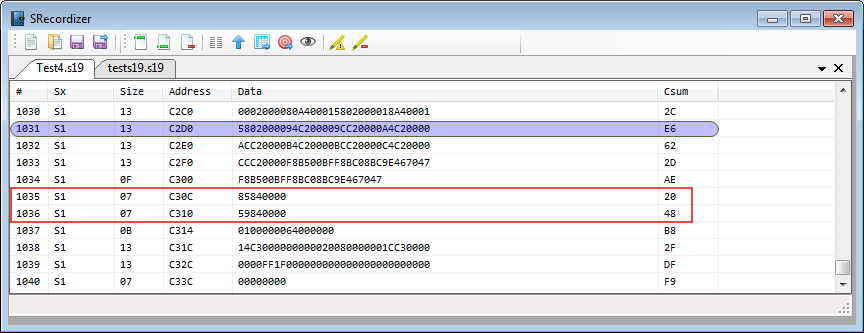
Not aligned S19 file entries
 MCU on Eclipse