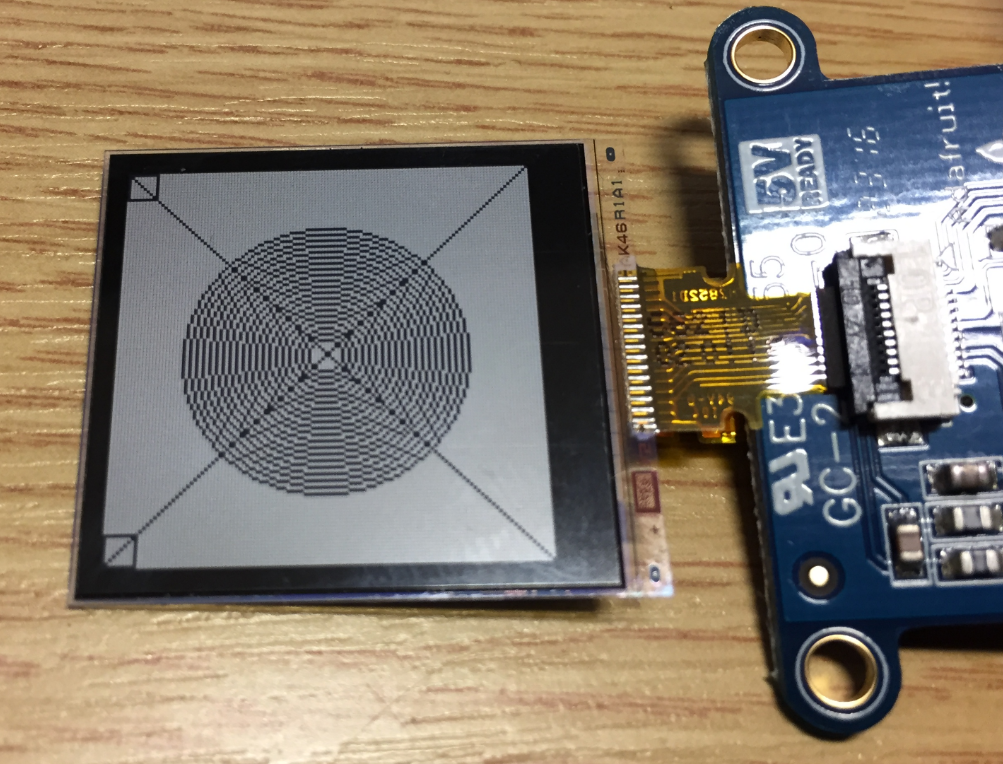
In “Low Power LCD: Adafruit Breakout Board with Sharp Memory Display” I used a 96×96 Sharp Display (LS013B4DN04) with the Adafruit breakout board, but because that one seems to be EOL (End Of Life), I searched for a replacement. I have found the 128×128 pixel version (Sharp LS013B7DH03), and best of all, it is pin compatible :-). With a small tweak of the driver, it works :-):
Tag Archives: Embedded Component
McuOnEclipse Components: 12-Dec-2016 Release
Time is passing by so fast, and the year end is approache fast! I’m pleased to announce that a new release of the McuOnEclipse components is available in SourceForge:
- Percepio Trace V3.1 for FreeRTOS which includes both Segger RTT continuous streaming and snapshot tracing in a single API
- Generation of sources and drivers so they can be used without Processor Expert using McuLibConfig, removal of dependency to NXP Kinetis SDK: components use a generic API approach to have them working with other SDKs.
- New contributed ExceptionsHandler component
- Callback Setter and Getter in USB CDC stack for simpler option handling
- GenericTimeDate with flexible RTC support and added Unix Timestamp functions
- LongKey events in Key component
- FreeRTOS with optimized task selection on Cortex-M4/M7
- Many smaller bug fixes and enhancements
Making-Of Sea Shell Sand Clock
The year is coming to an end, the Holiday season is approaching. In case you are looking for a nice present: I have completed my version of a sand clock: a clock writing the time into sand:
If you are interested to build your own version, I have documented the different steps with tips and tricks…
McuOnEclipse Components: 30-Oct-2016 Release
A new McuOnEclipse components release was long overdue, so I’m pleased to announce that a new drop is available with the following major changes:
- Segger SystemView library with kernel time reporting
- GenericTimeDate supports different hardware RTC devices
- Utility with little endian packet handling functions
- Shell Standard I/O handlers for USB CDC, Segger RTT and Bluetooth
- FreeRTOS and stack size reporting
- printf() support in Shell component
- Various small bug fixes and improvements
Tutorial: RFID Tags with the NXP NFC Controller PN7120 and Eclipse
Playing with RFID and NFC is definitely fun :-), and they are everywhere! For a research project I’m exploring different RFID tags and solutions. I several types around for a long time, but never found the time to actually work on it, so last nightI thought I give it a try, and I have it working with GNU ARM and Eclipse, powered by the NXP FRDM-K64F board 🙂
Tutorial: Blinky with Kinetis SDK V1.3 and Processor Expert
This tutorial goes through the steps how to create a blinking LED application, using Kinetis SDK and Processor Expert, using the TWR-KL43Z48M board from Freescale (now NXP):
McuOnEclipse Components: 31-July-2016 Release
Time for a new major update of the McuOnEclipse components, with the fillowing main features and changes:
- FatFS component updated to R0.12 with patch 3 and exFAT support
- Extended support for Cortex-M7
- Extended support for Kinetis SDK V2.0
- USB component support for Kinetis SDK V1.3
- Improved FreeRTOS for NXP FreeRTOS TAD plugin
- Added C++ wrappers to multiple components
- Many smaller fixes and improvements
FatFS with Adafruit MicroSD Breakout Board and NXP FRDM-KL25Z
Breakout boards are great: they allow me to explore functions quickly, without to build my custom board: all what I need is some wires and ideally a bread board.
McuOnEclipse Components: 25-June-2016 Release
A new release is available on SourceForge, with the following main changes:
- Support for FreeRTOS and Cortex-M7
- Segger SystemView updated to V2.38
- Components for NXP Kinetis SDK V1.3
- Fixed bug in Wait component (register handling for GCC and ARM)
- FatFS supports FreeRTOS V9.0.0 with static memory allocation
- FreeRTOS shell and task list with static memory allocation
- Floating point conversion routines in Utility
- FreeRTOS component shows NVIC mask bits
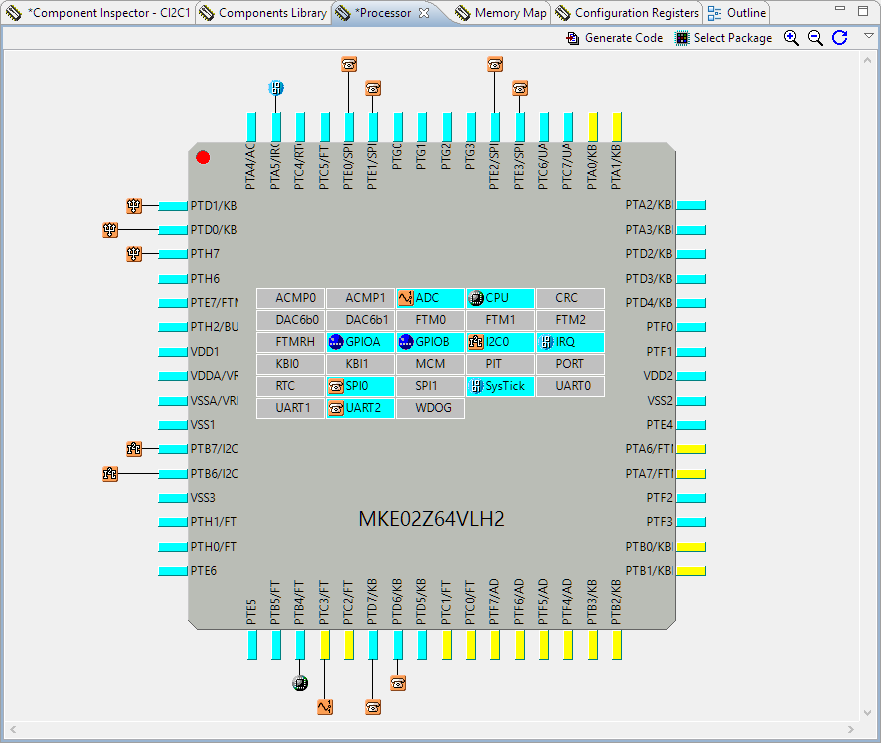
Switching the Microcontroller Package, Device and Family
One of the major benefits of Processor Expert is that I can easily switch the device or processor used in a project. For example I can do my concept with a larger device with more FLASH and RAM, and then at the end easily switch to a smaller or even completely different device very quickly. For example I have a project working with the 64KByte FLASH version of the KE02Z (KE02Z68VLH2):