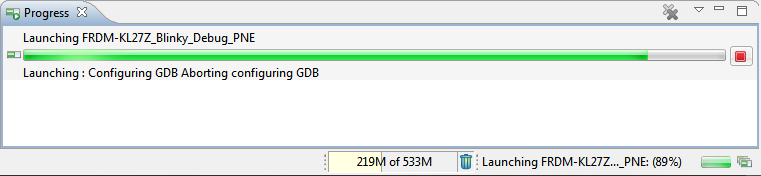
The bad thing with Eclipse and GDB is: if something is failing, then all what I get is a very cryptic error message when I launch the debugger:
Tag Archives: Debugging
Debugging Multiple NXP Boards with GDB and P&E
In “Debug Multiple Boards with GDB at the Same Time” I have used the Segger J-Link to debug multiple boards, from the same IDE, at the same time. The remaining question in that article was: how to do the same the P&E Multilink/OpenSDA?
Semihosting with Eclipse and the NXP Kinetis SDK V2.0
The world is changing, and the say is “change is good” :-). In the software and API world, change very often means that a change results into something broken. So I had battled with semihosting working on the NXP Kinetis parts, only to find out that it does not work any more with using the latest version 2.0. The semihosting output e.g. with P&E debug connection remains empty:
So how to fix this?
Solution for OpenOCD “Cannot communicate… target not haltet”
Related to my earlier article about using OpenOCD, I want to share something I have learned (again) with OpenOCD v0.10.0:
I was running often into the following error:
Warn : Cannot communicate... target not halted. Error: auto_probe failed Error: Connect failed. Consider setting up a gdb-attach event for the target to prepare target for GDB connect, or use 'gdb_memory_map disable'. Error: attempted 'gdb' connection rejected
FreeRTOS Thread Debugging with Eclipse and OpenOCD
FreeRTOS is probably the number one RTOS used, and Eclipse is likely the most popular IDE I can think of. But debugging FreeRTOS applications with Eclipse and GDB is somewhat limited? What I would like to get at the minimum is this: ability to see all the different threads in the Eclipse debug view like this:
As you might guess from that screenshot: this post is about how to make FreeRTOS tread debugging possible with Eclipse and GDB :-).
Flashing many ARM Boards without a Host PC
So here I have 50 new NXP Kinetis K22 Robot boards (see “Zumo Robot with Magnetic Encoders“), and they all need to be programmed with the first firmware on the bench:
The challenge is: how to do this in a fast an efficient way, without the need for an IDE or even host PC machine?
Solving “Launching: Configuring GDB Aborting Configuring GDB”
In case you are running into this problem that launching GDB hangs with this message in Eclipse:
Dealing with Code Size in Kinetis SDK v2.x Projects
I’m exploring the Kinetis SDK v2.0 (see “First NXP Kinetis SDK Release: SDK V2.0 with Online On-Demand Package Builder“). For this, I’m using the ‘standard’ way: blinking the LED on the board 🙂
McuOnEclipse Components: 7-Feb-2016 Release
New in this release:
- Segger SystemViewer: Upgraded to V2.30, added stack high-water mark
- Segger RTT: fixed BASEPRI issue on Cortex M4 for critical sections
- Utility: Fixed issue with Utility module and Kinetis SDK (usage of ‘byte’)
- USB CDC: property to specify USB device current usage, new status getter functions.
Show Floating Point Variable Bytes in Eclipse CDT
My preferred variable format in Eclipse is hexadecimal (see “Debugging Variables in Hexadecimal with Eclipse“). However, this does not work well with floating point variables:
The above view shows all variables having the value 0x0 (zero), but that’s actually not really true.